


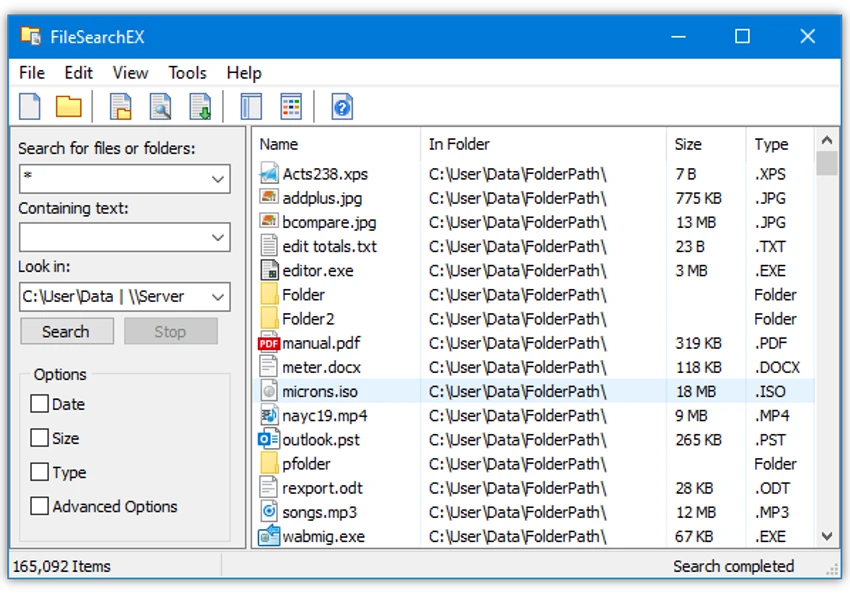

FileSearchEX is a lightweight Windows file search utility designed to provide a straightforward alternative to the built-in Windows search feature. Compatible with Windows 7 and later, it offers a familiar search interface that helps users quickly locate files, folders, and document contents without the complexity often associated with modern desktop search tools.
The software focuses on fast and efficient file discovery by allowing users to search both file names and the contents of supported documents, including PDF files and Microsoft Word documents. This makes it useful for finding information stored inside documents rather than relying solely on file names.
FileSearchEX also supports searching network shares and UNC paths, making it suitable for business environments where files are stored on shared servers. The application respects existing Windows user permissions and domain security settings, ensuring that users only access files they are authorized to view.
Designed to integrate naturally with Windows, FileSearchEX uses a standard context menu and maintains a familiar interface that minimizes the learning curve. It operates without requiring administrator privileges or a traditional installer, making deployment simple for both individual users and network administrators. With low system requirements and compatibility with restricted user accounts, FileSearchEX offers a practical solution for everyday file searching on local and network storage.
Features of FileSearchEX
- Search for files and folders on Windows
- Search the contents of PDF documents
- Search the contents of Microsoft Word documents
- Search local drives and network shares
- Support for UNC path searching
- Familiar Windows-style search interface
- Native Windows look and feel
- Standard Windows context menu integration
- View image thumbnails
- Automatic expansion of network shares
- Low system requirements
- No installer required
- No administrator privileges required
- Compatible with restricted user accounts
- Respects Windows domain security and user permissions
Interface and Usability
FileSearchEX is designed to feel like a natural part of Windows. Its classic search interface resembles earlier Windows search tools, allowing users to begin searching without learning a new workflow. The software integrates with the operating system through a standard context menu and provides a clean interface focused on finding files quickly. Searching document contents, browsing network locations, and viewing image thumbnails are all presented through a familiar layout.
Because it does not require administrator rights or a traditional installation process, FileSearchEX is easy to deploy in both personal and business environments, particularly on systems with restricted user accounts.
Who Should Use FileSearchEX?
- Windows users searching for files and folders
- Office workers managing large document collections
- IT administrators supporting network environments
- Businesses searching shared network folders
- Users who prefer a classic Windows search experience
Conclusion
FileSearchEX is a practical Windows search utility that emphasizes simplicity, speed, and compatibility. Its ability to search both file names and document contents, along with support for network shares and restricted user environments, makes it a useful alternative to the default Windows search experience.


