Markdown Monster logo

Markdown Monster 4.4.3

  • User Rating:
    ★★★★★
    ★★★★★
    0.0 0Votes
  • Requirements:
    Windows
  • Version: 4.4.3
  • Latest updated: 1 week ago
  • License: Freeware  
  • Publisher: West Wind Technologies
  • Size: 20 MB
× app stores

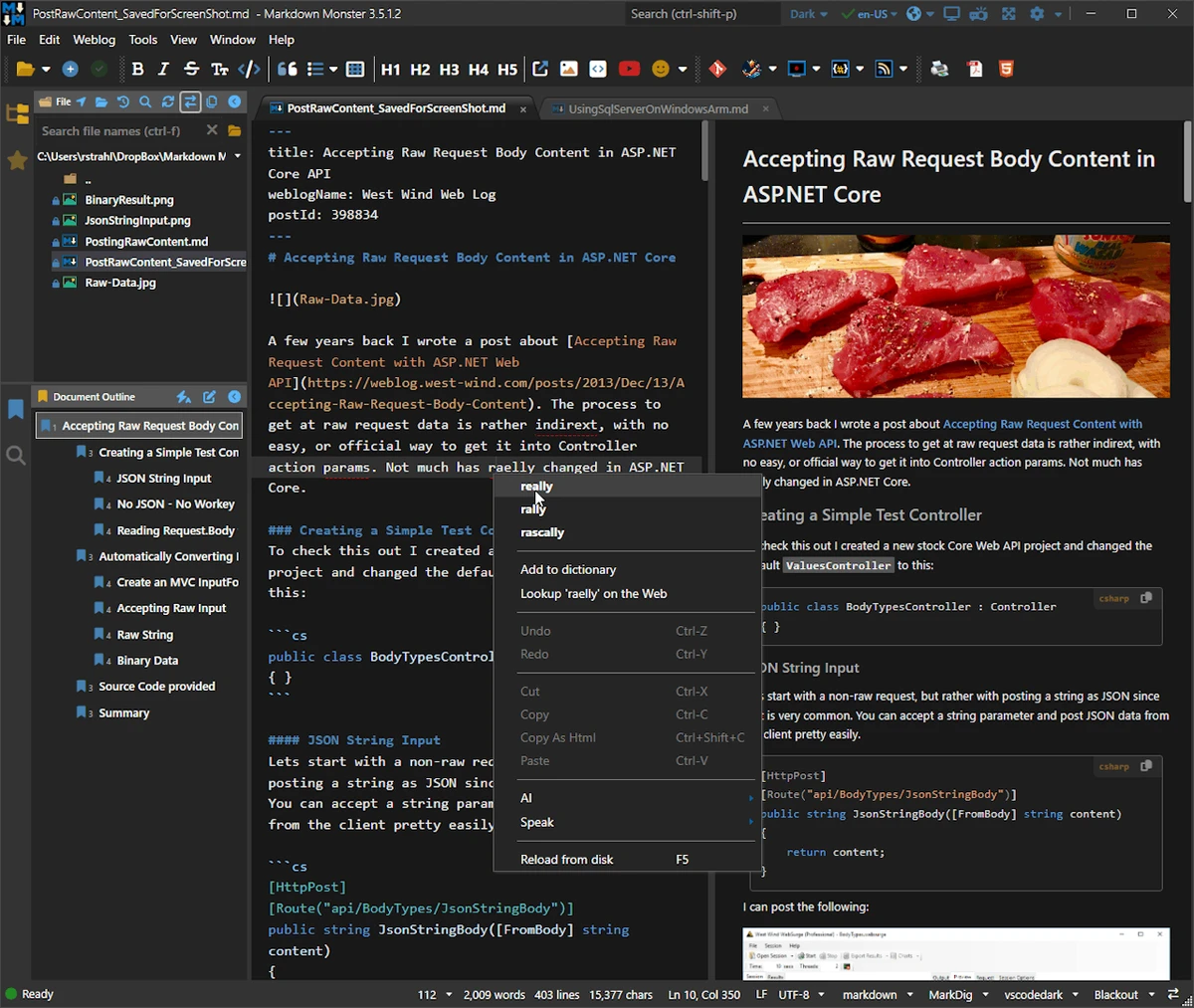
Markdown Monster is a professional Markdown editor for Windows that combines fast text editing, live preview, publishing tools, and developer-friendly features in a polished interface. It is designed for writers, bloggers, developers, and technical documentation creators who want a streamlined Markdown workflow.

Overview

Markdown Monster goes beyond basic Markdown editing by providing a synchronized live preview, syntax highlighting, export options, and publishing capabilities. The editor focuses on productivity, allowing users to write and format content efficiently while seeing the rendered output in real time. The application supports common content creation tasks such as inserting images, links, emojis, code blocks, and screenshots. It also includes tools for blog publishing, Git integration, document navigation, and customization through themes and templates. Whether you're creating technical documentation, blog posts, project notes, or web content, Markdown Monster offers a comprehensive editing environment that balances ease of use with advanced functionality.

Features of Markdown Monster

  • Syntax-highlighted Markdown editing
  • Live synchronized HTML preview
  • Inline spell checking
  • Word count support
  • Embed images, links, and emojis
  • Paste images directly from the clipboard
  • Drag-and-drop image insertion
  • Screenshot capture and embedding
  • Export Markdown to HTML
  • Export Markdown to PDF
  • Copy Markdown selections as HTML
  • Syntax highlighting for code snippets in preview
  • Customizable HTML and CSS templates
  • Light and dark application themes
  • Customizable editor and preview themes
  • Optional Vim and Emacs keyboard conventions
  • Built-in folder browser
  • Document outline navigation
  • Integration with Windows Explorer and Terminal
  • Git integration
  • Weblog publishing and editing
  • HTML-to-Markdown conversion
  • Template text expansion
  • .NET scripting and add-in support

User Experience

Markdown Monster delivers an efficient writing experience with a clean interface that balances editing and previewing. The synchronized live preview is one of its strongest features, allowing users to instantly see how Markdown content will render without switching between windows. Adding images is particularly convenient thanks to clipboard support, drag-and-drop functionality, and screenshot capture tools. These features significantly reduce friction when creating documentation or blog content.

The document outline panel is useful for navigating long articles, while inline spell checking helps catch mistakes without interrupting the writing flow. Developers will appreciate syntax-highlighted code blocks, Git integration, and support for familiar keyboard workflows such as Vim and Emacs. Customization is another strength. Users can tailor themes, templates, editor appearance, and preview styles to fit personal preferences or publishing requirements. Overall, the application strikes a strong balance between simplicity for writers and advanced capabilities for technical users.

Who Should Use Markdown Monster?

  • Technical writers
  • Bloggers and content creators
  • Software developers
  • Documentation teams
  • Knowledge base authors
  • Students and researchers using Markdown
  • Users managing Markdown-based websites

Conclusion

Markdown Monster is a powerful Markdown editor that combines writing, previewing, publishing, and developer-focused tools into a single productivity package. Its live preview, export options, Git integration, and content management features make it suitable for both professional and personal use.

Pros & Cons

Pros

  • Fast Markdown editing with syntax highlighting
  • Excellent live preview functionality
  • HTML and PDF export support
  • Built-in image handling and screenshot capture
  • Git integration for developers
  • Blog publishing capabilities
  • Extensive theme and template customization
  • Document outline improves navigation
  • Spell checking and word count tools
  • Add-in and scripting support

Cons

  • Advanced features may be overwhelming for beginners
  • Primarily focused on Markdown workflows
  • Some users may not need the extensive customization options

Frequently Asked Questions

What is Markdown Monster used for?

Markdown Monster is used for writing, editing, previewing, and publishing Markdown documents on Windows.

Does Markdown Monster support live preview?

Yes. It includes a synchronized live HTML preview that updates as you type or scroll.

Can I export Markdown files to PDF?

Yes. Markdown Monster supports exporting content to both HTML and PDF formats.

Does it support code syntax highlighting?

Yes. Both the editor and HTML preview support syntax-highlighted code snippets.

Can I insert images easily?

Yes. You can drag and drop images, paste them from the clipboard, or capture screenshots directly within the application.

Does Markdown Monster support Git?

Yes. It includes Git integration for source control workflows.

Recommended apps [Freeware]:
  • DirPrintOK 7.61 DirPrintOK logo fast and portable tool to print or export directory contents in XLS, HTML, CSV, or TXT formats.
  • Valentina Studio 17.5 Valentina Studio logo manage SQL and NoSQL databases with schema design, queries, reports, and cross-platform support.
  • Clean Space 2026 v721 Clean Space logo a Windows utility for removing system junk files, cache, logs, and improving online privacy protection.
  • RustDesk 1.4.8 RustDesk logo open-source remote desktop solution with self-hosting, cross-platform support, and customizable remote access tools
  • EaseUS Partition Master 20.3.0 EaseUS Partition Master logo a disk management tool for resizing, cloning, converting, and recovering partitions safely
  • Prime95 31.06 Build 1 Prime95 logo CPU stress testing tool used for overclocking stability checks and Mersenne prime number calculations
Recommended apps [Shareware]:
  • AVG Driver Updater 26.5.10990.0 AVG Driver Updater logo automatically scan and update outdated drivers to improve PC performance and stability on Windows.
  • DroidKit 2.3.9.20260625 DroidKit logo Recover data, unlock Android devices, repair system issues, and manage phone content with DroidKit for Windows
  • MobiKin Backup Manager for Android 2.0.30 MobiKin Backup Manager for Android logo Back up and restore Android data with one click using MobiKin Backup Manager for Android for Windows PCs
  • Modern CSV 2.4.3 Modern CSV logo high-performance CSV editor for Windows with fast large-file handling, multi-cell editing, filtering, and sorting tools
  • Image for Windows 4.12 Image for Windows logo disk imaging tool for full system backup, restore, and recovery with encryption, compression, and bootable rescue medi
  • Advanced ETL Processor Professional 6.5.1.5 Advanced ETL Processor Professional logo a powerful ETL tool for database automation and data integration