FTP Rush logo

FTP Rush 3.6.7

  • User Rating:
    ★★★★★
    ★★★★★
    0.0 0Votes
  • Requirements:
    Windows
  • Version: 3.6.7
  • Latest updated: 1 day ago
  • License: Freeware  
  • Publisher: wftpserver.com
  • Size: 4 MB
× app stores

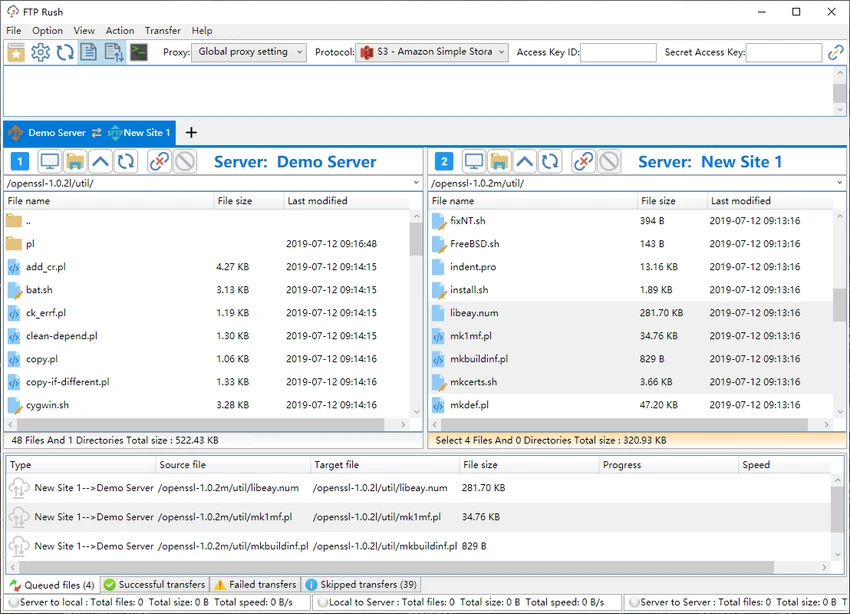
FTP Rush is a versatile file transfer client designed for managing FTP, FTPS, SFTP, WebDAV, and major cloud storage services such as Google Drive, Dropbox, OneDrive, and Amazon S3. It provides a tabbed, Explorer-like interface that makes handling multiple connections straightforward and efficient. One of its standout capabilities is server-to-server file transfer across different protocols, allowing users to move data directly between services without downloading everything locally first.

Features of FTP Rush

  • Supports FTP, FTPS, SFTP, and WebDAV
  • Cloud storage integration (Google Drive, Dropbox, OneDrive, Amazon S3)
  • Cross-platform support (Windows, macOS, Linux, Android, iOS)
  • Tabbed interface for multiple connections
  • Drag-and-drop file transfers
  • Server-to-server file transfer between protocols
  • Proxy support (HTTP and SOCKS5)
  • File filters and comparison tools
  • Bookmarking for quick directory navigation
  • Directory caching for faster browsing
  • Interactive terminal for advanced tasks
  • C# scripting support for automation
  • Skip and allow transfer lists
  • Interface customization and detailed documentation

User Experience

FTP Rush delivers a familiar experience for users who have worked with FTP clients before. The tabbed interface feels similar to a file manager, making it easy to manage multiple remote connections simultaneously. Connecting to servers is straightforward, and file transfers via drag-and-drop work smoothly. The ability to open multiple tabs for different protocols is particularly useful when working across cloud services and traditional FTP servers at the same time.

A standout feature in practice is server-to-server transfer. Instead of downloading files to your local machine and re-uploading them elsewhere, FTP Rush handles transfers directly between services, saving both time and bandwidth. Advanced users will also appreciate the built-in C# scripting support, which allows automation of repetitive file transfer tasks. However, beginners may not use this feature immediately due to its technical nature.

Overall, the interface balances usability with depth, offering both simple drag-and-drop operations and advanced tools for power users.

Who Should Use FTP Rush?

  • IT administrators
  • Web developers
  • DevOps engineers
  • Cloud storage users managing multiple services
  • Users transferring large datasets between servers
  • Advanced users needing automation via scripting

Conclusion

FTP Rush is a strong all-in-one FTP and cloud file transfer solution that simplifies complex file management tasks across multiple platforms. Its support for both traditional FTP and modern cloud services makes it highly versatile, while features like server-to-server transfer and scripting add significant power for advanced workflows.

Pros & Cons

Pros

  • Supports many protocols and cloud services
  • Server-to-server transfers reduce manual work
  • Tabbed, easy-to-use interface
  • Cross-platform availability
  • Drag-and-drop file management
  • Proxy and advanced network support
  • Scripting support for automation

Cons

  • Advanced features may be overwhelming for beginners
  • Interface is functional but not highly modern-looking
  • Scripting requires technical knowledge

Frequently Asked Questions

What is FTP Rush used for?

FTP Rush is used to transfer and manage files across FTP, SFTP, and cloud storage services like Google Drive and Dropbox.

Does FTP Rush support cloud storage?

Yes. It supports Google Drive, Dropbox, OneDrive, and Amazon S3.

Can FTP Rush transfer files between servers directly?

Yes. It supports server-to-server transfers across different protocols without downloading files locally.

Is FTP Rush suitable for beginners?

It can be used by beginners for basic transfers, but advanced features like scripting are better suited for experienced users.

Does FTP Rush support automation?

Yes. It supports C# scripting for automating file transfer and management tasks.

Recommended apps [Freeware]:
  • Easy Gamer Utility 1.3.107 Easy Gamer Utility logo a Windows tool that optimizes gaming performance, clears cache, and fixes common game issues.
  • Red Burner 19.7 Red Burner logo a portable disc burning tool for CD, DVD, and Blu-ray with fast ISO handling and a simple interface
  • TickTick 8.1.0.1 TickTick logo Organize tasks, manage schedules, and stay focused with TickTick's calendar, Pomodoro timer, and collaboration tools
  • Speccy 1.34.084 Speccy logo provides detailed PC hardware information, temperature monitoring, and system reports for Windows users
  • Viber for Windows 28.2.0 Viber for Windows logo make free calls, send messages, and sync chats across devices via WiFi or 3G
  • Disk Benchmark 1.0 Disk Benchmark logo measures SSD, HDD, NVMe, and USB drive performance with detailed speed, IOPS, and latency tests
Recommended apps [Shareware]:
  • EF File Catalog 26.05 EF File Catalog logo Catalog disks, folders, archives, and media for fast offline browsing, searching, and file organization
  • Allavsoft 3.29.3.9669 Allavsoft logo video downloader and converter for batch downloads, HD quality, and audio extraction on Windows.
  • CloudMounter 3.7.2137 CloudMounter logo mounts cloud storage and remote servers like local drives for easy file access and management on Windows
  • ReclaiMe Build 6447 ReclaiMe logo easy-to-use Windows data recovery tool for hard drives, USB drives, RAID arrays, and memory cards
  • Cubase Pro 15.0.30 Cubase Pro logo a professional DAW for recording, composing, editing, mixing, and music production
  • LINQPad 9.9.10 LINQPad logo .NET development environment for C#, F#, and VB with database querying, scripting, debugging, and AI-assisted coding tools