HomeBank logo

HomeBank 5.10.2

  • User Rating:
    ★★★★★
    ★★★★★
    0.0 0Votes
  • Requirements:
    Windows
  • Version: 5.10.2
  • Latest updated: 23 hours ago
  • License: Freeware  
  • Publisher: Maxime Doyen
  • Size: 20 MB
×

HomeBank is a personal finance management application designed to help users track expenses, manage budgets, monitor accounts, and analyze spending habits. With support for multiple import formats, detailed reports, and customizable budgeting tools, it offers a practical solution for individuals seeking greater control over their finances. Managing personal finances can be challenging without a clear view of income, expenses, and account balances. HomeBank simplifies this process by providing tools for transaction tracking, budgeting, financial analysis, and account management in a user-friendly environment.

The software supports importing financial data from various popular formats, making it easier to migrate information from other financial applications. Detailed reports, interactive charts, and customizable filters allow users to gain valuable insights into spending patterns and financial health. Whether you're tracking daily expenses, planning monthly budgets, or reviewing long-term financial trends, HomeBank provides a comprehensive set of tools to help keep your finances organized.

Features of HomeBank

  • Personal account and expense management
  • Import data from QIF, OFX, QFX, and CSV formats
  • Import support for Quicken and Microsoft Money data
  • Duplicate transaction detection
  • Export accounts to QIF and CSV formats
  • Dynamic financial reports
  • Interactive 2D charts and visual analytics
  • Transaction filtering and custom report parameters
  • Budget tracking and management
  • Monthly and annual budget planning
  • Budget import and export capabilities
  • Scheduled and recurring transactions
  • Category splitting for transactions
  • Internal account transfers
  • Transaction templates for common entries
  • Multiple transaction editing
  • Transaction tagging system
  • Payment mode and status tracking
  • Automatic category and payee assignment
  • Auto-completion for categories and payees
  • Vehicle cost and fuel consumption tracking

User Experience

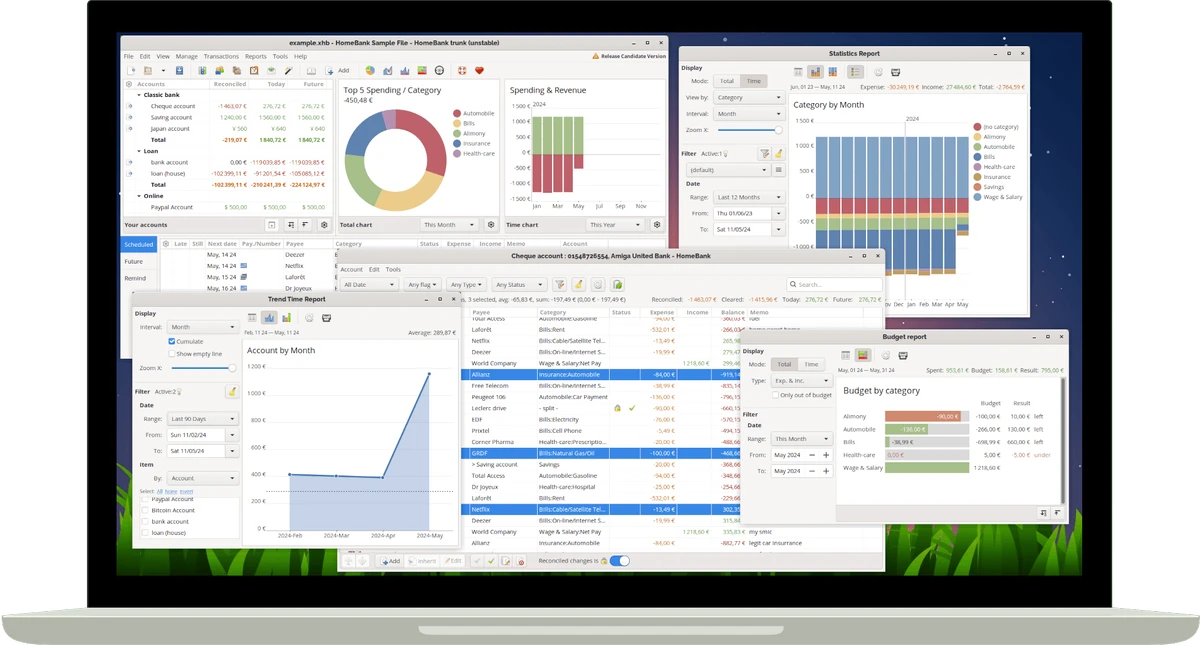
HomeBank offers a clean and practical experience that focuses on making financial management straightforward. The interface is designed to help users quickly record transactions, monitor account balances, and review financial reports without unnecessary complexity.

One of the most useful aspects of the software is its reporting system. The dynamic reports and visual charts provide immediate insights into spending habits, budget performance, and account activity. The filtering options make it easy to narrow down specific transactions and analyze financial data in greater detail.

Conclusion

HomeBank delivers a comprehensive personal finance management experience without overwhelming users with unnecessary complexity. Its budgeting tools, transaction management features, data import capabilities, and insightful reports make it a practical solution for everyday money management.

Pros & Cons

Pros

    • Comprehensive personal finance management tools
    • Supports multiple financial import formats
    • Powerful reporting and analysis features
    • Flexible budgeting system
    • Duplicate transaction detection
    • Scheduled and recurring transaction support
    • Customizable charts and reports
    • Automatic categorization options
    • Import and export functionality

Cons

    • Focused on personal finance rather than investment management
    • Interface prioritizes functionality over modern design
    • Some advanced financial users may require additional specialized tools

Frequently Asked Questions

What is HomeBank used for?

HomeBank is a personal finance application used for tracking expenses, managing accounts, creating budgets, and analyzing financial activity.

Can HomeBank import data from other financial software?

Yes. HomeBank supports importing data from formats such as QIF, OFX, QFX, and CSV, including data exported from applications like Quicken and Microsoft Money.

Does HomeBank support budgeting?

Yes. Users can create monthly and annual budgets, track spending, and import or export budget data.

Can HomeBank detect duplicate transactions?

Yes. The software includes duplicate detection tools that help identify and manage duplicate entries.

Does HomeBank provide financial reports?

Yes. HomeBank offers dynamic reports, interactive charts, spending analysis, budget reports, and balance tracking tools.

Can I automate recurring transactions?

Yes. The software supports scheduled transactions, recurring payments, internal transfers, and transaction templates.

What operating systems are supported?

HomeBank supports Windows 7, Windows 8, Windows 10, and Windows 11.

Recommended apps [Freeware]:
  • Easy Gamer Utility 1.3.106 Easy Gamer Utility logo a Windows tool that optimizes gaming performance, clears cache, and fixes common game issues.
  • BitTorrent 7.11.0.47255 BitTorrent logo peer-to-peer file sharing client for fast, decentralized downloads with bandwidth control and resume support
  • CS Easy Unlocker 1.1.5.0 CS Easy Unlocker logo unlock restricted folders and fix “Access Denied” errors with a simple one-click tool.
  • Easy System Utility 1.1.63 Easy System Utility logo clean junk files, repair tools, passwords and system optimization.
  • Exportizer 10.3.4.822 Exportizer logo view, edit, and export databases to Excel, CSV, SQL, and more with advanced conversion tools.
  • DriversCloud 12.1.6 DriversCloud logo scan system hardware, update drivers, monitor performance, and analyze blue screen errors (BSODs) on Windows.
Recommended apps [Shareware]:
  • WinRAR 7.22 WinRAR logo Windows tool for compressing, decompressing, and managing RAR, ZIP, and many other archive formats.
  • Wondershare PDFelement Professional 12.1.23 Wondershare PDFelement Professional logo a PDF editor for editing, converting, signing, and managing documents easily.
  • Syncovery 12.0.5.29 Syncovery logo fast backup and file synchronization tool with real-time sync, versioning, and advanced automation features
  • Charles 5.2.0 Charles logo HTTP proxy tool for web debugging, allowing developers to inspect, modify, and analyze network traffic in real time
  • Bandizip 7.44 Bandizip logo Fast and intuitive file compression software supporting ZIP, RAR, 7Z, and more with high-speed archiving features
  • Teorex FolderIco 9.2.2 Teorex FolderIco logo Change folder colors or icons in one click and organize your files visually, so you can find everything instantly