NoteCase Pro logo

NoteCase Pro 4.9.0

  • User Rating:
    ★★★★★
    ★★★★★
    0.0 ★ 0Votes
  • Requirements:
    Windows
  • Version: 4.9.0
  • Latest updated: 3 weeks ago
  • License: Free Trial  
  • Publisher: NoteCase
  • Size: 45 MB
× app stores

NoteCase Pro is a comprehensive note-taking and personal information management application designed for users who need more than a basic notebook. It combines note organization, task management, rich text editing, file attachments, and automation tools into a single workspace.

One of its strongest advantages is its cross-platform compatibility, allowing users to work with their notes across Windows, macOS, Linux, and several mobile platforms. The software also supports importing data from numerous note-taking applications, making migration from existing tools straightforward. Whether you're organizing research, managing projects, keeping meeting notes, or building a personal knowledge base, NoteCase Pro provides a flexible environment for storing and managing information.

Features of NoteCase Pro

  • Cross-platform support for Windows, macOS, Linux, FreeBSD, OpenBSD, Solaris, Android, Raspberry Pi, Nokia Maemo, and OpenPandora
  • User interface available in multiple languages
  • Import data from more than 30 file formats
  • Supports importing from Evernote, XMind, TreePad, Tomboy, and other compatible formats
  • Export notes to HTML, RTF, OPML, and other formats
  • Built-in spell checker with customizable dictionaries
  • Organize notes using tags for easier searching and filtering
  • Print entire documents, branches, or individual notes
  • Built-in task management with:
    • Due dates
    • Recurring tasks
    • Priority settings
  • Plugin support using Lua scripting
  • Automation through extensive Lua API commands
  • Attach multiple files directly to notes
  • Store attachments inside NoteCase Pro document files
  • Rich text editing with:
    • Text formatting
    • Hyperlinks
    • Embedded images
  • Record audio directly into notes
  • Create audio notes for meetings, reminders, or voice memos

Interface and Usability

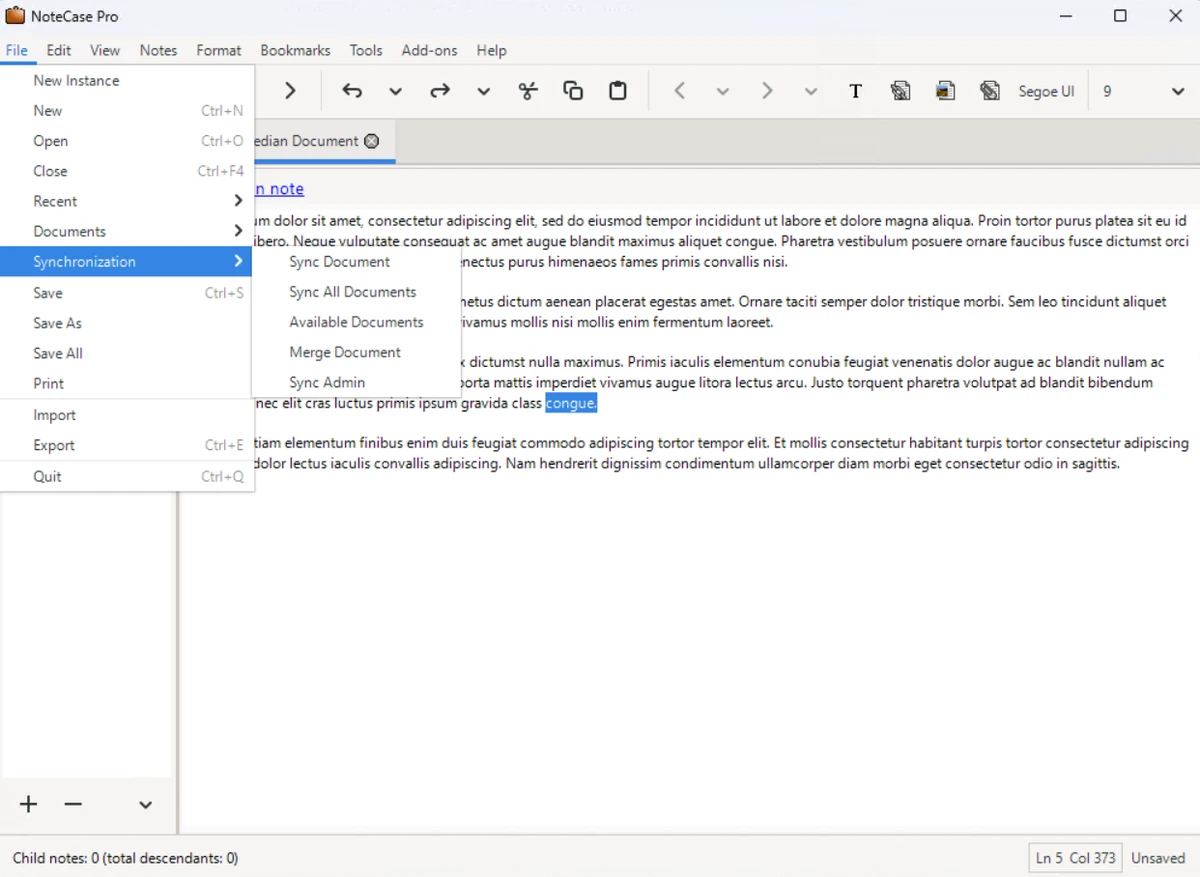
NoteCase Pro focuses on functionality rather than visual simplicity. The interface is organized to help users create structured notes while providing quick access to editing, tagging, attachments, and task management tools.

Despite offering many advanced capabilities, common tasks such as creating notes, organizing content, and attaching files are straightforward. Users migrating from other note-taking applications can also benefit from the software's broad import support. The extensive customization and plugin system make the application particularly appealing for users who need a flexible and expandable note management solution.

Who Should Use NoteCase Pro?

  • Students organizing study materials
  • Researchers managing large collections of notes
  • Writers and authors
  • Project managers
  • Developers documenting projects
  • Business professionals keeping meeting records
  • Users migrating from Evernote or other note-taking software
  • Anyone needing a cross-platform information management solution

Conclusion

NoteCase Pro is a powerful note-taking and information management solution that goes well beyond basic note editors. With support for rich text, task management, file attachments, audio recording, scripting, and extensive import/export capabilities, it provides a comprehensive workspace for organizing information.

Pros & Cons

✓

Pros

  • Excellent cross-platform compatibility
  • Supports importing from numerous note formats
  • Rich text editing with images and hyperlinks
  • Built-in task management
  • File attachment support
  • Audio note recording
  • Powerful tagging and search capabilities
  • Plugin system with Lua scripting
  • Flexible export options
✕

Cons

  • Interface prioritizes functionality over modern design
  • Advanced features may require time to learn
  • Plugin and scripting features are more suited to experienced users

Frequently Asked Questions

What is NoteCase Pro used for?

NoteCase Pro is designed for creating, organizing, and managing notes, tasks, documents, and attachments within a single information management system.

Can I import notes from other applications?

Yes. NoteCase Pro supports importing data from more than 30 file formats, including Evernote, XMind, TreePad, and Tomboy.

Does NoteCase Pro support task management?

Yes. Every note can function as a task with support for due dates, recurring schedules, and priority settings.

Can I attach files to my notes?

Yes. You can attach multiple files to individual notes, and the attachments are stored within the NoteCase Pro document.

Does NoteCase Pro support audio notes?

Yes. You can record audio directly into notes, making it useful for meeting recordings, voice memos, or spoken reminders.

Is NoteCase Pro available on multiple operating systems?

Yes. The desktop version supports Windows, macOS, Linux, FreeBSD, OpenBSD, and Solaris, while additional versions are available for Android and several other platforms.

Recommended apps [Freeware]:
  • Smadav 2026 v15.8.2 Smadav logo a lightweight antivirus for Windows that provides USB protection, malware cleaning, and additional security
  • Vivaldi Browser 8.1.4087.55 Vivaldi Browser logo a Chromium-based browser with built-in mail, calendar, notes, ad blocker, and deep customization features.
  • Bulk Crap Uninstaller 6.2 Bulk Crap Uninstaller logo a free Windows tool that quickly removes multiple applications and cleans leftover files
  • Kali Linux 2026.2 Kali Linux logo a powerful penetration testing OS with tools for cybersecurity, digital forensics, and ethical hacking
  • Q-Dir 12.71 Q-Dir logo a lightweight quad-pane file manager for Windows, offering fast navigation, drag-and-drop, and portable access
  • Duplicati 2.3.0.4 Duplicati logo Create encrypted backups with flexible cloud storage support, scheduling, compression, and secure data protection features.
Recommended apps [Shareware]:
  • HyperSnap 10.1.2 HyperSnap logo captures screenshots, scrolling windows, OCR text and video with advanced editing tools on Windows.
  • Total Commander 11.58 Total Commander logo a dual-pane Windows file manager with advanced search, FTP support, archive tools, and synchronization features
  • Araxis Merge 2026.0 Araxis Merge logo a powerful file comparison and merging tool for developers, legal teams, and professionals handling version control
  • Cubase Pro 15.0.30 Cubase Pro logo a professional DAW for recording, composing, editing, mixing, and music production
  • Fast Video Downloader 4.0.0.82 Fast Video Downloader logo download videos from YouTube, Facebook, Vimeo, and more, with conversion and screen recording tools
  • Sasi Calc 17.1.26.0518 Sasi Calc logo Calculate Maryland child support guidelines with a professional tool designed for legal financial calculations and court-related recommendations.