BitComet logo

BitComet 2.21

  • User Rating:
    ★★★★★
    ★★★★★
    0.0 ★ 0Votes
  • Requirements:
    Windows
  • Version: 2.21
  • Latest updated: 2 months ago
  • License: Freeware  
  • Publisher: BitComet
  • Size: 40 MB
× app stores

BitComet is a free BitTorrent client and download manager designed to handle large file transfers efficiently. It supports multiple download protocols and includes advanced optimization features such as long-term seeding, disk caching, and bandwidth management to improve download speed and reliability.

Overview

BitComet is built for users who frequently download large files such as movies, software, and games. It combines traditional torrent functionality with HTTP and FTP download support, making it a versatile tool for managing different types of file transfers in one application. The software is designed to improve download stability and performance through intelligent resource management. Features like disk caching, smart allocation, and long-term seeding help ensure that downloads complete faster and more reliably, even when peer availability is low. Its interface is straightforward, allowing users to manage multiple torrents simultaneously while maintaining full control over speed, priorities, and scheduling.

Features of BitComet

  • Full BitTorrent protocol support
  • HTTP and FTP download support
  • Magnet link and DHT network compatibility
  • Long-term seeding to improve download completion rates
  • Intelligent disk caching system
  • Smart disk allocation to reduce fragmentation
  • Preview video files while downloading
  • Multi-torrent download management
  • Bandwidth control and speed limiting
  • File priority settings within torrents
  • Auto shutdown after downloads complete
  • NAT and firewall traversal support
  • Download pause, resume, and scheduling
  • Detailed download statistics and monitoring

User Experience

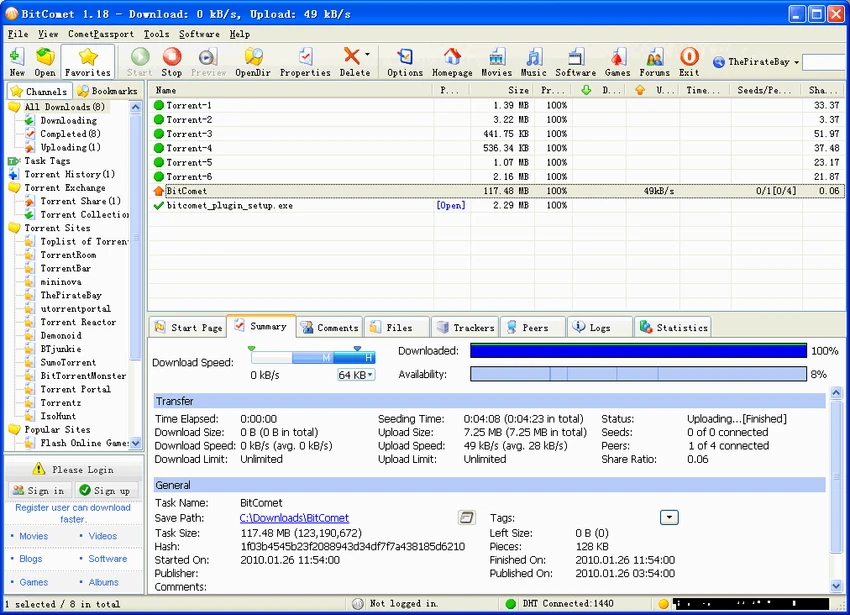
BitComet provides a practical and functional interface focused on download management rather than aesthetics. Users can easily add torrents or links, monitor progress, and adjust priorities as needed. One of its most useful features is the ability to preview video files while they are still downloading, which is especially helpful for large media files. The software also performs well in maintaining download stability, even when peer availability fluctuates.

Bandwidth control allows users to manage network usage effectively, ensuring downloads do not interfere with other online activities. The long-term seeding feature helps improve completion rates by finding additional peers for incomplete downloads. While the interface may feel utilitarian compared to modern apps, its performance and feature set make it highly effective for managing large-scale downloads.

Who Should Use BitComet?

  • Users who frequently download large files
  • Torrent users managing multiple downloads
  • People needing bandwidth control and scheduling
  • Users wanting HTTP/FTP and torrent support in one tool
  • Media consumers downloading movies, games, or software
  • Advanced users managing network-heavy workflows

Conclusion

BitComet is a powerful and practical download manager designed for users who need efficient control over large file transfers. With strong torrent support and advanced optimization features, it remains a solid choice for managing high-volume downloads on Windows systems.

Pros & Cons

✓

Pros

  • Supports torrents, HTTP, and FTP downloads
  • Strong download optimization features
  • Long-term seeding improves completion rates
  • Built-in video preview during downloads
  • Advanced bandwidth and priority controls
  • Stable performance with large files
  • Free to use
✕

Cons

  • Interface design feels outdated
  • Contains many advanced options that may confuse beginners
  • Focused primarily on downloading, not general file management

Frequently Asked Questions

What is BitComet used for?

BitComet is used for downloading torrents and managing HTTP/FTP file transfers efficiently.

Does BitComet support magnet links?

Yes. It fully supports magnet links and DHT networks.

Can BitComet speed up downloads?

Yes. It uses features like disk caching, long-term seeding, and smart allocation to improve performance.

Can I preview videos while downloading?

Yes. BitComet allows partial video preview during downloads.

Does BitComet support bandwidth control?

Yes. You can limit upload and download speeds for better network management.

Is BitComet free?

Yes. BitComet is free to use.

Recommended apps [Freeware]:
  • Smart Defrag 11.4.0.508 Smart Defrag logo a fast Windows disk defragmenter that optimizes hard drives, improves speed, and system stability.
  • WAU Manager 3.8.7.0 WAU Manager logo Provides complete control over Windows Updates, including scheduling, installing, hiding, and uninstalling updates on Windows 10/11
  • DoesNotBelong 11.8.3 DoesNotBelong logo free malware removal and Windows repair tool that complements antivirus software with on-demand scanning and system cleanup
  • Shutter Encoder 20.2 Shutter Encoder logo free multimedia tool for converting, editing, compressing, and processing video, audio, and image files with advanced batch features
  • HWdetails 2.0 HWdetails logo View detailed PC hardware, Windows, network, and system information with monitoring tools and exportable reports.
  • Winget-AutoUpdate 2.12.0 Winget-AutoUpdate logo Automatically update Windows applications with scheduled Winget tasks, notifications, app filters, and detailed update logs.
Recommended apps [Shareware]:
  • Adobe Illustrator 2026 Adobe Illustrator logo professional vector graphic editor for creating logos, illustrations, and scalable designs.
  • Allavsoft 3.29.4.9686 Allavsoft logo video downloader and converter for batch downloads, HD quality, and audio extraction on Windows.
  • JP Software TCC 36.50.70 JP Software TCC logo advanced Windows CMD replacement shell with scripting, debugging, and enhanced command-line features
  • Coolmuster Android Eraser 4.0.25 Coolmuster Android Eraser logo permanently wipes Android data, making files unrecoverable before resale or donation
  • Actual Window Menu 8.15.4 Actual Window Menu logo adds advanced commands like transparency, always-on-top, minimize to tray, and resize options to the Windows system menu
  • SecureCRT 9.7.3 Build 3916 SecureCRT logo Secure remote connections with SSH, Telnet, scripting, session management, and secure file transfer tools for professionals.