


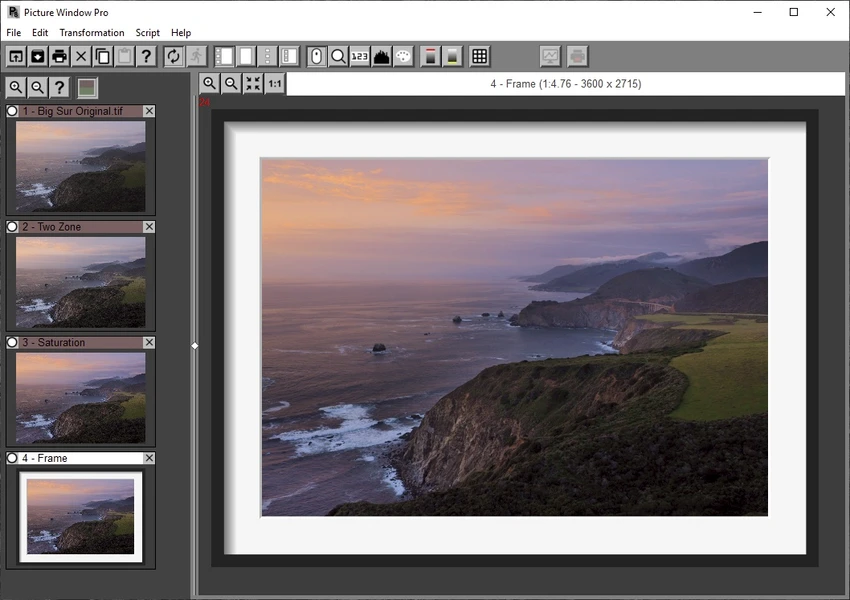

Picture Window Pro is a free professional image editing application designed for photographers and users who require precise control over every stage of image enhancement. After working with the software, I found its non-destructive editing workflow to be one of its strongest features, allowing changes to be revisited and adjusted without altering the original image. Version 8 introduces a redesigned image tree interface that organizes every editing step into an editable workflow, making complex projects easier to manage. Combined with support for high-resolution displays, multi-core processors, and high bit-depth images, Picture Window Pro provides a capable editing environment for demanding photo editing tasks.
Features of Picture Window Pro
- Free professional-grade image editing software
- Comprehensive photo editing and retouching tools
- Non-destructive image editing
- Image tree workflow that records and organizes every editing step
- Edit any stage of the workflow without starting over
- Save workflows as reusable script files
- Side branches for comparing different editing settings
- Supports multiple monitors
- Optimized for high-resolution displays
- Dual-monitor support for larger workspaces
- Supports 16-bit grayscale and 48-bit color images
- Multi-core processor support for faster editing
- Basic and advanced color balancing tools
- Special effects for images
- Ready to use without extensive setup or configuration
Interface and Usability
Picture Window Pro features a practical interface that focuses on editing efficiency rather than visual flair. The image tree is the centerpiece of the workflow, allowing each adjustment to be organized in a logical sequence and revisited whenever needed. This non-destructive approach makes experimentation much more comfortable since previous edits remain editable throughout the project.
The application also takes advantage of multiple monitors and high-resolution displays, providing a spacious workspace for editing large images. While version 8 offers many improvements over previous releases, it may require more system memory, making it less suitable for older computers with limited RAM.
Who Should Use Picture Window Pro?
- Photographers editing high-quality images
- Users who prefer non-destructive photo editing
- Creative professionals working with high-resolution photos
- Hobbyists looking for a free advanced image editor
- Anyone who wants to save and reuse editing workflows
Conclusion
Picture Window Pro delivers an impressive collection of professional photo editing tools at no cost. Its non-destructive editing system, workflow management through the image tree, and support for high-resolution, high bit-depth images make it particularly appealing to photographers and advanced users. If you're looking for a capable free image editor that emphasizes editing flexibility and workflow control, Picture Window Pro is an excellent option to explore.


