


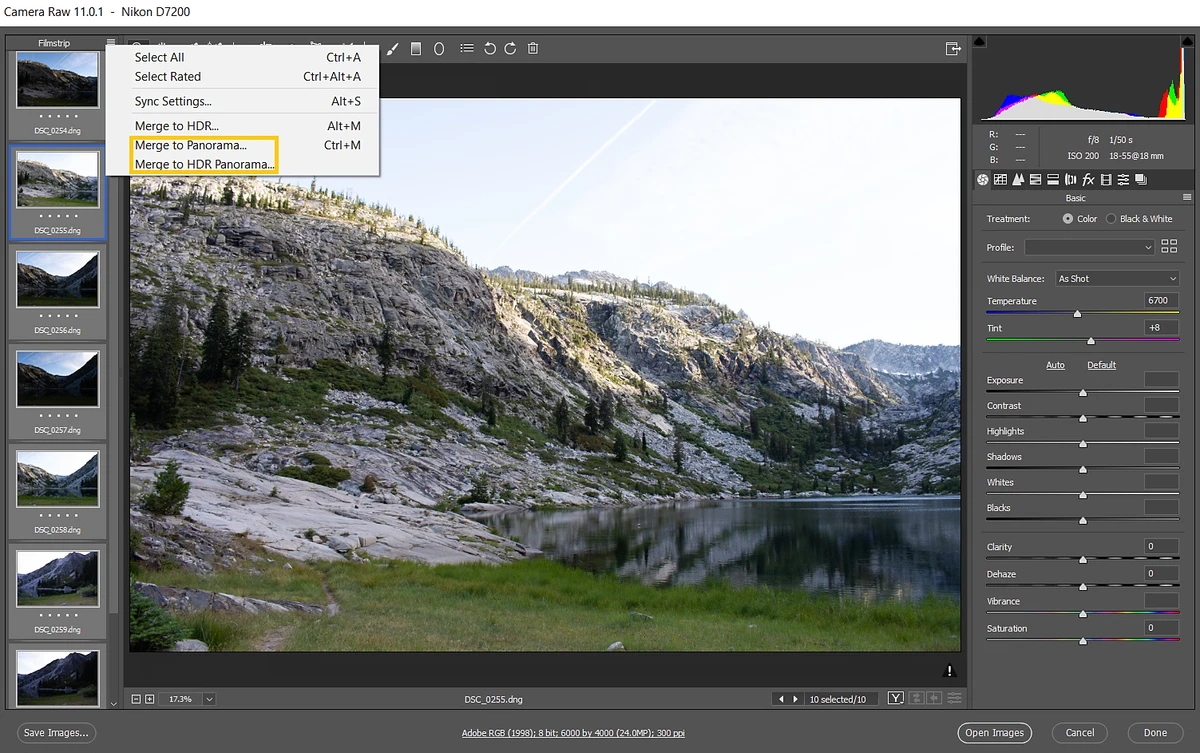

Adobe Camera Raw is a powerful Photoshop plugin designed to provide photographers with direct access to RAW image formats produced by a wide range of digital cameras. By working with RAW files—often referred to as digital negatives—users can make adjustments and enhancements while preserving the original image data. Built on the same RAW processing technology used in Adobe Lightroom, Adobe Camera Raw offers photographers a flexible workflow for editing, converting, and optimizing images before final output. It has become a widely used tool among photography professionals and enthusiasts who require greater control over image quality and post-processing.
Features of Adobe Camera Raw
- Open and process RAW image files directly in Photoshop
- Support for DNG (Digital Negative) format
- Convert RAW images into widely supported file formats
- Non-destructive workflow that preserves original image data
- Crop, rotate, tilt, and adjust photographs
- Apply artistic effects and image enhancements
- Compatible with many professional and midrange digital cameras
- Supports camera brands including Canon, Nikon, Sony, Fujifilm, Panasonic, Leica, Pentax, Olympus, Sigma, Hasselblad, Ricoh, Samsung, Kodak, and others
- Built on the same RAW processing technology used in Adobe Lightroom
- Provides greater flexibility and control compared to editing compressed image formats
- Designed for photographers working with high-quality digital images
- Supports Windows 11 and Windows 10
User Experience
After reviewing Adobe Camera Raw, it is easy to understand why it has become a standard tool in many photography workflows. The plugin bridges the gap between image capture and final editing by allowing photographers to work directly with RAW files before they undergo compression or conversion. One of the biggest advantages is the ability to preserve the original image data throughout the editing process. Rather than making permanent changes to the source file, users can adjust and refine their images while maintaining the integrity of the original capture.
The workflow feels particularly natural for photographers who already use Adobe Photoshop. RAW images open directly within the plugin, allowing adjustments before the file enters the broader Photoshop editing environment. Basic editing functions such as cropping, rotating, and image corrections are easy to access, while the RAW processing workflow provides additional flexibility compared to working with standard image formats.
Compatibility is another strong point. Adobe Camera Raw supports a broad range of camera manufacturers, making it accessible to photographers regardless of the equipment they use. One limitation worth noting is that compatibility depends on the Photoshop version installed. Users must verify that the version of Adobe Camera Raw they choose is supported by their specific Photoshop release.
Who Should Use Adobe Camera Raw?
- Professional photographers
- Photography enthusiasts
- Adobe Photoshop users
- RAW image workflow specialists
- Studio photographers
- Landscape and portrait photographers
- Users working with DNG and camera RAW files
It is particularly valuable for photographers who want maximum control over image quality before performing advanced editing in Photoshop.
Conclusion
Adobe Camera Raw continues to be a cornerstone of digital photography workflows. Its ability to process RAW files directly within Photoshop provides photographers with greater flexibility, image quality preservation, and creative control than standard image formats typically allow.


