ON1 Effects logo

ON1 Effects 2026.4

  • User Rating:
    ★★★★★
    ★★★★★
    0.0 0Votes
  • Requirements:
    Windows
  • Version: 2026.4
  • Latest updated: 5 days ago
  • License: Free Trial  
  • Publisher: ON1
  • Size: 347 MB
× app stores

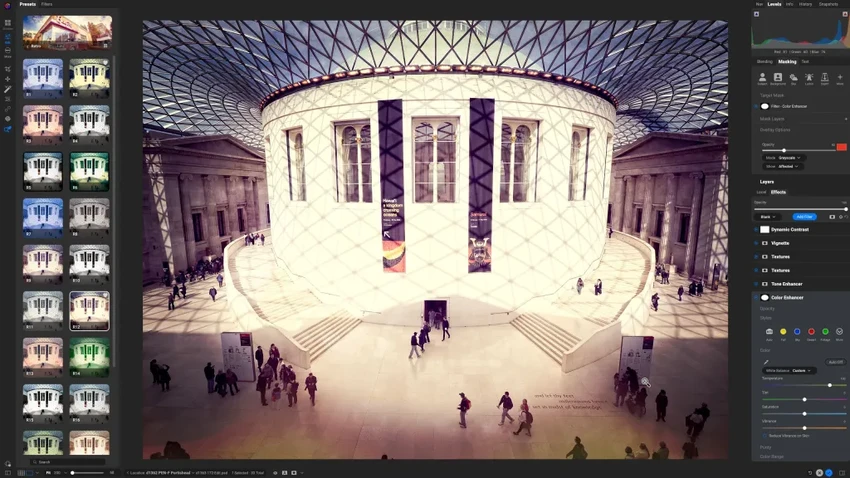
ON1 Effects 2026 is a specialized photo editing application designed to help photographers quickly enhance images using professional-grade effects, presets, filters, textures, and LUTs. Whether you're polishing portraits, creating cinematic landscapes, or applying a consistent style across an entire photo collection, ON1 Effects focuses on delivering creative results with minimal effort. The software can operate as a standalone application, a plugin for popular photo editing platforms, or as part of the broader ON1 Photo RAW ecosystem.

Features of ON1 Effects 2026

  • More than 30 customizable photo filters
  • Hundreds of professional presets and creative effects
  • AI Style Advisor for effect recommendations
  • AI-powered masking for subject and background selections
  • LUT support for advanced color grading
  • Textures and borders for creative styling
  • Fully customizable effect stacks
  • Batch styling capabilities for multiple photos
  • Standalone application functionality
  • Plugin support for Photoshop, Lightroom, and compatible applications
  • Four new creative filters:
    • Depth Lighting
    • Double Exposure
    • Motion Filter
    • Split Field
  • Non-destructive creative workflow
  • Fast one-click image enhancement tools

User Experience

During my experience with ON1 Effects 2026, the software stood out for its ability to apply professional-looking enhancements quickly without requiring complex editing workflows. The interface focuses heavily on visual creativity, making it easy to experiment with different styles and effects. The included presets provide an excellent starting point for photographers who want immediate results. Instead of manually building an effect from scratch, users can apply a preset and then fine-tune individual settings as needed.

One of the most useful additions in this version is the AI Style Advisor, which helps recommend effects based on the image being edited. This can significantly speed up the creative process, particularly for users who are unsure which style best fits a photo. The AI masking tools also improve efficiency by allowing quick selection of subjects and backgrounds. Tasks that would normally require manual masking can often be completed with a single click.

The new creative filters expand the software's artistic possibilities. Depth Lighting helps direct attention toward subjects, Double Exposure enables layered compositions, Motion Filter adds dynamic movement effects, and Split Field offers creative perspective adjustments. Integration with Adobe Photoshop and Lightroom allows photographers to incorporate ON1 Effects into existing workflows without disrupting their editing process.

Who Should Use ON1 Effects 2026?

  • Professional photographers
  • Portrait photographers
  • Landscape photographers
  • Content creators and influencers
  • Photo enthusiasts looking for creative enhancements
  • Adobe Photoshop and Lightroom users seeking additional effects
  • Users who want fast, high-quality photo styling

Conclusion

ON1 Effects 2026 successfully balances simplicity and creative power. Its extensive library of filters, presets, textures, and LUTs allows photographers to achieve polished results quickly, while AI-powered features help streamline the editing process.

Pros & Cons

Pros

  • Large collection of presets and creative filters
  • AI-powered style recommendations
  • Fast and intuitive workflow
  • AI masking simplifies complex selections
  • Flexible customization options
  • Works as both standalone software and plugin
  • Useful batch processing capabilities
  • Strong integration with existing photography workflows

Cons

  • Primarily focused on effects rather than full photo management
  • Advanced users may still require additional editing software
  • Creative results can depend heavily on the chosen preset and image type

Frequently Asked Questions

What is ON1 Effects 2026 used for?

ON1 Effects 2026 is used to apply creative effects, filters, presets, LUTs, textures, and enhancements to digital photos.

Does ON1 Effects include AI features?

Yes. It includes AI Style Advisor recommendations and AI-powered masking tools.

Can ON1 Effects work as a standalone application?

Yes. It can be used independently without requiring other photo editing software.

Does ON1 Effects support Photoshop and Lightroom?

Yes. It integrates as a plugin with Photoshop, Lightroom, and other compatible applications.

What are the new filters in ON1 Effects 2026?

The new filters include Depth Lighting, Double Exposure, Motion Filter, and Split Field.

Can I customize the included presets?

Yes. Presets and effects can be adjusted and customized to create unique looks.

Is ON1 Effects suitable for professional photographers?

Yes. Its advanced effects, AI tools, and workflow integrations make it suitable for both enthusiasts and professionals.

Recommended apps [Freeware]:
  • Awesome Miner 11.5.5 Awesome Miner logo manage Bitcoin, Litecoin and Ethereum mining, monitor rigs, switch pools, and optimize profitability
  • Windows 11 Debloater 2.1.3 Windows 11 Debloater logo remove unwanted features, adjust privacy settings, and personalize Windows 11
  • QueueExplorer 5.0.84 QueueExplorer logo helps developers and admins manage, test, troubleshoot, and monitor message queues across platforms
  • AB Download Manager 1.9.2 AB Download Manager logo Download files with features such as queue management, scheduling, speed control, and browser integration.
  • Vektorrazor 2.2 Vektorrazor logo converts logos and image sources into clean, CAD-friendly vector contours for technical workflows
  • DriverHub 2.1.5 DriverHub logo scans your PC and installs the latest drivers automatically, helping keep hardware updated and stable on Window
Recommended apps [Shareware]:
  • Adobe Acrobat Pro DC 2026 Adobe Acrobat Pro DC logo create, edit, and secure PDFs easily. Professional PDF solution for individuals and businesses.
  • WinRAR 7.22 WinRAR logo Windows tool for compressing, decompressing, and managing RAR, ZIP, and many other archive formats.
  • Charles 5.2.0 Charles logo HTTP proxy tool for web debugging, allowing developers to inspect, modify, and analyze network traffic in real time
  • Disk Savvy 18.2.36 Disk Savvy logo analyze disk space usage, network shares, NAS storage, and generate detailed reports on Windows
  • OkMap Desktop 19.6.4 OkMap Desktop logo a GPS mapping software for route planning, waypoint creation, and offline/online map management
  • Softros LAN Messenger 12.6.3.0 Softros LAN Messenger logo secure encrypted LAN messaging, group chat, and file sharing for office communication