


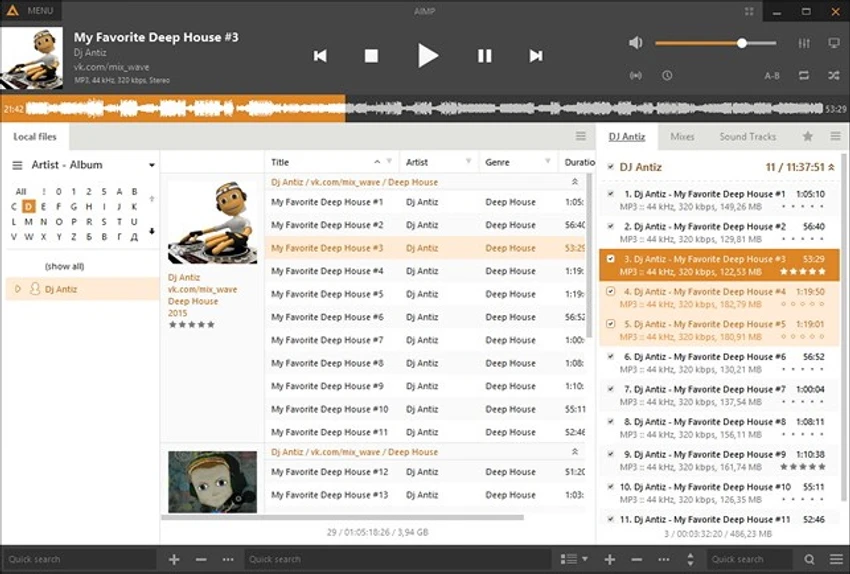

AIMP is a feature-rich audio player designed to deliver high-quality music playback with low system resource usage. It supports a wide range of audio formats and includes advanced tools such as an equalizer, audio conversion utilities, playlist management, and sound recording features.
Overview
AIMP is built for users who want a clean yet powerful music playback experience. Its interface is inspired by classic media players, making it familiar and easy to use, while still offering modern features for advanced audio control. The software supports multiple audio formats and provides tools for organizing, enhancing, and customizing the listening experience. In addition to playback, AIMP includes built-in utilities such as audio conversion, CD ripping, sound recording, and tag editing, making it a versatile audio management tool. Despite its wide feature set, AIMP remains lightweight and efficient, ensuring smooth performance even on older systems.
Features of AIMP
- High-quality audio playback engine (based on BASS)
- Supports multiple audio formats (MP3, FLAC, AAC, WAV, OGG, and more)
- 18-band graphic equalizer
- Built-in audio effects (reverb, flanger, chorus, echo, pitch, tempo, speed)
- Playlist editor with multiple playlist support
- Smooth track transition and fading effects
- Volume normalization between tracks
- Global and local hotkey support
- Internet radio playback and recording
- Audio converter (MP3, WAV, WMA, OGG output formats)
- Audio CD ripping (CD grabber)
- Built-in sound recorder
- Advanced tag editor (ID3v1, ID3v2, Vorbis, WMA)
- Audio library management system
- Plugin support (including Winamp plugins)
- Bookmarking and playback queue features
- Multilingual and multi-user support
- Customizable skins and interface themes
User Experience
AIMP provides a smooth and responsive listening experience with a familiar interface that resembles traditional media players. Users can quickly build playlists, switch between tracks, and apply sound effects without navigating complex menus. The equalizer is one of its standout features, offering precise control over audio output. Combined with built-in sound effects and normalization tools, AIMP allows users to tailor their listening experience to different genres and environments.
Playlist management is flexible, supporting multiple playlists at once and allowing users to organize large music collections efficiently. The audio library feature helps categorize and search through tracks with ease. Additional tools such as audio conversion, CD ripping, and tagging make AIMP more than just a player—it becomes a complete lightweight audio management suite. Despite its advanced capabilities, AIMP maintains a small footprint and performs reliably even on older or low-spec systems.
Who Should Use AIMP?
- Music enthusiasts seeking high-quality playback
- Users with large local music libraries
- Audiophiles who want detailed sound control
- Users on low-spec or older computers
- People who need audio conversion and tagging tools
- Internet radio listeners
Supported Operating Systems
- Windows XP
- Windows Vista
- Windows 7
- Windows 8
- Windows 10
- Windows 11
Conclusion
AIMP is a powerful yet lightweight audio player that offers excellent sound quality, flexible playlist management, and a wide range of built-in audio tools. Its combination of performance and functionality makes it a strong choice for both casual listeners and advanced users.


