MixPad logo

MixPad 14.19

  • User Rating:
    ★★★★★
    ★★★★★
    0.0 ★ 0Votes
  • Requirements:
    Windows
  • Version: 14.19
  • Latest updated: 3 weeks ago
  • License: Free Trial  
  • Publisher: NCH Software
  • Size: 5 MB
× app stores

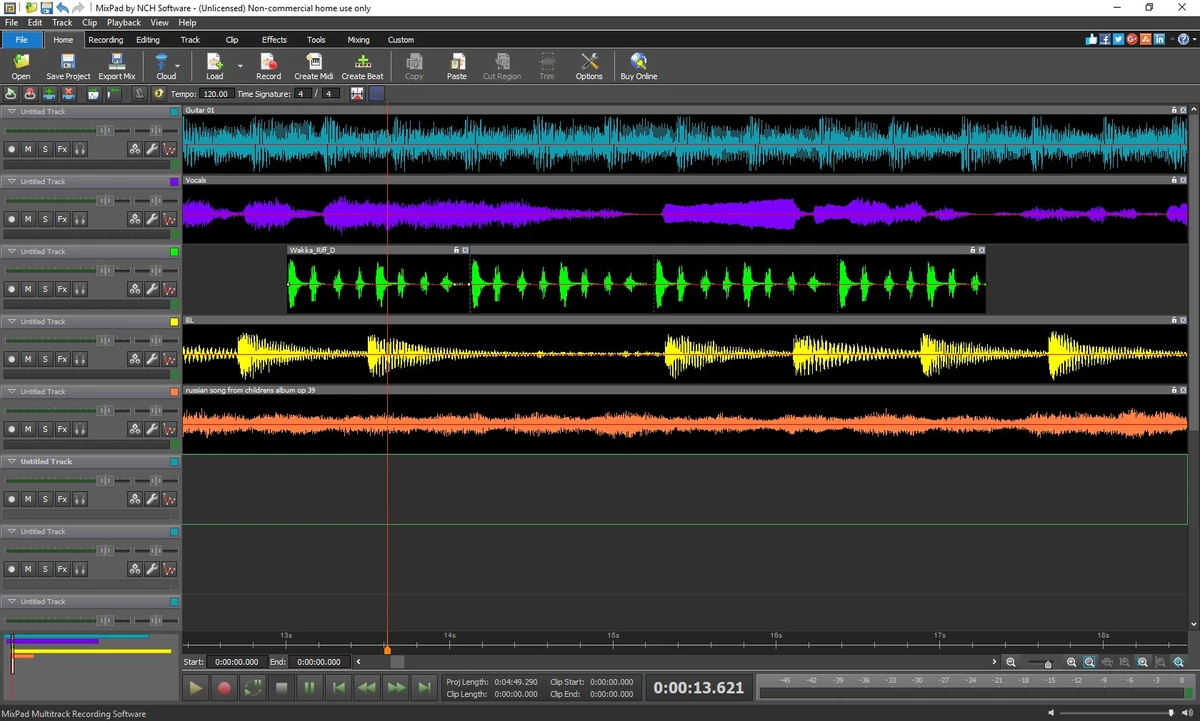
MixPad is a multi-track recording and mixing application designed to bring professional-style audio production tools into an accessible desktop environment. Whether you're recording vocals, mixing music, editing podcasts, or creating beats, MixPad provides an intuitive workspace that supports unlimited audio tracks and a variety of built-in production features. With simultaneous multi-track recording, MIDI editing, percussion kits, and a royalty-free sound library, MixPad offers a solid foundation for musicians, podcasters, and content creators looking to produce high-quality audio without a steep learning curve.

Features of MixPad

  • Multi-track audio recording and mixing.
  • Support for an unlimited number of audio tracks.
  • Simultaneous recording from multiple audio sources.
  • Multiple tracks can remain in record standby mode.
  • Built-in MIDI editor for editing MIDI tracks and files.
  • Add or remove MIDI notes for detailed editing.
  • Volume and pan automation using fade points.
  • Built-in percussion kits.
  • Create custom percussion kits using local sound files.
  • Customize existing sample beats.
  • Drag-and-drop beat creation.
  • Royalty-free sound library.
  • Basic editing tools, including trimming and splitting audio.

User Experience

MixPad makes audio production approachable without sacrificing the core tools needed for recording and mixing. The interface is clean and well organized, allowing new users to begin recording or importing tracks with minimal setup. Working with multiple tracks feels smooth, and the ability to keep several tracks in record standby simplifies recording sessions involving multiple microphones or instruments. The mixer provides convenient controls for adjusting volume and stereo positioning, while fade points make it easy to automate changes throughout a project.

The integrated MIDI editor is another welcome addition. Editing notes directly within the application helps streamline music production without requiring separate MIDI software. I also appreciated the included percussion kits and the option to build custom kits from locally stored sounds, making beat creation accessible even for beginners. The royalty-free sound library adds creative flexibility, while simple editing tools such as trimming and splitting cover many everyday editing needs. Although MixPad is easy enough for newcomers, it also provides enough functionality for users who want to explore more advanced recording and mixing techniques.

One thing to keep in mind is that the software offers a seven-day trial, and the installer may promote other NCH Software products and add an additional desktop shortcut during installation.

Who Should Use MixPad?

  • Home musicians and songwriters.
  • Podcasters and voice recording creators.
  • Beginners learning audio production.
  • Content creators producing audio for videos.
  • Users creating beats with MIDI and percussion tools.
  • Anyone looking for an easy-to-use multitrack recording solution.

Conclusion

MixPad is a capable and approachable audio production application that simplifies multi-track recording and mixing without overwhelming users. Its combination of unlimited tracks, MIDI editing, beat creation tools, and royalty-free sounds provides everything needed to start producing music or spoken-word content.

Pros & Cons

✓

Pros

  • Intuitive and beginner-friendly interface.
  • Supports unlimited audio tracks.
  • Simultaneous multi-track recording.
  • Built-in MIDI editor.
  • Easy volume and pan automation.
  • Includes percussion kits and beat creation tools.
  • Royalty-free sound library.
  • Useful audio editing tools such as trimming and splitting.
  • Suitable for music production, podcasts, and voice recording.
✕

Cons

  • Free trial is limited to seven days.
  • Installer may promote other NCH Software products.
  • Adds an extra NCH desktop shortcut during installation.

Frequently Asked Questions

What is MixPad?

MixPad is a multi-track recording and mixing application that allows users to record, edit, and mix audio projects using an unlimited number of tracks within a single workspace.

Can MixPad record multiple audio sources at the same time?

Yes. MixPad supports simultaneous recording from multiple audio sources by allowing several tracks to remain in record standby mode during recording sessions.

Does MixPad include MIDI editing?

Yes. MixPad features a built-in MIDI editor that allows users to add, remove, and edit MIDI notes for greater control over MIDI tracks and files.

Can I create beats in MixPad?

Yes. MixPad includes built-in percussion kits, supports custom drum kits created from local sound files, and provides tools for customizing sample beats or creating new beats from scratch.

Does MixPad include audio editing tools?

Yes. In addition to recording and mixing, MixPad includes essential editing features such as trimming, splitting, and volume or pan automation using fade points.

Is MixPad free?

MixPad offers a seven-day trial. After the trial period, continued use depends on the available licensing options. During installation, the installer may also promote other NCH Software products and create an additional desktop shortcut.

Recommended apps [Freeware]:
  • Markdown Monster 4.4.4 Markdown Monster logo a powerful Windows Markdown editor with live preview, HTML/PDF export, Git integration, and blogging tools
  • PCSX2 2.6.3 PCSX2 logo Play PlayStation 2 games on your PC, explore its features, setup process, performance, and usability
  • Image Sort 2.14.7 Image Sort logo a free, open-source photo organizer that helps you quickly sort, move, rename, and delete images
  • Wise Disk Cleaner 11.3.6.856 Wise Disk Cleaner logo Free up storage, remove junk files, and optimize your PC with Wise Disk Cleaner for faster Windows performance
  • FindInside 2.0 FindInside logo Search inside PDFs, Office files, and text documents with a free Windows tool that finds content quickly using flexible filters.
  • Beeper 4.2.972 Beeper logo Bring multiple messaging services together in one app with unified chats, cross-platform support, searchable conversations, and synced notifications.
Recommended apps [Shareware]:
  • Coolutils Total Doc Converter 5.1.0.403/176 Coolutils Total Doc Converter logo Convert DOC, DOCX, RTF, and TXT files into PDF, HTML, images, and more with fast batch processing
  • O&O SafeErase 21.3.26142 O&O SafeErase logo securely deletes files, drives, and internet traces using certified methods to prevent data recovery on Windows
  • Advanced Installer 23.8 Advanced Installer logo Windows MSI packaging tool for developers to build, customize, and deploy reliable installers
  • Axialis IconVectors 1.70 Axialis IconVectors logo a lightweight SVG icon editor for developers, featuring live code previews, vector editing tools, and workflow integration
  • Centurion Setup 51.0 Centurion Setup logo Windows installer builder that creates compressed, self-contained executables with multilingual support
  • Ideal Remote 26.8 Ideal Remote logo Manage Windows, macOS, and Linux systems remotely with IDEAL REMOTE, featuring secure remote access and built-in administration tools