JP Software TCC logo

JP Software TCC 36.50.70

  • User Rating:
    ★★★★★
    ★★★★★
    0.0 ★ 0Votes
  • Requirements:
    Windows
  • Version: 36.50.70
  • Latest updated: 3 weeks ago
  • License: Free Trial  
  • Publisher: JP Software
  • Size: 84 MB
× app stores

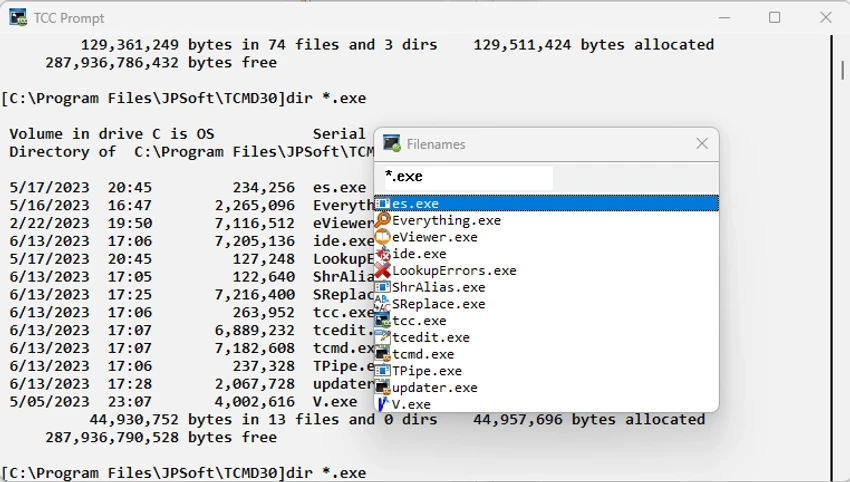
JP Software TCC (Take Command Console) is a powerful replacement for the Windows Command Prompt (CMD). It enhances the standard command-line environment with advanced scripting capabilities, improved usability, and a significantly expanded command set for professional users.

TCC is designed as a modern, high-performance command shell for Windows, originally known as 4NT. It is fully compatible with existing CMD commands and batch files, while extending functionality far beyond the limitations of the default Windows command processor. With over 250 internal commands, 700+ variables and functions, and extensive enhancements to existing CMD behavior, TCC transforms the traditional command-line experience into a more productive and script-friendly environment.

It also integrates tools for batch development, including an editor and debugger, making it suitable not only for command execution but also for building and maintaining complex automation scripts.

Features of JP Software TCC

  • Full CMD replacement command shell for Windows
  • Backward compatibility with CMD commands and batch files
  • Over 250 built-in internal commands
  • 700+ variables and functions for scripting flexibility
  • Enhanced versions of standard CMD commands
  • Integrated batch script editor and debugger
  • Advanced command-line editing improvements
  • Faster and more efficient command execution workflow
  • Context-sensitive help for commands and syntax
  • Reduced syntax errors through consistent command structure
  • Works with existing Windows command-line applications
  • Designed for both interactive use and scripting automation
  • Windows support for Server and desktop environments

User Experience

TCC provides a noticeably more powerful and structured command-line experience compared to CMD. Users benefit from improved command editing, better feedback, and a more consistent syntax system that reduces common scripting mistakes. For professionals who rely heavily on automation, the integrated scripting tools and debugging features significantly speed up development and troubleshooting. The learning curve exists, but the productivity gains become clear once users adapt to its extended command set. The environment feels stable and purpose-built for system administration, scripting, and advanced command-line workflows.

Who Should Use JP Software TCC?

  • System administrators managing complex Windows environments
  • Developers working heavily with batch scripting and automation
  • Advanced users seeking a more powerful CMD replacement
  • IT professionals who need extended command-line functionality
  • Users who want integrated scripting and debugging tools

Conclusion

JP Software TCC is one of the most powerful command-line replacements available for Windows. By expanding CMD compatibility with hundreds of enhancements, built-in functions, and scripting tools, it delivers a significantly more productive environment for technical users.

Pros & Cons

✓

Pros

  • Massive expansion over standard CMD functionality
  • Fully backward compatible with CMD scripts
  • Powerful scripting and automation capabilities
  • Integrated editor and debugging tools
  • Highly productive for advanced users
✕

Cons

  • Steeper learning curve than CMD
  • Designed primarily for technical users
  • Can feel overwhelming due to feature depth

Frequently Asked Questions

What is JP Software TCC?

TCC is an advanced Windows command shell that replaces CMD and adds extensive scripting and automation features.

Is TCC compatible with CMD commands?

Yes, it supports CMD commands and batch files while adding enhancements.

Does TCC include scripting tools?

Yes, it includes an integrated editor and batch file debugger.

Who should use TCC?

It is best suited for system administrators, developers, and advanced Windows users.

Is TCC better than CMD?

TCC is significantly more powerful than CMD, offering more commands, functions, and scripting capabilities.

Recommended apps [Freeware]:
  • OcenAudio 3.20.0 OcenAudio logo a fast and easy-to-use audio editor with real-time effects, spectrogram analysis, and VST plugin support
  • ChrisPC Free VideoTube Downloader 15.26.0718 ChrisPC Free VideoTube Downloader logo a Windows tool for downloading, recording, and converting online videos
  • Kalmuri 4.2.5 Kalmuri logo screen capture and recording tool that supports screenshots, MP4 recording, and multiple export formats with hotkey support
  • VirtualBox 7.2.12 VirtualBox logo Run multiple operating systems on one PC with VirtualBox, a free open-source virtualization platform for Windows
  • Alternate Pic View 3.660 Alternate Pic View logo View, edit, organize, and convert images with a lightweight photo viewer featuring batch tools, slideshows, and GIF support.
  • PropertySystemView 1.22 PropertySystemView logo View and modify Windows file metadata, timestamps, and system properties with this portable utility designed for advanced users.
Recommended apps [Shareware]:
  • GiliSoft USB Lock 11.3 GiliSoft USB Lock logo restricts USB, disk, program, and website access to prevent data leaks and misuse
  • DaVinci Resolve 21.0.2 DaVinci Resolve logo a professional video editor with advanced color grading, AI tools, and high-end post-production features.
  • priPrinter Server 7.0.1.2625 priPrinter Server logo virtual printer driver that lets users preview, edit, and optimize print jobs before printing or exporting to PDF and image formats
  • BeerSmith 4.0.22 BeerSmith logo brewing software for designing beer, mead, wine, and cider recipes with style matching, mash calculations, and ingredient management
  • PDQ Deploy 20.0.20.0 PDQ Deploy logo Deploy software and Windows updates across multiple PCs with PDQ Deploy using automated scheduling and silent installations
  • BackUp Maker 8.406 BackUp Maker logo Protect important files with BackUp Maker using scheduled backups, AES encryption, ZIP archives, and cloud or FTP storage