FileLegit Windows Office & Productivity PDF Tools VovSoft PDF to Text Converter
VovSoft PDF to Text Converter logo

VovSoft PDF to Text Converter 1.5

  • User Rating:
    ★★★★★
    ★★★★★
    0.0 0Votes
  • Requirements:
    Windows
  • Version: 1.5
  • Latest updated: 3 days ago
  • License: Free Trial  
  • Publisher: VovSoft
  • Size: 7 MB
× app stores

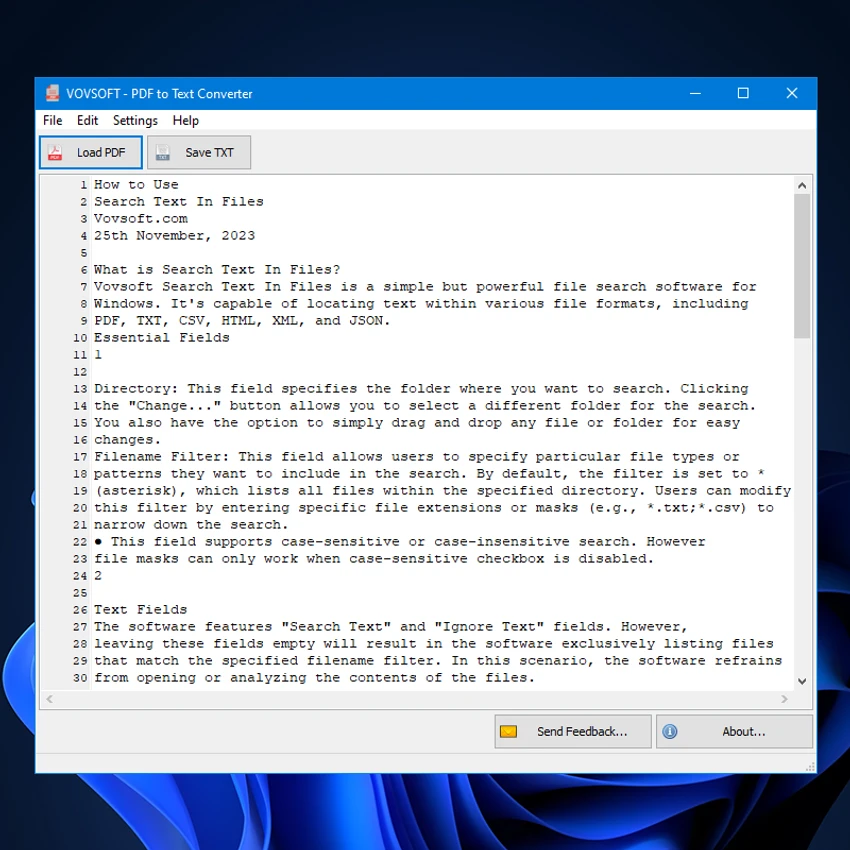
VovSoft PDF to Text Converter is a lightweight Windows utility designed to extract text from PDF documents and save it as editable TXT files. The software works entirely offline, making it a convenient solution for users who want to convert PDF content without uploading files to online services.

Overview

VovSoft PDF to Text Converter focuses on one task—turning PDF documents into plain text quickly and efficiently. Its clean, minimalist interface makes the conversion process straightforward, even for users with little technical experience. The application supports batch processing, allowing multiple PDF files to be converted in one session. After extraction, the text is displayed within the program, where it can be edited before being saved as a standalone TXT file. Because all processing is performed locally, users can convert documents while keeping their files on their own computer.

Features of VovSoft PDF to Text Converter

  • Convert PDF documents into plain TXT files
  • Offline conversion without uploading files to online servers
  • Batch processing for multiple PDF files at once
  • Simple and beginner-friendly interface
  • Drag-and-drop support for importing documents
  • Preview extracted text within the application
  • Edit extracted text before saving
  • Standard text editing functions, including cut, copy, and paste
  • Save edited text to any folder as a TXT file

User Experience

Using VovSoft PDF to Text Converter is straightforward from start to finish. The interface is uncluttered, making it easy to load PDF files either by browsing folders or simply dragging and dropping them into the application. Batch conversion is useful for handling multiple documents efficiently, while the built-in text editor allows quick corrections without requiring another application. Being able to review and modify extracted text before saving adds flexibility, especially when preparing documents for further editing. The software is best suited for users looking for a simple offline conversion tool rather than a full-featured PDF editor.

Who Should Use VovSoft PDF to Text Converter?

This software is ideal for students, office workers, researchers, and anyone who regularly needs to extract editable text from PDF documents. It is particularly useful for users who prefer offline processing for convenience or privacy.

Conclusion

VovSoft PDF to Text Converter offers a simple and focused solution for converting PDF documents into editable text files. Its offline operation, batch conversion support, and built-in text editing make it a practical choice for everyday document conversion tasks.

Pros & Cons

Pros

  • Converts PDF files to editable TXT documents
  • Works entirely offline
  • Supports batch conversion of multiple files
  • Simple interface suitable for beginners
  • Includes basic text editing before saving
  • Drag-and-drop file support

Cons

  • Limited to PDF-to-TXT conversion only
  • No advanced PDF editing or formatting features mentioned

Frequently Asked Questions

What is VovSoft PDF to Text Converter used for?

It is used to extract text from PDF documents and save the content as editable TXT files.

Does the software work offline?

Yes. All PDF conversions are performed locally without uploading files to online servers.

Can I convert multiple PDF files at once?

Yes. The software supports batch conversion, allowing multiple PDF documents to be processed in a single session.

Can I edit the extracted text before saving?

Yes. The extracted text is displayed within the application, where you can edit it using standard cut, copy, and paste functions before saving.

Which operating systems are supported?

The software supports Windows 11, Windows 10, Windows 8/8.1, and Windows 7 in both 32-bit and 64-bit versions.

Recommended apps [Freeware]:
  • FastCopy 5.11.3 FastCopy logo a lightweight Windows tool for ultra-fast file copying, syncing, and error-resilient data transfer
  • XRecode 3 v1.184 XRecode logo a powerful audio converter supporting many formats, CD ripping, and audio extraction from video files
  • WildBit Viewer 6.20.1 WildBit Viewer logo a fast, lightweight image viewer for Windows with slideshow, compare tools and EXIF metadata support
  • darktable 5.6.0 darktable logo a free open-source RAW photo editor and photography workflow tool for professional image management
  • TimVer 0.12.0 TimVer logo open-source Windows system information tool that provides detailed OS version, build, compatibility, and system data beyond standard Winver
  • TeraCopy 4.0.0.28 TeraCopy logo Windows file transfer tool that speeds up copying, resumes transfers, and improves reliability with error recovery
Recommended apps [Shareware]:
  • Adobe After Effects 2026 Adobe After Effects logo advanced motion graphics, visual effects, compositing, and animation tools for creators.
  • Sequence Generator Pro 4.5.0.1649 Sequence Generator Pro logo a Windows astrophotography capture suite for automating imaging, focus, and sequencing.
  • TweakNow WinSecret Plus 9.5.4 TweakNow WinSecret Plus logo Windows optimization, hidden tweaks, PDF tools, image conversion, and system utilities
  • EditPlus 6.1.899 EditPlus logo powerful Windows text editor with syntax highlighting, coding tools, FTP support, and web editing features
  • O&O SafeErase 21.3.26142 O&O SafeErase logo securely deletes files, drives, and internet traces using certified methods to prevent data recovery on Windows
  • HTML Compiler 2026.7 HTML Compiler logo convert HTML apps into secure Windows executables using Chromium-based runtime