Actual Window Menu logo

Actual Window Menu 8.15.4

  • User Rating:
    ★★★★★
    ★★★★★
    0.0 ★ 0Votes
  • Requirements:
    Windows
  • Version: 8.15.4
  • Latest updated: 3 weeks ago
  • License: Free Trial  
  • Publisher: Actual Tools
  • Size: 9 MB
× app stores

Actual Window Menu is a Windows desktop enhancement tool that extends the standard system menu available in every application window. Instead of relying only on basic controls like minimize, maximize, and close, it adds a set of advanced window management commands directly into the window’s title bar menu.

Once installed, these additional options appear in every window’s system menu, allowing users to quickly control window behavior without opening separate settings panels or tools. This makes it easier to manage multiple applications efficiently and reduce desktop clutter. The software is designed for both casual and advanced users who want faster access to hidden or extended window management features.

Features of Actual Window Menu

  • Extend the standard Windows system menu with additional commands
  • Minimize any window directly to the system tray
  • Make windows transparent (0% to 100% opacity control)
  • Keep windows always on top of other applications
  • Roll up windows to show only the title bar
  • Resize windows using preset or custom dimensions
  • Set exact window sizes in pixels (e.g., 800×600, 1024×768)
  • Resize windows based on percentage of screen size
  • Apply custom commands per application
  • Improve taskbar organization by reducing clutter
  • Easy access through standard window icon menu
  • Lightweight and quick installation process

Interface and Usability

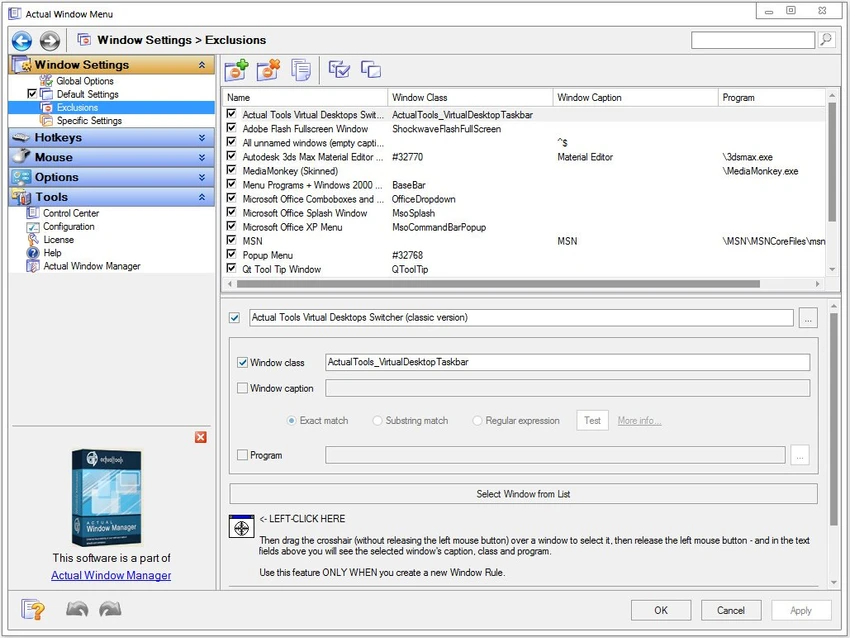
Actual Window Menu integrates directly into the native Windows interface by adding extra options to the system menu of each window. These options are accessed by clicking the application icon in the title bar, making the tool feel like a natural extension of Windows itself. Users can apply commands instantly without switching between different utilities or settings panels. The interface is minimal because all functionality is embedded within existing window controls. Customization options allow users to enable only the features they need for specific applications, helping to maintain a clean and efficient workflow.

Who Should Use Actual Window Menu?

  • Users who frequently manage multiple open windows
  • Office workers looking to reduce desktop clutter
  • Developers and technical users
  • Multi-tasking professionals
  • Users who want quick access to window controls
  • Anyone looking for lightweight window management tools

Conclusion

Actual Window Menu is a lightweight and practical tool that enhances the standard Windows system menu with useful window management features. By adding quick access to transparency, resizing, and system tray minimization, it improves workflow efficiency without changing the way Windows normally works.

Pros & Cons

✓

Pros

  • Adds powerful controls to native Windows system menu
  • Easy and intuitive to use
  • Supports transparency and always-on-top features
  • Can minimize windows to system tray
  • Includes flexible resizing options
  • Lightweight and fast installation
  • Works across most Windows applications
✕

Cons

  • Limited advanced automation features compared to other tools
  • No modern UI or standalone control panel
  • Features depend on system menu access only
  • May overlap with built-in Windows shortcuts

Frequently Asked Questions

What is Actual Window Menu used for?

Actual Window Menu is used to extend the Windows system menu with advanced window controls like transparency, resizing, and minimizing to tray.

Can I minimize windows to the system tray?

Yes. The software allows any window to be minimized directly to the system tray instead of the taskbar.

Does it support window transparency?

Yes. You can adjust window transparency from fully solid to fully transparent.

Can I resize windows automatically?

Yes. You can set predefined or custom window sizes, including pixel-based and percentage-based dimensions.

Is it easy to use?

Yes. All features are integrated into the standard window system menu, making it very easy to access and use.

Does it work with all Windows applications?

It works with most standard Windows applications by integrating into their system menus.

Recommended apps [Freeware]:
  • Markdown Monster 4.4.4 Markdown Monster logo a powerful Windows Markdown editor with live preview, HTML/PDF export, Git integration, and blogging tools
  • Wireless Network Watcher 2.45 Wireless Network Watcher logo a lightweight utility that scans your Wi-Fi network and lists connected devices
  • PHP 8.5.8 PHP logo Develop dynamic websites with PHP, the free open-source scripting language for modern server-side web development
  • Argente System Repair 1.0.8.2 Argente System Repair logo scans and fixes Windows errors to improve performance with simple, recommended, and custom modes
  • MKVToolNix 100.0 MKVToolNix logo free MKV toolkit for splitting, merging, editing, and extracting video and audio streams easily
  • MailStore Home 26.3.0.24111 MailStore Home logo Archive, back up, and search emails from multiple accounts and applications with a reliable personal email management tool.
Recommended apps [Shareware]:
  • ON1 Resize AI 2026.4 ON1 Resize AI logo advanced AI upscaling technology to enlarge photos up to 10x while preserving detail, sharpness, and print quality
  • HelpNDoc 10.7.0.400 HelpNDoc logo Create CHM help files, PDFs, Word docs, and web documentation easily with HelpNDoc’s all-in-one editor and compiler
  • FolderMatch 5.1.3.0 FolderMatch logo Compare folders, synchronize files, find duplicates, and batch rename files with FolderMatch for Windows.
  • pdfMachine merge 2.0.9628.25372 pdfMachine merge logo merge automates personalized PDF email campaigns using Word, Excel, PowerPoint, and HTML templates
  • iTop Data Recovery 6.3.0.955 iTop Data Recovery logo Recover deleted files from drives, SSDs, USB devices, and memory cards with a simple Windows data recovery tool.
  • Batch It Ultra 6.77 Batch It Ultra logo Process thousands of images with batch resizing, conversion, effects, watermarking, captions, and advanced automation tools.