NxFilter logo

NxFilter 4.7.5.1

  • User Rating:
    ★★★★★
    ★★★★★
    0.0 0Votes
  • Requirements:
    Windows
  • Version: 4.7.5.1
  • Latest updated: 1 day ago
  • License: Freeware  
  • Publisher: Jahastech
  • Size: 85 MB
× app stores

NxFilter is a free, enterprise-focused web filtering solution designed to monitor and control internet activity across organizational networks. It operates as a DNS-based filter, allowing administrators to block malicious domains, restrict access to specific websites, and enforce browsing policies across users and groups. In addition to content filtering, NxFilter enhances network security by detecting malware, botnets, and phishing attempts, making it a practical tool for organizations looking to centralize internet control and protection.

Features of NxFilter

  • DNS-based web filtering and monitoring
  • Malware, phishing, and botnet protection
  • Local DNS caching for improved browsing speed
  • Load balancing and failover clustering
  • Active Directory integration
  • User and group-based policy management
  • Remote user filtering support
  • Bandwidth control and traffic management
  • Application control features
  • Safe search enforcement (Google, etc.)
  • Dual policy system (work-time and free-time rules)
  • Multiple authentication methods:
    • IP-based authentication
    • Password-based authentication
    • LDAP authentication
    • Single sign-on (Active Directory)
  • Domain category filtering
  • Custom blacklist and whitelist support
  • DNS query logging and search
  • Email alerts for security events
  • Syslog export support
  • Dashboard and reporting system
  • Internationalized domain name support

User Experience

NxFilter is primarily designed for administrators rather than general users. The setup process involves configuring DNS-based filtering rules and integrating the system into a network environment, which requires some networking knowledge. Once configured, NxFilter runs in the background and provides centralized control over internet access. Administrators can define policies based on users, groups, or time schedules, allowing for fine-grained control over browsing behavior.

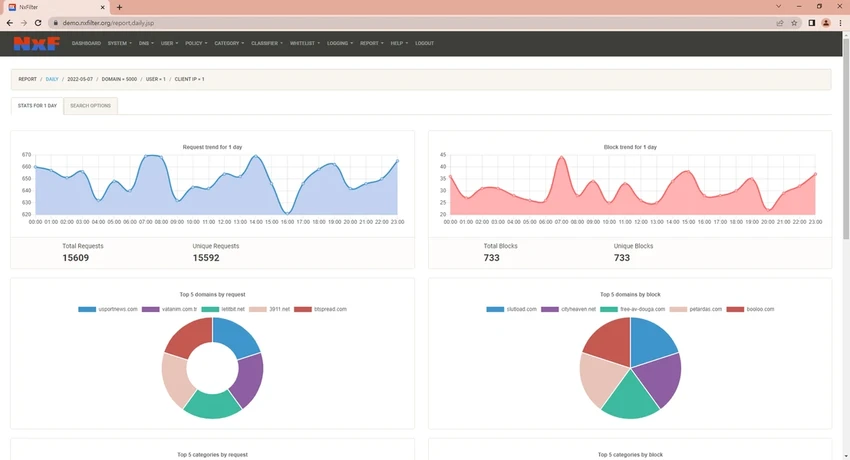
The dashboard provides visibility into DNS queries, blocked domains, and user activity, making it easier to monitor potential threats or misuse. Features like Active Directory integration and group-based policies are particularly useful in corporate environments where managing multiple users efficiently is essential. While the interface is functional and includes a built-in GUI, it is clearly geared toward technical users and IT administrators rather than casual home users.

Who Should Use NxFilter?

  • IT administrators
  • Corporate networks
  • Schools and educational institutions
  • Organizations needing internet access control
  • Security-focused network environments
  • Businesses managing multiple users and devices

Conclusion

NxFilter is a robust DNS-based filtering and security platform that gives administrators full control over internet access and threat protection. With features like Active Directory integration, malware blocking, and detailed reporting, it is well-suited for enterprise environments.

Pros & Cons

Pros

  • Free and enterprise-ready web filtering solution
  • Strong DNS-level malware and phishing protection
  • Excellent Active Directory integration
  • Flexible policy and user management system
  • Supports clustering and failover for reliability
  • Detailed logging and reporting tools
  • Works on both Windows and Linux

Cons

  • Requires networking and DNS knowledge to configure
  • Not designed for casual or home users
  • Interface is functional but not modern or beginner-friendly
  • Initial setup can be complex

Frequently Asked Questions

What is NxFilter used for?

NxFilter is used to monitor and control internet access by filtering DNS requests, blocking malicious domains, and enforcing browsing policies.

Does NxFilter protect against malware?

Yes. It includes protection against malware, phishing sites, and botnet domains by blocking harmful DNS requests.

Can NxFilter be used in businesses?

Yes. NxFilter is designed for enterprise and organizational environments, including businesses and schools.

Does NxFilter support Active Directory?

Yes. It integrates with Active Directory for user and group-based policy management.

Is NxFilter difficult to set up?

It can be complex for beginners because it requires DNS and network configuration knowledge.

Recommended apps [Freeware]:
  • Glow 26.9 Glow logo advanced Windows system analysis tool offering deep hardware insights, diagnostics, benchmarks, and system optimization utilities
  • OCCT 16.1.11.99 OCCT logo hardware monitoring and stress testing tool for CPU, GPU, memory, and power supply performance analysis.
  • Bulk Crap Uninstaller 6.2 Bulk Crap Uninstaller logo a free Windows tool that quickly removes multiple applications and cleans leftover files
  • Viber for Windows 28.2.0 Viber for Windows logo make free calls, send messages, and sync chats across devices via WiFi or 3G
  • Claude Desktop 1.15962.1 Claude Desktop logo Anthropic's AI assistant to Windows and macOS for writing, coding, research, and file analysis
  • Media Player Codec Pack 5.1.2.625 Media Player Codec Pack logo enables smooth playback of audio and video formats on Windows by adding essential codecs and filters.
Recommended apps [Shareware]:
  • DSLR Remote Pro 3.31.5 DSLR Remote Pro logo Windows software for Canon DSLR control, photo booth creation, live view, HDR capture via USB connection
  • 4DDiG File Repair 4.4.2.9 4DDiG File Repair logo a Windows tool for repairing damaged photos and videos in batch mode with a simple, automated workflow
  • Duplicate Photos Fixer Pro 1.3.1086.1158 Duplicate Photos Fixer Pro logo finds and removes duplicate and similar photos to organize your library and save space
  • Tomabo MP4 Downloader 6.4.6 Tomabo MP4 Downloader logo downloads videos, playlists, subtitles, and audio while offering format conversion tools.
  • OkMap Desktop 19.6.4 OkMap Desktop logo a GPS mapping software for route planning, waypoint creation, and offline/online map management
  • Diffchecker 7.1.4 Diffchecker logo offline tool for comparing text, images, PDFs, spreadsheets, and folders securely on Windows