HeidiSQL logo

HeidiSQL 12.20

  • User Rating:
    ★★★★★
    ★★★★★
    0.0 0Votes
  • Requirements:
    Windows
  • Version: 12.20
  • Latest updated: 6 days ago
  • License: Freeware  
  • Publisher: Ansgar Becker
  • Size: 17 MB
× app stores

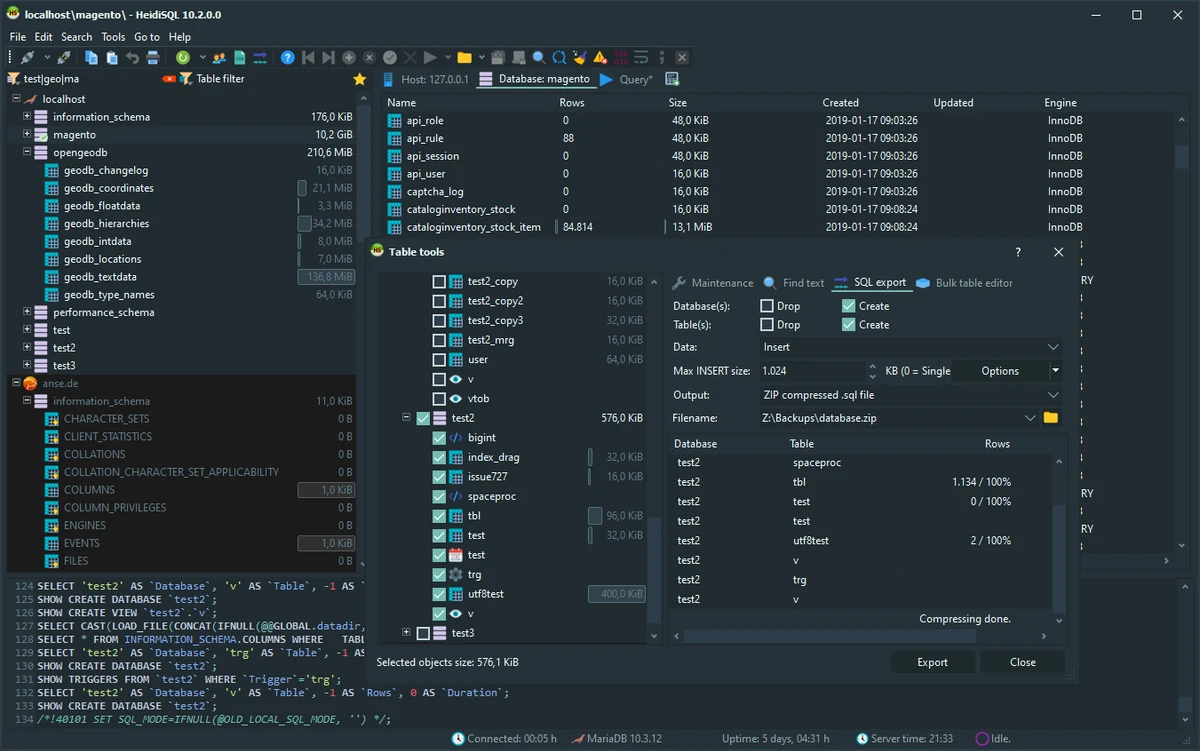
HeidiSQL is a lightweight and user-friendly database management tool designed for working with SQL databases such as MySQL and Microsoft SQL Server (MSSQL). It provides a Windows-based graphical interface that allows users to browse tables, execute SQL queries, and manage database structures efficiently. It is particularly useful for developers and database administrators who need a fast and practical way to interact with databases without relying solely on command-line tools.

Overview

HeidiSQL functions as a graphical database client that simplifies common database tasks. Users can create, modify, and delete tables, run SQL queries, and inspect database content through a clean interface. Beyond basic operations, it also supports database maintenance tasks such as integrity checks, optimization, and repair functions. It can import data from text files, synchronize tables between databases, and export selected tables into SQL scripts or other database formats.

Features of HeidiSQL

  • Graphical interface for MySQL and Microsoft SQL Server management
  • Execute and manage SQL queries easily
  • Create, edit, and delete database tables
  • Browse and edit table contents
  • Database maintenance tools (optimize, repair, integrity check)
  • Import data from text files
  • Export tables to SQL scripts or other databases
  • Table synchronization between two databases
  • Support for large SQL scripts
  • BLOB and MEMO data editing support
  • User process management tools
  • Lightweight and fast Windows application
  • Open-source software

User Experience

HeidiSQL is designed to be straightforward and efficient. The interface is structured around database connections, making it easy to switch between servers and schemas. Query execution and table browsing are responsive, and the layout keeps essential tools accessible without overwhelming the user. Even users who are relatively new to database management can quickly understand the workflow. For more advanced users, features like table synchronization and bulk export provide additional flexibility for managing complex database environments.

Who Should Use HeidiSQL?

  • Developers working with MySQL or MSSQL databases
  • Database administrators managing multiple database servers
  • Students learning SQL and database structure
  • Users who prefer GUI-based database tools over command-line clients
  • Anyone needing quick database browsing and query execution

Conclusion

HeidiSQL is a fast, lightweight, and practical database management tool that simplifies working with SQL databases on Windows. With support for query execution, table editing, and data synchronization, it provides a solid balance between simplicity and functionality.

Pros & Cons

Pros

  • Simple and fast SQL database interface
  • Supports MySQL and MSSQL databases
  • Includes table synchronization and export tools
  • Lightweight and easy to install
  • Open-source and widely used

Cons

  • Limited to Windows environment
  • No advanced enterprise-grade features mentioned

Frequently Asked Questions

What is HeidiSQL used for?

HeidiSQL is used to manage and interact with SQL databases through a graphical interface.

Does HeidiSQL support MySQL?

Yes, it supports MySQL databases along with Microsoft SQL Server.

Can I run SQL queries in HeidiSQL?

Yes, it allows users to execute and manage SQL queries directly.

Is HeidiSQL suitable for beginners?

Yes, its simple interface makes it easy for beginners to learn database management.

Can HeidiSQL export data?

Yes, it can export tables to SQL scripts and other database formats.

Recommended apps [Freeware]:
  • Simple IP Config 2.9.7 Simple IP Config logo a lightweight, portable tool for quickly changing Windows IP, DNS, and network settings
  • Awesome Miner 11.5.5 Awesome Miner logo manage Bitcoin, Litecoin and Ethereum mining, monitor rigs, switch pools, and optimize profitability
  • Vivaldi Browser 8.0.4033.54 Vivaldi Browser logo a Chromium-based browser with built-in mail, calendar, notes, ad blocker, and deep customization features.
  • DAEMON Tools Lite 12.6.0.2458 DAEMON Tools Lite logo Create, mount, and manage ISO, MDF, and other disc images with virtual CD/DVD/Blu-ray drives
  • Disk Drill 6.3.1398.0 Disk Drill logo advanced data recovery software for Windows to restore deleted files from drives, USB, and partitions
  • DISMTools 0.8 DISMTools logo open-source GUI for Windows DISM that simplifies image management, system repair, and maintenance
Recommended apps [Shareware]:
  • ExamDiff Pro 17.0.1.4 ExamDiff Pro logo a Windows file comparison tool for code review, folder sync, and document diffing with merge support.
  • GiliSoft Private Disk 11.8 GiliSoft Private Disk logo Protect sensitive files with AES 256-bit encryption, hidden disk images, and portable encrypted storage
  • PowerDirector 2026 v24.6 PowerDirector logo AI-powered video editor offering templates, effects, and tools for fast, professional video creation
  • Yamicsoft Windows Manager 2.3.9 Yamicsoft Windows Manager logo optimizes, cleans, secures, and customizes Windows 10 and 11 with over 40 tools.
  • Royal TS 7.4.50622 Royal TS logo centralizes remote connections, credential management, automation, and secure team collaboration.
  • FastStone Image Viewer 8.5 FastStone Image Viewer logo a fast and user-friendly tool for viewing, editing, converting, and managing images on Windows