HTTP Debugger Pro logo

HTTP Debugger Pro 10.3

  • User Rating:
    ★★★★★
    ★★★★★
    0.0 0Votes
  • Requirements:
    Windows
  • Version: 10.3
  • Latest updated: 4 days ago
  • License: Free Trial  
  • Publisher: MadeForNet
  • Size: 11.4 MB
× app stores

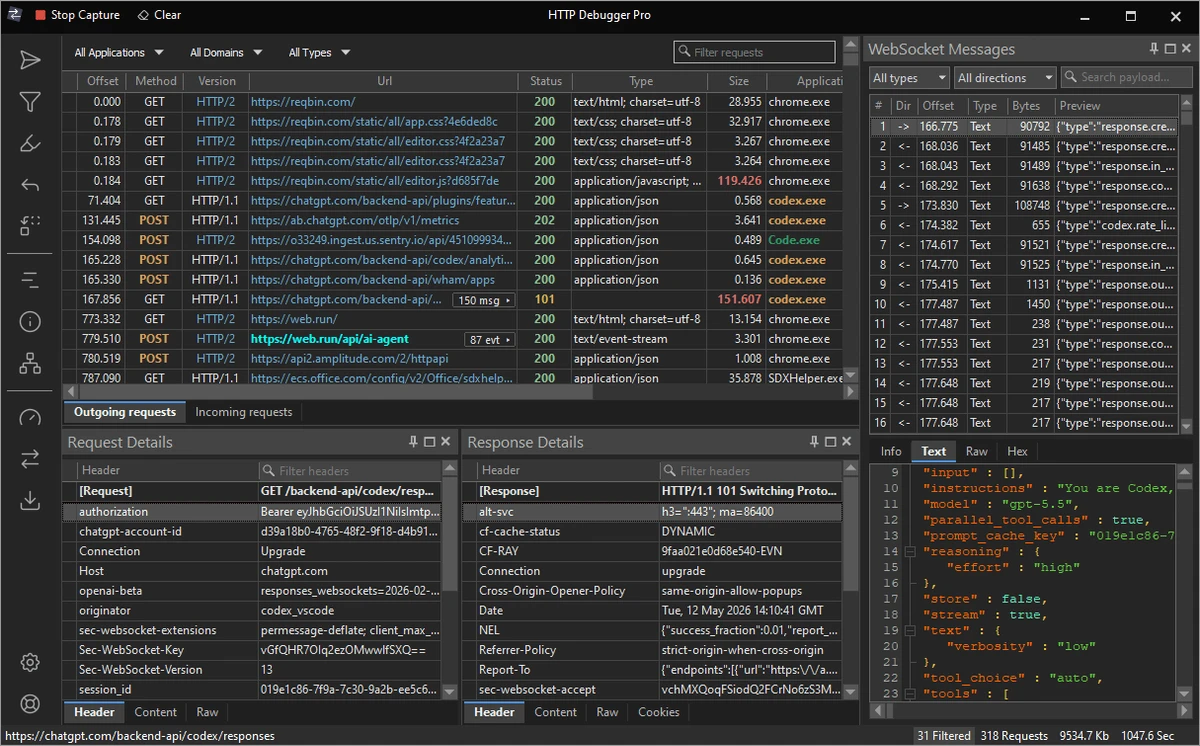
HTTP Debugger Pro is an advanced network traffic analysis tool designed to capture, inspect, and debug HTTP and HTTPS communication between software applications and the internet. It is primarily used by web developers, software engineers, and system administrators to understand how applications send and receive data over HTTP-based protocols. The software intercepts traffic from web browsers and other HTTP-enabled applications, allowing users to analyze requests, responses, headers, cookies, and payload data in detail.

Key Features of HTTP Debugger Pro

  • Captures HTTP and HTTPS traffic in real time
  • Supports analysis of incoming and outgoing web requests
  • Displays HTTP headers, cookies, query strings, and POST data
  • Decodes SSL/HTTPS and compressed content (gzip/chunked)
  • Works with major browsers including Chrome, Firefox, Opera, and Internet Explorer
  • Supports analysis of third-party applications and plugins
  • Compatible with both 32-bit and 64-bit applications
  • Captures traffic from Windows services and desktop applications
  • Built-in viewer for HTML, XML, scripts, and media content
  • Export captured traffic into RAW or decoded log formats
  • Measures request size, speed, and response time
  • Helps debug redirections, authorization headers, and error codes

User Experience

After using HTTP Debugger Pro, the most noticeable aspect is its depth of visibility into network traffic. Every HTTP request and response is captured in real time, making it possible to inspect exactly how a browser or application communicates with a server.

The interface organizes traffic into readable logs, where each request can be expanded to view headers, cookies, query parameters, and response content. This makes debugging web applications significantly easier, especially when tracking issues related to authentication, API calls, or data submission errors. One of the strongest aspects is HTTPS decoding, which allows inspection of encrypted traffic after proper configuration. This is particularly useful for modern web applications that rely heavily on secure connections.

The tool is also valuable beyond web development. System administrators can analyze outbound traffic from applications to understand what data is being sent externally, while developers can debug custom software that uses HTTP communication. Overall, HTTP Debugger Pro provides a detailed and technical view of network communication that is essential for debugging and performance analysis.

Who Should Use HTTP Debugger Pro?

  • Web developers debugging APIs and websites
  • Software engineers analyzing HTTP-based applications
  • System administrators monitoring outbound traffic
  • Security professionals inspecting network requests
  • QA testers validating web application behavior

Conclusion

HTTP Debugger Pro is a powerful and highly technical tool for inspecting and analyzing HTTP/HTTPS traffic at a granular level. Its ability to capture detailed request and response data makes it extremely useful for debugging web applications and monitoring software behavior.

Pros & Cons

Pros

  • Deep inspection of HTTP and HTTPS traffic
  • Real-time request and response monitoring
  • Supports multiple browsers and applications
  • Decodes encrypted and compressed content
  • Useful for both web and software debugging
  • Detailed logging and export options
  • Works with 32-bit and 64-bit systems

Cons

  • Interface is designed for developers, not casual users
  • HTTPS interception may require configuration
  • Focused solely on HTTP-level analysis (not full network monitoring)

Frequently Asked Questions

What is HTTP Debugger Pro used for?

It is used to capture and analyze HTTP and HTTPS traffic between applications and the internet.

Can HTTP Debugger Pro inspect encrypted traffic?

Yes. It supports HTTPS decoding with proper configuration.

Does it work with modern browsers?

Yes. It supports Chrome, Firefox, Opera, and other major browsers.

Can it debug software applications?

Yes. It can analyze HTTP traffic from both browsers and standalone applications.

Is HTTP Debugger Pro suitable for beginners?

No. It is designed for developers and technical users.

What platforms does it support?

It supports Windows 10 and Windows 11.

Recommended apps [Freeware]:
  • iTop Easy Desktop 4.3.0.342 iTop Easy Desktop logo declutter, organize, and manage Windows desktop items efficiently and quickly
  • Audacity 3.7.8 Audacity logo Free open-source audio editor and recorder with multi-track editing, effects, audio analysis, and format conversion
  • Far Manager 3.0 Build 6699 Far Manager logo Manage files efficiently with Far Manager's fast text-based interface, plugins, and archive support
  • Autoruns 14.30 Autoruns logo a Windows startup manager that reveals and controls all autostart programs, services, drivers, and registry entries
  • O&O ShutUp10++ 3.1.1104 O&O ShutUp10++ logo control Windows privacy, telemetry, updates, and system settings with a simple portable interface
  • Adobe Camera Raw 18.4 Adobe Camera Raw logo Edit, process, and convert RAW photos in Photoshop with Adobe Camera Raw's powerful image workflow tools
Recommended apps [Shareware]:
  • Any video Converter 9.2.3 Any video Converter logo video conversion tool that supports multiple formats, editing features, and device-ready output profiles
  • Sequence Generator Pro 4.5.0.1649 Sequence Generator Pro logo a Windows astrophotography capture suite for automating imaging, focus, and sequencing.
  • IntraWEB 16.2.2 IntraWEB logo web development framework for creating interactive web applications using a Windows application-style approach
  • Copy Protect 3.0.2 Copy Protect logo converts media files into secured executables to prevent copying, duplication, and unauthorized distribution on Windows.
  • Classroom Spy Pro 5.6.6 Classroom Spy Pro logo Monitor, control, and manage student computers remotely with Classroom Spy Pro for Windows classrooms
  • UVK Ultra Virus Killer 11.10.26.0 UVK Ultra Virus Killer logo removes malware, manages system processes, repairs Windows issues, and provides advanced system cleanup tools