LanSend logo

LanSend 26.06

  • User Rating:
    ★★★★★
    ★★★★★
    0.0 0Votes
  • Requirements:
    Windows
  • Version: 26.06
  • Latest updated: 4 days ago
  • License: Free Trial  
  • Publisher: LizardSystems
  • Size: 14 MB
× app stores

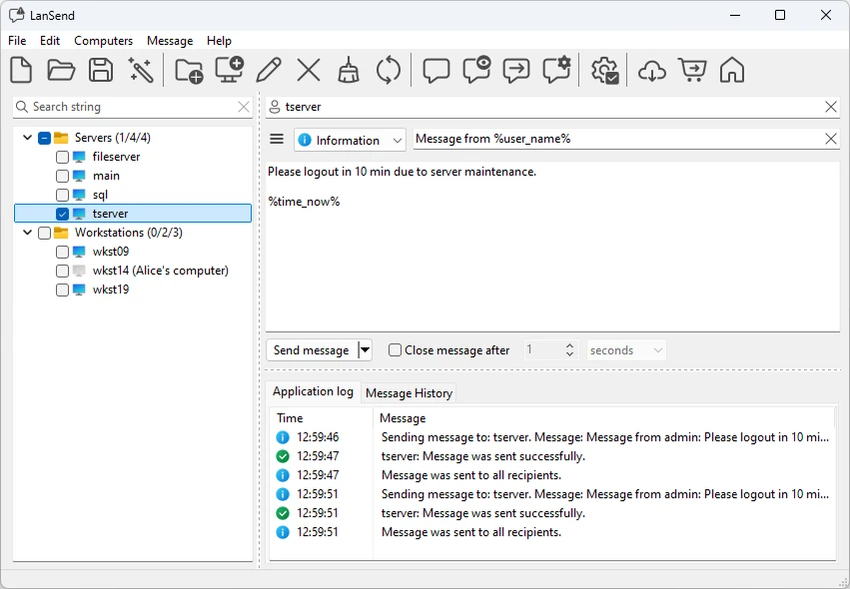
LanSend is a lightweight network communication tool designed specifically for system administrators who need to send instant messages across a local area network (LAN). It enables fast and efficient communication with multiple Windows users without requiring any software installation on the recipient machines. The application is built for simplicity and speed, offering a straightforward graphical interface for composing and broadcasting messages across networked systems. It is especially useful in corporate environments where IT teams need to notify users quickly about maintenance, alerts, or system updates.

Features of LanSend

  • Send instant messages to multiple users on a LAN
  • No client software required on recipient machines
  • Supports messaging across Windows systems (XP and later)
  • Compatible with Terminal Server environments
  • Message templates for faster communication
  • Customizable template variables for repeated messaging tasks
  • Ability to create user groups from network machines
  • Broadcast messages to selected groups or all machines
  • Logging of all sent messages for tracking and auditing
  • Runs in system tray for quick access
  • Works without internet access or dedicated server setup
  • Does not rely on legacy Windows Messenger service

User Experience

After using LanSend, the most immediate benefit is its simplicity and speed. The interface is minimal and focused, allowing administrators to quickly select target machines or groups and send messages within seconds. The template system is particularly useful in environments where repeated messages are required, such as maintenance notifications or scheduled downtime alerts. This reduces repetitive typing and ensures consistency in communication. Because no software installation is required on client machines, deployment is extremely easy. This makes it practical for large networks where managing endpoint software can be time-consuming.

The ability to send messages across both local and remote desktop sessions ensures that communication remains consistent across different user environments. Logging also provides accountability, which is important in enterprise IT environments. Overall, LanSend delivers a straightforward and efficient messaging solution for network administrators who need fast communication tools without infrastructure complexity.

Who Should Use LanSend?

  • System administrators managing corporate networks
  • IT support teams sending alerts or notifications
  • Organizations needing internal LAN messaging
  • Schools, offices, or institutions with Windows networks
  • Users who need simple broadcast communication tools

Conclusion

LanSend is a practical and efficient LAN messaging tool designed for IT administrators who need fast, reliable communication across Windows networks. With its simple interface, template system, and no-client-installation design, it fits well into enterprise environments where quick communication is essential.

Pros & Cons

Pros

  • No client-side installation required
  • Fast and easy LAN messaging system
  • Works across multiple Windows environments
  • Supports message templates and groups
  • Lightweight and simple interface
  • Useful logging and tracking features
  • No internet or server dependency

Cons

  • Limited to Windows-based environments
  • No advanced collaboration or chat features
  • Focused only on administrative messaging use cases
  • Lacks modern UI compared to newer communication tools

Frequently Asked Questions

What is LanSend used for?

LanSend is used to send instant messages to multiple users on a local network.

Do recipients need to install software?

No. LanSend works without requiring any installation on recipient machines.

Does LanSend require internet access?

No. It works entirely on local networks without internet or a server.

Can I send messages to groups?

Yes. You can create user groups and send messages to multiple machines at once.

Is LanSend suitable for personal use?

It is primarily designed for system administrators and enterprise environments.

Does LanSend support logging?

Yes. It keeps logs of all sent messages for tracking and auditing purposes.

Recommended apps [Freeware]:
  • HomeBank 5.10.2 HomeBank logo Track expenses, manage budgets, and analyze personal finances with HomeBank's powerful reporting tools
  • Mozilla Firefox 152.0.3 Mozilla Firefox logo Browse the web securely and quickly with Mozilla Firefox, a customizable browser with strong privacy and add-on support
  • Vektorrazor 2.2 Vektorrazor logo converts logos and image sources into clean, CAD-friendly vector contours for technical workflows
  • AIMP 5.40.2721 AIMP logo a lightweight audio player with high-quality sound, playlist tools, equalizer, and audio conversion features
  • PhotoPad Photo Editor 15.16 PhotoPad Photo Editor logo photo retouching, effects, collages, panoramas, and non-destructive editing for Windows
  • TeraCopy 4.0.0.28 TeraCopy logo Windows file transfer tool that speeds up copying, resumes transfers, and improves reliability with error recovery
Recommended apps [Shareware]:
  • iPubsoft Android Desktop Manager 3.7.22 iPubsoft Android Desktop Manager logo transfer files, manage Android data, back up and restore devices, and organize contacts and SMS from your PC
  • GiliSoft Exe Lock 12.0.0 GiliSoft Exe Lock logo Protect Windows applications with passwords and prevent unauthorized access using GiliSoft Exe Lock
  • Remo Recover Windows 6.0.0.260 Remo Recover Windows logo Recover deleted, formatted, and lost files with Remo Recover Windows, a comprehensive data recovery solution
  • Araxis Merge 2026.0 Araxis Merge logo a powerful file comparison and merging tool for developers, legal teams, and professionals handling version control
  • App Builder 2026.15 App Builder logo a visual development environment for creating HTML5, mobile, desktop, and PWA applications
  • ON1 Resize AI 2026.4 ON1 Resize AI logo advanced AI upscaling technology to enlarge photos up to 10x while preserving detail, sharpness, and print quality