


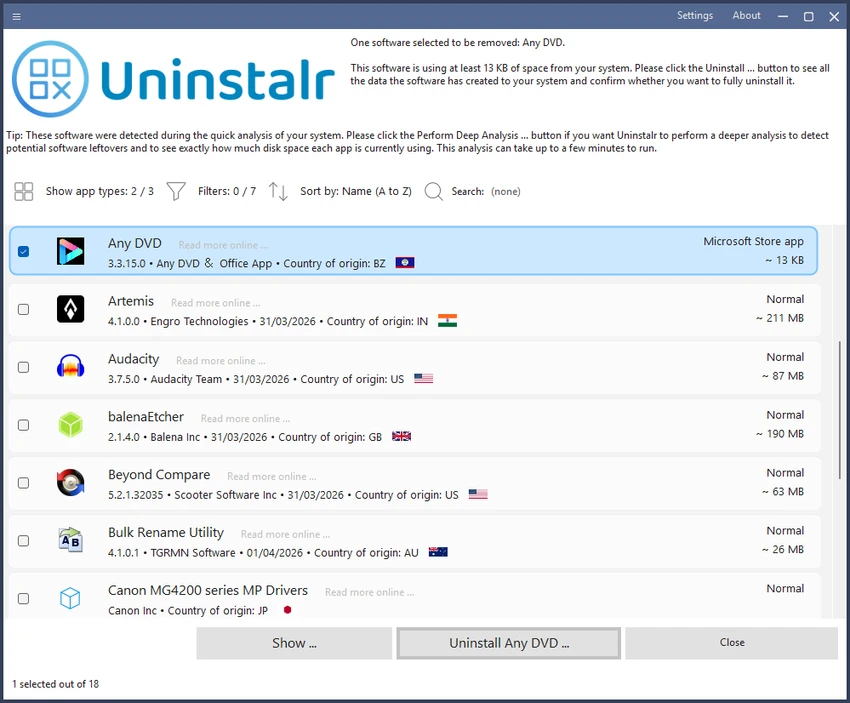

Uninstalr is a lightweight and free software uninstaller for Windows that goes beyond the standard uninstall process. Designed to remove applications thoroughly, it automatically detects leftover files, folders, registry entries, and other traces that traditional uninstallers often leave behind. With support for batch uninstalling, portable applications, and installation monitoring, Uninstalr offers a practical solution for keeping your system clean and organized.
Available in both installer and portable editions, it runs on Windows 7 through Windows 11 and supports multiple interface languages.
Features of Uninstalr
- Batch uninstall multiple applications simultaneously
- Supports unattended (silent) uninstall when available
- Monitors newly installed software
- Detects leftover files from previously removed applications
- Identifies portable applications
- Displays every file, folder, registry key, and registry value associated with an application before removal
- Shows all items that will be deleted before uninstall begins
- Search and filter installed software
- Supports uninstalling Microsoft Store, Steam, Chocolatey, NuGet, Big Fish Game System, and Ninite applications
- Windows Dark Mode support
- Available as both portable and standard installer versions
- Built-in multilingual interface
- Lightweight and completely free
User Experience
Using Uninstalr feels noticeably more transparent than relying on the default Windows uninstall utility. After scanning the system, it presents a clean list of installed applications along with useful search and filtering options that make locating software quick and easy.
One feature I particularly appreciated is the detailed preview before uninstalling. Instead of simply launching the application's own uninstaller, Uninstalr displays every file, folder, and registry entry associated with the selected program. This gives confidence that you know exactly what will be removed before making any changes. Batch uninstalling is another major time saver. Rather than removing applications one at a time, I could queue multiple programs and let Uninstalr handle the process automatically, making system cleanup much faster.
The software also excels at detecting leftover files from previously uninstalled applications. Cleaning up these remnants helps reduce unnecessary clutter without requiring manual searches through folders or the Windows Registry. The interface is straightforward, responsive, and lightweight. Support for Dark Mode, multiple languages, and a portable version makes it convenient for both everyday users and IT professionals.
Who Should Use Uninstalr?
- Windows users wanting cleaner software removal
- IT administrators maintaining multiple PCs
- Power users who frequently install and test applications
- Users cleaning leftover files after uninstalling software
- Anyone looking for a lightweight alternative to the default Windows uninstaller
Conclusion
Uninstalr raises the standard for software removal on Windows by combining accuracy, speed, and ease of use in a lightweight package. Its ability to identify leftover files, uninstall multiple applications at once, and preview every change before removal makes it significantly more capable than the built-in Windows uninstaller.


