Artweaver logo

Artweaver 8.1.6.4131

  • User Rating:
    ★★★★★
    ★★★★★
    0.0 ★ 0Votes
  • Requirements:
    Windows
  • Version: 8.1.6.4131
  • Latest updated: 3 weeks ago
  • License: Freeware  
  • Publisher: Artweaver
  • Size: 17 MB
× app stores

Artweaver Free is a lightweight digital painting application designed for users who want to explore drawing and illustration without investing in complex professional tools. It provides a simple environment for creating artwork, sketching ideas, and experimenting with digital brushes on a Windows PC.

The software focuses on accessibility and ease of use, making it suitable for beginners who are just starting with digital art. Users can work with basic painting tools to create illustrations or practice drawing techniques in a straightforward interface. While it does not aim to compete with advanced professional art suites, it delivers a practical entry point for casual artists and hobbyists who want to develop their creative skills in a digital format.

Features of Artweaver Free

  • Basic digital painting and drawing tools
  • Brush-based sketching and illustration support
  • Simple interface designed for easy navigation
  • Suitable for creative experimentation and learning
  • Windows-based lightweight application
  • Supports standard image creation workflows

Interface and Usability

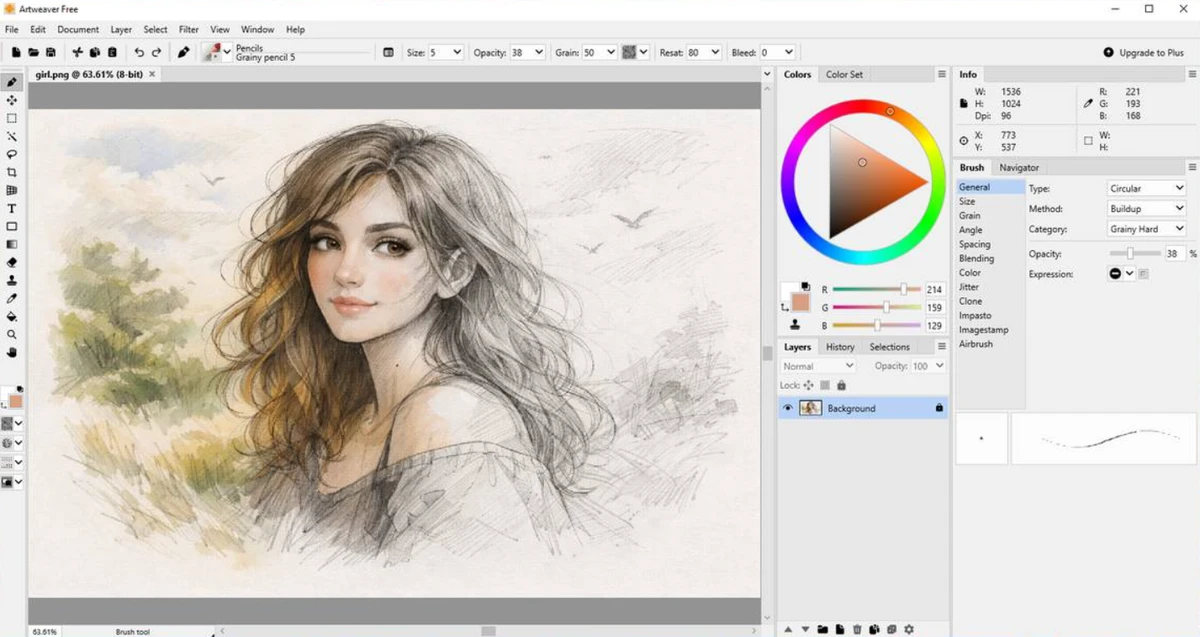
Artweaver Free offers a clean and uncomplicated interface that focuses on essential drawing tools. The layout is designed to help users start painting quickly without needing to go through complex setup steps. It is especially suitable for beginners who prefer a straightforward workspace with minimal distractions. While it may not include advanced customization options, its simplicity makes it easy to learn and use from the start.

Who Should Use Artweaver Free?

Artweaver Free is best suited for beginners, students, and casual users who want to try digital painting or sketching without using professional-grade software. It is also a good option for hobbyists who need a simple tool for quick drawings, concept sketches, or learning basic digital art techniques.

Conclusion

Artweaver Free is a simple and accessible entry-level painting tool that focuses on helping beginners get started with digital drawing. It offers the essential tools needed for sketching and basic illustration without overwhelming users with advanced features or complex workflows.

Pros & Cons

✓

Pros

  • Free and easy to use for beginners
  • Lightweight and simple interface
  • Good starting point for digital drawing practice
  • Quick setup with minimal learning curve
✕

Cons

  • Limited advanced features compared to professional tools
  • Not suitable for complex illustration workflows
  • Basic functionality may feel restrictive for experienced artists

Frequently Asked Questions

What is Artweaver Free used for?

Artweaver Free is used for basic digital drawing, sketching, and simple illustration work. It is designed for users who want an easy entry into digital painting.

Is Artweaver Free suitable for beginners?

Yes. It is specifically designed with beginners in mind, offering a simple interface and basic tools for learning digital art.

Does Artweaver Free include advanced painting features?

No. It focuses on basic painting and drawing tools rather than advanced professional features.

Can I use Artweaver Free for professional work?

It is mainly intended for casual use and learning. Professional users may find it too limited for complex projects.

Is Artweaver Free easy to use?

Yes. Its interface is simple and straightforward, making it easy for new users to start drawing quickly.

What type of projects can I create with Artweaver Free?

You can create simple sketches, basic illustrations, and practice drawings, especially for learning and experimentation purposes.

Recommended apps [Freeware]:
  • Easy System Utility 1.1.67 Easy System Utility logo clean junk files, repair tools, passwords and system optimization.
  • Video Repair Tool 5.0.4.5 Video Repair Tool logo repair corrupted, broken, or unplayable video files on Windows and Mac with simple recovery workflows.
  • Adobe Camera Raw 18.4 Adobe Camera Raw logo Edit, process, and convert RAW photos in Photoshop with Adobe Camera Raw's powerful image workflow tools
  • Google Chrome 150.0.7871.125 Google Chrome logo fast, secure, and stable web browser with sandboxing, tab isolation, and a minimal interface for modern web applications
  • Media Player Codec Pack 5.1.2.625 Media Player Codec Pack logo enables smooth playback of audio and video formats on Windows by adding essential codecs and filters.
  • Win11Debloat 2026.07.11 Win11Debloat logo Remove unwanted apps, reduce telemetry, and customize Windows settings with a lightweight PowerShell script for system cleanup.
Recommended apps [Shareware]:
  • Wondershare PDFelement Professional 12.1.24 Wondershare PDFelement Professional logo a PDF editor for editing, converting, signing, and managing documents easily.
  • Duplicate Finder 2026 v418 Duplicate Finder logo remove duplicate photos and videos by scanning files using MD5 hashing for accurate results.
  • DBF Recovery 4.74 DBF Recovery logo repairs corrupted DBF database files from dBASE, FoxPro, and Visual FoxPro formats with automatic recovery tools
  • Image for Windows 4.12 Image for Windows logo disk imaging tool for full system backup, restore, and recovery with encryption, compression, and bootable rescue medi
  • SpectraLayers 13.0 SpectraLayers logo Edit, repair, and design audio visually with SpectraLayers using AI-powered spectral processing and advanced sound separation tools
  • WinSnap 6.2.4 WinSnap logo Capture and edit screenshots quickly with advanced shadows, transparency support, image effects, and flexible saving options.