


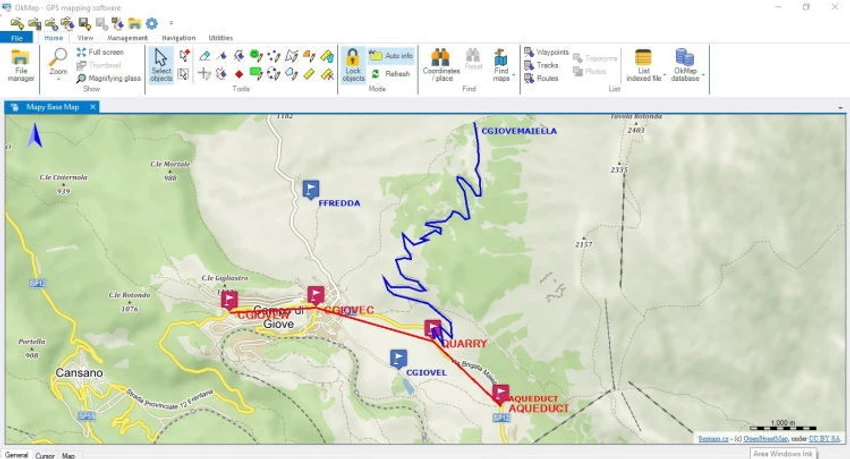

OkMap Desktop is an interactive GPS mapping application designed for working with digital maps, route planning, and GPS data management. It supports both offline and online maps, allowing users to create, edit, and analyze routes, waypoints, and tracks directly on their computer.
Overview
OkMap Desktop is built for users who need more control over GPS data and map-based planning. It enables importing and managing different map formats, downloading maps from servers, and creating custom navigation data for GPS devices. The software also supports vector data and elevation information, helping users work with terrain-based navigation. By combining mapping tools with GPS data import/export functions, OkMap Desktop serves as a bridge between digital map planning and real-world navigation devices.
A free version is available with limitations, while the full version unlocks advanced mapping, conversion, and GPS integration features.
Features of OkMap Desktop
- Interactive GPS map viewing and editing
- Support for offline and online maps
- Download maps from map servers
- Create custom maps for GPS devices
- Import vector data with elevation (DEM) support
- Create waypoints, routes, and tracks
- Upload navigation data to GPS devices
- Automatic altitude data assignment
- Travel time estimation
- Auto-routing capabilities
- Geocoding functions
- Import GPS data for visualization and analysis
- Generate navigation statistics
- Coordinate conversion tools (paid feature)
- Map tiling and conversion (paid feature)
- GPX data saving support
- Map georeferencing (limited in free version)
- Google Maps/Earth integration (paid feature)
User Experience
OkMap Desktop provides a structured environment for managing and analyzing GPS and map data. Users can visually create routes and navigation paths directly on digital maps, making it useful for planning outdoor trips, fieldwork, or logistics operations. The ability to create waypoints and tracks directly on the map simplifies navigation planning, while automatic altitude and travel time estimation adds practical value for real-world route preparation.
Importing GPS data allows users to review past routes and generate statistical insights, which is especially useful for tracking movement or analyzing travel performance. However, some advanced features are restricted in the free version, including map georeferencing limits, Google integration, and map conversion tools. These limitations may affect users who require professional-grade GIS capabilities without upgrading.
Who Should Use OkMap Desktop?
- Outdoor enthusiasts and hikers
- GPS device users and travelers
- Surveyors and field workers
- Users planning routes and navigation paths
- GIS hobbyists and map enthusiasts
- Anyone needing offline map planning tools
Conclusion
OkMap Desktop is a practical GPS mapping and navigation planning tool for users who want detailed control over routes, tracks, and map data. It bridges the gap between digital map planning and real GPS device usage, making it especially useful for outdoor navigation and field-based work.


