ReclaiMe logo

ReclaiMe Build 6447

  • User Rating:
    ★★★★★
    ★★★★★
    0.0 0Votes
  • Requirements:
    Windows
  • Version: Build 6447
  • Latest updated: 3 days ago
  • License: Freemium  
  • Publisher: ReclaiMe.com
  • Size: 113 MB
× app stores

ReclaiMe File Recovery is a data recovery software designed to help users restore lost or deleted files from a wide range of storage devices. It focuses on simplicity, making it accessible even for users without technical expertise. The software supports recovery from hard drives, USB drives, memory cards, mobile devices, RAID arrays, and NAS systems. It is built to handle both simple file deletion and more complex data loss scenarios involving different file systems.

Features of ReclaiMe File Recovery

  • Recovers data from multiple storage devices:
    • Hard drives
    • USB flash drives
    • Memory cards
    • Mobile devices and MP3 players
    • RAID arrays and NAS systems
  • Supports multiple file systems:
    • Windows: NTFS, FAT, exFAT, ReFS
    • Linux: ext2, ext3, ext4, BTRFS, XFS
    • macOS: APFS, HFS+, UFS
  • Simple and user-friendly interface with no complex setup.
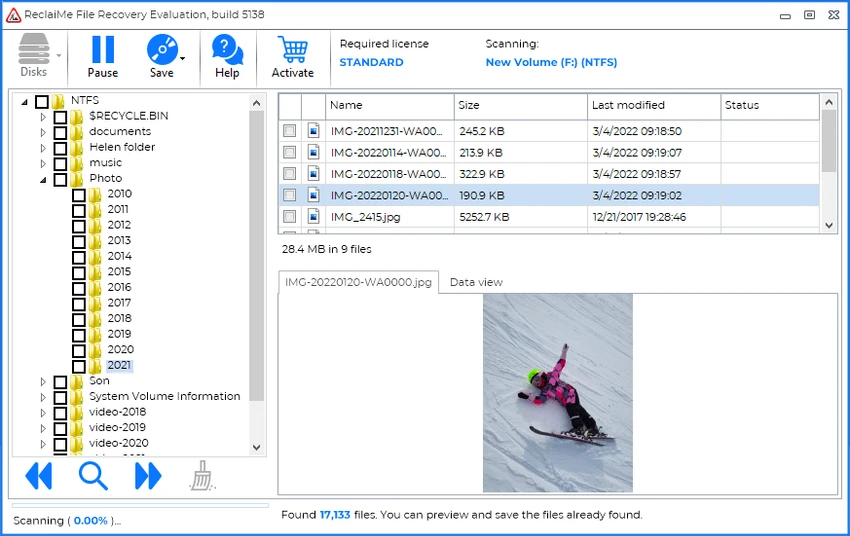
  • Allows preview of recoverable files before completing recovery.
  • Works with both small removable media and large multi-disk systems.
  • Creates virtual disk images (.vhd / .vhdx) for recovery and mounting in Windows.
  • Designed for non-technical users and professionals alike.

User Experience

ReclaiMe File Recovery emphasizes ease of use. The interface is straightforward, guiding users through the recovery process without requiring advanced configuration or technical knowledge. This makes it particularly useful for beginners who need to recover lost files quickly. One of its most useful features is the ability to preview recovered data before the full recovery process completes. This helps users confirm whether their files are recoverable without waiting for long scans to finish. Performance varies depending on the size and type of storage device, but the software is designed to handle both simple and complex recovery tasks efficiently.

Licensing & Limitations

The free version allows users to scan and preview recoverable files, but full recovery requires a paid license.

Paid version includes:

  • Lifetime license for personal use.
  • Recovery from all supported Windows file systems.
  • Support for Apple and Linux file systems (via Windows-based recovery workflow).
  • Ability to create and mount VHD/VHDX images.
  • Full recovery from complex storage setups like RAID arrays.

Who Should Use ReclaiMe File Recovery?

  • Users who accidentally deleted important files.
  • People needing USB or memory card recovery.
  • IT professionals handling RAID or NAS recovery.
  • Users looking for a simple recovery tool without complexity.
  • Businesses needing cross-platform file recovery support.

Conclusion

ReclaiMe File Recovery is a practical and accessible tool for recovering lost data from a wide range of devices and file systems. Its simplicity and broad compatibility make it suitable for both beginners and professionals.

Pros & Cons

Pros

  • Extremely easy to use for beginners.
  • Supports a wide range of devices and file systems.
  • RAID and NAS recovery support.
  • File preview before recovery completion.
  • Lifetime license option available.

Cons

  • Full recovery requires paid license.
  • Advanced features may be unnecessary for simple recovery tasks.

Frequently Asked Questions

What is ReclaiMe File Recovery used for?

It is used to recover deleted or lost files from storage devices such as hard drives, USB drives, and RAID systems.

Does ReclaiMe support RAID recovery?

Yes, it supports RAID arrays and multi-disk NAS recovery.

Can I preview files before recovery?

Yes, it allows previewing recoverable files before completing the recovery process.

Is ReclaiMe free?

It offers a free version for scanning and preview, but full recovery requires a paid license.

Recommended apps [Freeware]:
  • OCCT 16.1.11.99 OCCT logo hardware monitoring and stress testing tool for CPU, GPU, memory, and power supply performance analysis.
  • Garmin Express 7.29.0.0 Garmin Express logo manage Garmin GPS devices with map updates, backups, software updates, and device registration
  • Zortam Mp3 Media Studio 33.96 Zortam Mp3 Media Studio logo Manage, tag, rip, organize, convert, and play MP3 files with the all-in-one Zortam Mp3 Media Studio
  • MakeMKV 1.18.4 MakeMKV logo disc ripper that converts DVD and Blu-ray discs into MKV files while preserving audio, video, subtitles, and metadata
  • CCleaner 7.08.1355 CCleaner logo removes junk files, clears browsing traces, and helps optimize Windows for better performance
  • Photo Pos Pro 4.21 Build 51 Photo Pos Pro logo a feature-rich photo editor for Windows with layers, filters, RAW support, and advanced image design tools
Recommended apps [Shareware]:
  • Bandizip 7.44 Bandizip logo Fast and intuitive file compression software supporting ZIP, RAR, 7Z, and more with high-speed archiving features
  • VX Search 18.2.34 VX Search logo a powerful rule-based file search tool with advanced filtering, reporting, and network search capabilities.
  • Sketchbook Pro 9.4.7.0 Sketchbook Pro logo a professional drawing app with customizable brushes, layers, symmetry tools, and natural pen support.
  • OkMap Desktop 19.6.4 OkMap Desktop logo a GPS mapping software for route planning, waypoint creation, and offline/online map management
  • Allavsoft 3.29.3.9669 Allavsoft logo video downloader and converter for batch downloads, HD quality, and audio extraction on Windows.
  • CloudMounter 3.7.2137 CloudMounter logo mounts cloud storage and remote servers like local drives for easy file access and management on Windows