Software Ideas Modeler logo

Software Ideas Modeler 15.50

  • User Rating:
    ★★★★★
    ★★★★★
    0.0 ★ 0Votes
  • Requirements:
    Windows
  • Version: 15.50
  • Latest updated: 2 weeks ago
  • License: Free Trial  
  • Publisher: Software Ideas
  • Size: 26 MB
× app stores

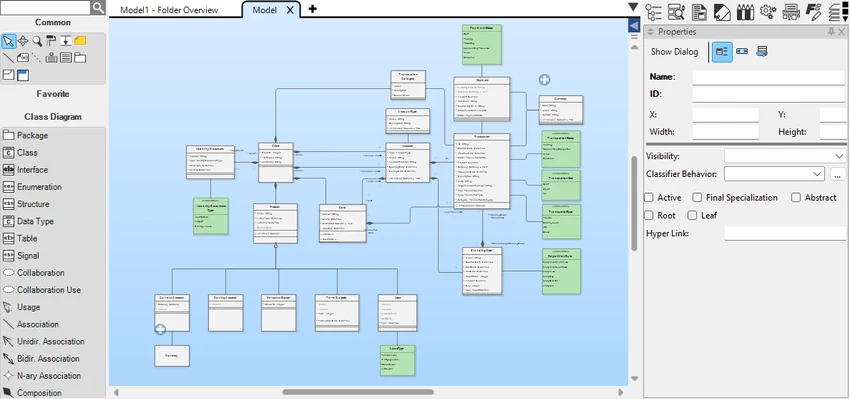
Software Ideas Modeler is a comprehensive CASE (Computer-Aided Software Engineering) tool designed to simplify software planning, system analysis, and diagram creation. After exploring its capabilities, I found it well suited for software engineers, architects, analysts, students, and development teams who need far more than a basic UML editor. The application supports over 110 diagram types, including UML, ERD, BPMN, SysML, flowcharts, wireframes, roadmaps, and enterprise architecture diagrams. Rather than spending time manually arranging objects, the software focuses on helping users express ideas quickly through smart layout tools, automated helpers, and an intuitive workspace that speeds up software design and documentation.

Features of Software Ideas Modeler

  • Create more than 110 diagram types
  • Comprehensive UML modeling tools
  • SysML modeling for system engineering
  • BPMN and CMMN business process modeling
  • ERD design with SQL creation and change script generation
  • Wireframe tools for desktop, web, and mobile UI design
  • User Story Mapping and requirement analysis
  • Screen Flow diagrams for UX behavior modeling
  • Flowchart and roadmap creation
  • Mind map creation tools
  • Enterprise architecture modeling with ArchiMate diagrams
  • Decision Matrix support
  • Infographic creation using configurable shapes
  • Layers, groups, container layouts, and automatic layouts
  • Snap lines, grids, and batch layout adjustments for faster diagram creation

Interface and Usability

Despite offering an extensive collection of modeling tools, Software Ideas Modeler remains approachable. The interface is organized around diagram creation, allowing users to select diagram types and begin designing with only a few clicks. During use, the smart layout options, snap lines, grids, and automatic arrangement tools noticeably reduce the time spent aligning objects manually.

The software strikes a good balance between advanced functionality and ease of use. Beginners can start with simple UML or flowcharts, while experienced analysts can take advantage of enterprise architecture, requirements modeling, and system engineering diagrams without feeling limited.

Who Should Use Software Ideas Modeler?

  • Software engineers
  • System architects
  • Business analysts
  • Database designers
  • UX and UI designers
  • Enterprise architects
  • Software engineering students
  • Development teams documenting projects
  • Anyone creating UML, BPMN, ERD, or SysML diagrams regularly

Conclusion

Software Ideas Modeler is much more than a UML editor. It combines software modeling, requirements management, database design, business process modeling, wireframing, and enterprise architecture into one capable application. The intelligent layout tools help reduce repetitive work, allowing users to focus on designing systems rather than arranging diagram elements.

Pros & Cons

✓

Pros

  • Supports more than 110 diagram types
  • Comprehensive UML, BPMN, SysML, and ERD tools
  • Excellent requirements analysis features
  • Smart layout and automatic diagram organization
  • Wireframing and UX design capabilities
  • Enterprise architecture support
  • User-friendly interface despite advanced functionality
✕

Cons

  • Feature-rich interface may require time to master
  • Primarily focused on modeling rather than coding
  • Requires Windows 10 or Windows 11

Frequently Asked Questions

Is Software Ideas Modeler only for UML diagrams?

No. While UML is one of its primary strengths, the software supports more than 110 diagram types, including ERD, BPMN, SysML, flowcharts, wireframes, mind maps, roadmaps, and enterprise architecture diagrams.

Can Software Ideas Modeler be used for database design?

Yes. The application includes ERD (Entity-Relationship Diagram) tools that allow users to model databases and generate SQL creation and change scripts.

Does Software Ideas Modeler support UI and UX design?

Yes. It includes wireframing tools for desktop, web, and mobile applications, along with Screen Flow diagrams for illustrating application behavior and user interactions.

Is Software Ideas Modeler suitable for business process modeling?

Yes. It supports BPMN, CMMN, and Decision Model and Notation (DMN) diagrams, making it suitable for documenting and analyzing business processes.

What operating systems does Software Ideas Modeler support?

According to the available information, Software Ideas Modeler supports Windows 10 and Windows 11 on x86, x64, and Arm64 architectures with at least 4 GB of RAM.

Who is Software Ideas Modeler best suited for?

The software is designed for software engineers, analysts, architects, database designers, students, and organizations that need professional modeling, documentation, and system design tools.

Recommended apps [Freeware]:
  • Universal USB Installer 2.0.3.8 Universal USB Installer logo create bootable Linux USB drives easily with ISO support and persistence options on Windows.
  • Opera One 133.0.5932.34 Opera One logo a fast Chromium-based browser with built-in VPN, AI assistant, tab management, and productivity tools for Windows users
  • Hasleo Backup Suite 5.8.2.2 Hasleo Backup Suite logo Windows backup software for system restore, disk imaging, and cloning with emergency recovery support
  • Waterfox 6.6.16.1 Waterfox logo Browse faster with a 64-bit Firefox-based browser optimized for performance, security, extensions, bookmarks, and downloads.
  • Converseen 0.15.2.6-1 Converseen logo Convert, resize, compress, and edit multiple images at once with a free cross-platform batch image processing tool.
  • Blender 5.2.0 Blender logo Create 3D models, animations, visual effects, and rendered scenes with a free, open-source suite for professional content creation
Recommended apps [Shareware]:
  • Robin YouTube Video Downloader Pro 7.5.6 Robin YouTube Video Downloader Pro logo Download videos, audio, and 4K content from popular sites with fast acceleration and built-in conversion tools
  • Asset Manager 2026 v4.10.3001 Asset Manager logo track assets, manage inventory, use barcodes, and maintain service histories efficiently
  • Output Messenger 3.0.0 Output Messenger logo secure team chat, video calls, file sharing, task management, and remote desktop access
  • Actual Window Rollup 8.15.4 Actual Window Rollup logo adds a roll-up button to Windows, letting you collapse windows into title bars for faster workspace management
  • Learn to Speak English 12.0.0.40 Learn to Speak English logo interactive language software with real-world scenarios, speech recognition and flexible learning paths.
  • Blocker Web 1.1.5.0 Blocker Web logo Block distracting websites on Windows, manage blocked URLs, and stay focused with a lightweight website blocking utility.