QuadSpinner Gaea logo

QuadSpinner Gaea 2.3.0.1

  • User Rating:
    ★★★★★
    ★★★★★
    0.0 0Votes
  • Requirements:
    Windows
  • Version: 2.3.0.1
  • Latest updated: 1 day ago
  • License: Freeware  
  • Publisher: QuadSpinner
  • Size: 67.1 MB
×

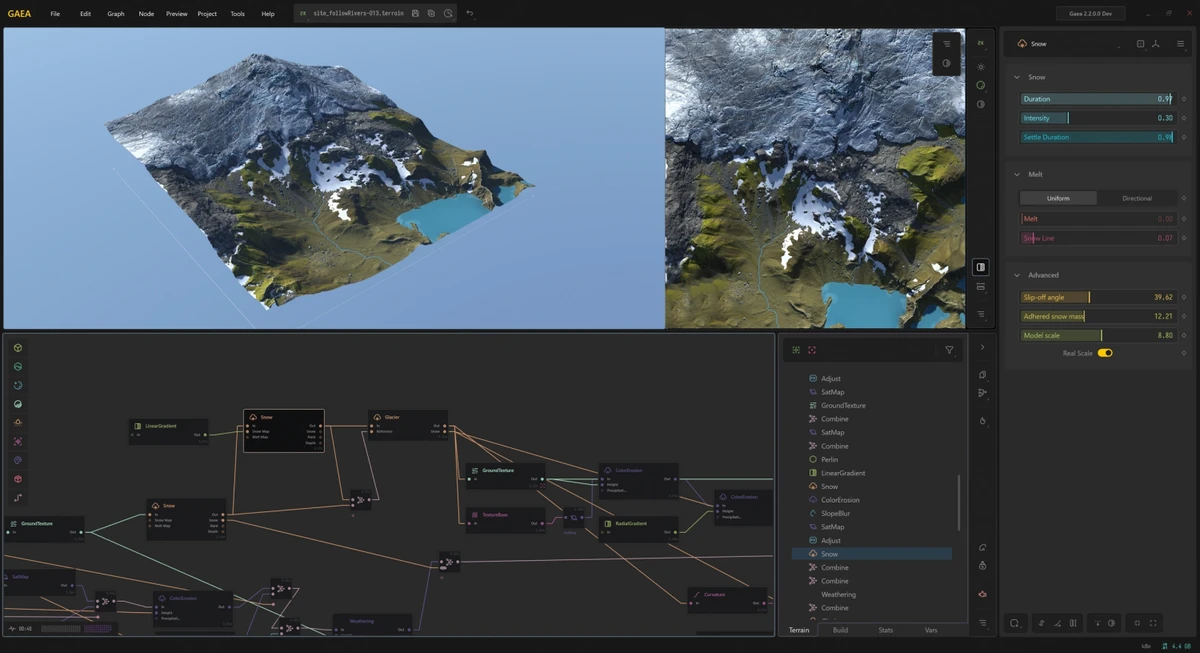
QuadSpinner Gaea is a professional-grade terrain design application built for creating highly realistic landscapes using procedural generation techniques. It is widely used in VFX, game development, and digital world-building workflows where detailed and believable terrain is essential. The software focuses on combining artistic control with physically realistic simulation, especially through its advanced erosion system and node-based procedural workflow.

Overview

QuadSpinner Gaea provides a modern environment for designing terrains ranging from stylized landscapes to highly realistic natural environments. It uses a node-based system that allows users to build terrain logic step by step, combining procedural primitives, erosion filters, and color synthesis tools. A key strength of the software is its erosion system, which simulates natural geological processes to produce believable terrain formations. Users can start from simple shapes like mountains or craters and evolve them into complex landscapes through guided erosion and sculpting tools. The workflow is designed to support different stages of production, from quick prototyping to final high-resolution terrain detailing.

Features of QuadSpinner Gaea

  • Advanced procedural terrain generation system
  • Industry-grade erosion simulation for realistic landscapes
  • Node-based workflow for flexible terrain creation
  • Procedural primitives (mountains, dunes, craters, ranges)
  • Directed erosion for detailed sculpting control
  • Real-time terrain iteration and refinement tools
  • Data Maps system for advanced terrain texturing
  • Color synthesis tools for satellite-quality terrain appearance
  • Vegetation generation for natural surface detailing
  • Multi-stage workflows (prototype, build, refine modes)
  • Support for both procedural and hand-guided terrain sculpting
  • Designed for high-resolution terrain production

User Experience

Using QuadSpinner Gaea feels like working in a highly specialized creative laboratory for terrain design. The node-based interface allows users to build complex landscapes step by step while maintaining full control over every stage of the process. The erosion tools stand out as one of the most impactful parts of the experience, producing natural-looking terrain with minimal manual adjustment. At the same time, the software still allows artistic control through sculpting and directed modifications.

While powerful, the workflow can feel technical at first, especially for users new to procedural generation. However, once understood, it enables extremely efficient terrain production compared to manual modeling approaches.

System Requirements

  • Windows 10 (April 2018 - Build 1803)
  • Intel Core i5-4200H / AMD FX-8370
  • RAM: 16GB
  • NVIDIA GeForce GTX 1080 / AMD Radeon RX Vega 64
  • 10GB HDD space

Conclusion

QuadSpinner Gaea is a powerful and highly specialized terrain design tool that excels in realism and procedural control. Its advanced erosion system and node-based workflow make it a top-tier solution for professional environment creation.

Pros & Cons

Pros

    • Highly realistic terrain generation using advanced erosion simulation
    • Powerful node-based procedural workflow
    • Excellent for game and VFX environment creation
    • Flexible combination of procedural and manual control
    • High-quality terrain and texture output
    • Efficient workflow for large-scale world building

Cons

    • Steep learning curve for beginners
    • Requires strong hardware for high-resolution work
    • No official rating or user feedback included in the data

Frequently Asked Questions

What is QuadSpinner Gaea used for?

QuadSpinner Gaea is used to create realistic 3D terrains for games, films, and digital environments using procedural generation.

Does Gaea use procedural modeling?

Yes, it is built around a node-based procedural system for terrain creation.

Can it simulate erosion?

Yes, it includes advanced erosion algorithms to create natural-looking landscapes.

Is it suitable for beginners?

It can be challenging for beginners due to its technical node-based workflow.

Recommended apps [Freeware]:
  • StaxRip 2.52.4 StaxRip logo powerful Windows GUI for video/audio encoding using FFmpeg, x265, AviSynth+, VapourSynth, and more.
  • iTop Easy Desktop 4.3.0.342 iTop Easy Desktop logo declutter, organize, and manage Windows desktop items efficiently and quickly
  • FBackup 9.9.1044 FBackup logo a free Windows backup tool offering automatic backups, cloud support, encryption, and easy file recovery options
  • Glow 26.9 Glow logo advanced Windows system analysis tool offering deep hardware insights, diagnostics, benchmarks, and system optimization utilities
  • CalendarTask 3.29.287.9038 CalendarTask logo lightweight desktop calendar with note-taking, cloud sync, reminders, and desktop scheduling tools
  • Universal USB Installer 2.0.3.7 Universal USB Installer logo create bootable Linux USB drives easily with ISO support and persistence options on Windows.
Recommended apps [Shareware]:
  • iPubsoft Android Desktop Manager 3.7.22 iPubsoft Android Desktop Manager logo transfer files, manage Android data, back up and restore devices, and organize contacts and SMS from your PC
  • Adobe After Effects 2026 Adobe After Effects logo advanced motion graphics, visual effects, compositing, and animation tools for creators.
  • Total Audio Converter 6.1.0.296 Total Audio Converter logo convert MP3, WAV, FLAC, AAC and more with batch processing, CD ripping, and Windows integration.
  • AVG Driver Updater 26.5.10990.0 AVG Driver Updater logo automatically scan and update outdated drivers to improve PC performance and stability on Windows.
  • Automatic PDF Processor 2.3.2 Automatic PDF Processor logo Automate PDF processing, renaming, printing, data extraction, and document organization on Windows.
  • VueScan 9.8.55 VueScan logo Enhance scanner functionality with advanced tools for scanning documents, photos, videos, and slides.