Chris-PC RAM Booster logo

Chris-PC RAM Booster 7.26.0706

  • User Rating:
    ★★★★★
    ★★★★★
    0.0 ★ 0Votes
  • Requirements:
    Windows
  • Version: 7.26.0706
  • Latest updated: 3 weeks ago
  • License: Free Trial  
  • Publisher: Chris-PC Software
  • Size: 4 MB
× app stores

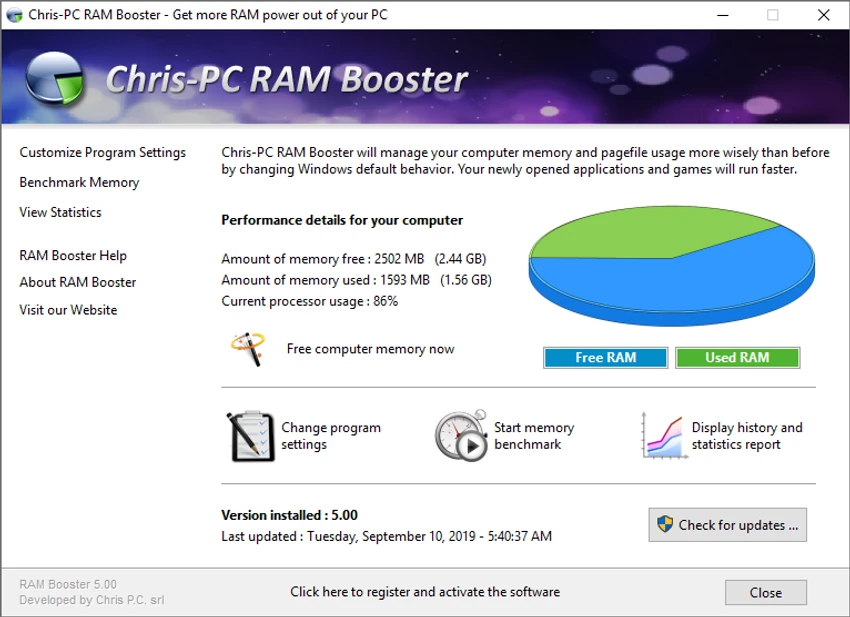
Chris-PC RAM Booster is a Windows system utility designed to help manage RAM usage and improve computer performance. The software monitors available memory and can automatically trigger memory optimization when RAM reaches a defined low-memory threshold. It works by managing the relationship between physical RAM and Windows virtual memory, helping newly opened applications and games access available resources more efficiently. The program provides customizable settings for memory management, background operation, performance statistics, and memory benchmarking. With support for Windows versions ranging from Windows XP to Windows 11, as well as Windows Server editions, Chris-PC RAM Booster is designed for users who want a simple tool to monitor and manage system memory usage.

Features of Chris-PC RAM Booster

  • RAM memory optimization: Helps manage physical RAM usage by monitoring memory availability and freeing resources when needed.
  • Automatic background operation: Runs quietly in the background after configuration and manages memory without requiring constant user interaction.
  • Custom memory settings: Allows users to adjust options such as low memory thresholds, full-screen application behavior, and CPU usage conditions for memory freeing.
  • Performance statistics: Provides information and statistics to help users monitor computer performance while RAM Booster is active.
  • Memory benchmark test: Includes a benchmark tool for evaluating system and RAM stability.
  • Real-time memory monitoring: Provides a dynamic system tray icon showing current memory usage.
  • Server support: Can also be used on server machines to help provide more available memory resources for server programs.
  • Simple interface: Features an intuitive interface focused on straightforward memory management.

Interface and Usability

Chris-PC RAM Booster is designed with simplicity in mind, offering users a straightforward way to monitor and manage RAM usage. The application provides access to memory settings, statistics, and real-time information through an easy-to-understand interface.

After installation and configuration, the software can operate in the background while automatically handling memory optimization tasks. Users who want more control can adjust available settings to match their preferred memory management behavior. The system tray monitoring feature also provides a quick view of current memory usage without opening the main application.

Who Should Use Chris-PC RAM Booster?

Chris-PC RAM Booster is suitable for users who experience slowdowns caused by limited memory availability or frequently run multiple applications at the same time. It may be useful for users who want a lightweight tool for monitoring RAM usage and managing system memory resources. The software can also be considered by users maintaining older computers or systems where memory management is an important factor in everyday performance.

Conclusion

Chris-PC RAM Booster provides a simple approach to managing Windows memory usage through automatic optimization, monitoring tools, and customizable settings. Its lightweight design and background operation make it suitable for users who want additional control over RAM management without using a complex system utility.

Pros & Cons

✓

Pros

  • Helps monitor and manage RAM usage
  • Runs quietly in the background
  • Includes customizable memory optimization settings
  • Provides performance statistics and memory monitoring
  • Includes a RAM benchmark feature
  • Supports a wide range of Windows versions
✕

Cons

  • Memory optimization results may vary depending on system configuration

Frequently Asked Questions

What is Chris-PC RAM Booster?

Chris-PC RAM Booster is a Windows utility designed to monitor RAM usage and optimize memory management by helping free up available physical memory when needed.

How does Chris-PC RAM Booster work?

The software monitors RAM usage and can start a memory freeing process when available memory reaches a selected threshold. It also manages the use of physical RAM and Windows virtual memory.

Can Chris-PC RAM Booster run automatically?

Yes. After installation and configuration, Chris-PC RAM Booster can run in the background and manage memory without requiring regular user interaction.

Does Chris-PC RAM Booster include memory monitoring tools?

Yes. The software provides statistics about computer performance and includes a system tray icon that displays real-time memory usage.

Can Chris-PC RAM Booster be used on server computers?

Yes. According to the available information, Chris-PC RAM Booster can also be used on server machines, including systems with no active user logged in.

Which versions of Windows does Chris-PC RAM Booster support?

Chris-PC RAM Booster supports Windows 11, Windows 10, Windows 8, Windows 7, Windows Vista, Windows XP, and Windows Server 2012, 2008, and 2003.

Recommended apps [Freeware]:
  • Windows 10 Debloater 3.0.3 Windows 10 Debloater logo customize Windows 10 by disabling unwanted features and generating PowerShell scripts
  • ProgDVB 7.72.3 ProgDVB logo a multimedia player for watching digital TV, IPTV, satellite broadcasts, and online radio on Windows
  • StarDesk 1.4.1 StarDesk logo remote desktop solution offering low-latency connections, file transfer, remote assistance, Quick Launch, and remote device management.
  • Cloudflare WARP 2026.6.850.0 Cloudflare WARP logo Browse faster and more securely with Cloudflare WARP, featuring encrypted connections, WireGuard technology, and Zero Trust support
  • VirtualBox 7.2.12 VirtualBox logo Run multiple operating systems on one PC with VirtualBox, a free open-source virtualization platform for Windows
  • DipTrace 5.3.0.1 DipTrace logo Design schematics, create multilayer PCB layouts, verify circuits, and generate manufacturing files with integrated design tools.
Recommended apps [Shareware]:
  • UPDF 2.5.5 UPDF logo AI-powered PDF editor for Windows that simplifies editing, annotating, converting, and managing PDFs
  • SysTools SQL Backup Recovery 12.0.0 SysTools SQL Backup Recovery logo Repair and recover corrupt SQL Server BAK files, restore database objects, and export recovered data with ease.
  • Aeon Timeline 3.5.107 Aeon Timeline logo create detailed timelines for writing, projects, legal cases, research and education
  • Start11 2.7.3 Start11 logo Windows customization tool that restores classic Start Menu styles and enhances taskbar functionality on Windows 10 and 11
  • Fast Video Downloader 4.0.0.82 Fast Video Downloader logo download videos from YouTube, Facebook, Vimeo, and more, with conversion and screen recording tools
  • Elcomsoft Forensic Disk Decryptor 2.21.1036 Elcomsoft Forensic Disk Decryptor logo Access and analyze encrypted BitLocker, FileVault, VeraCrypt, and TrueCrypt disks with forensic-grade decryption tools