CloudMounter logo

CloudMounter 3.7.2137

  • User Rating:
    ★★★★★
    ★★★★★
    0.0 0Votes
  • Requirements:
    Windows
  • Version: 3.7.2137
  • Latest updated: 6 days ago
  • License: Commercial  
  • Publisher: Electronic Team
  • Size: 54 MB
× app stores

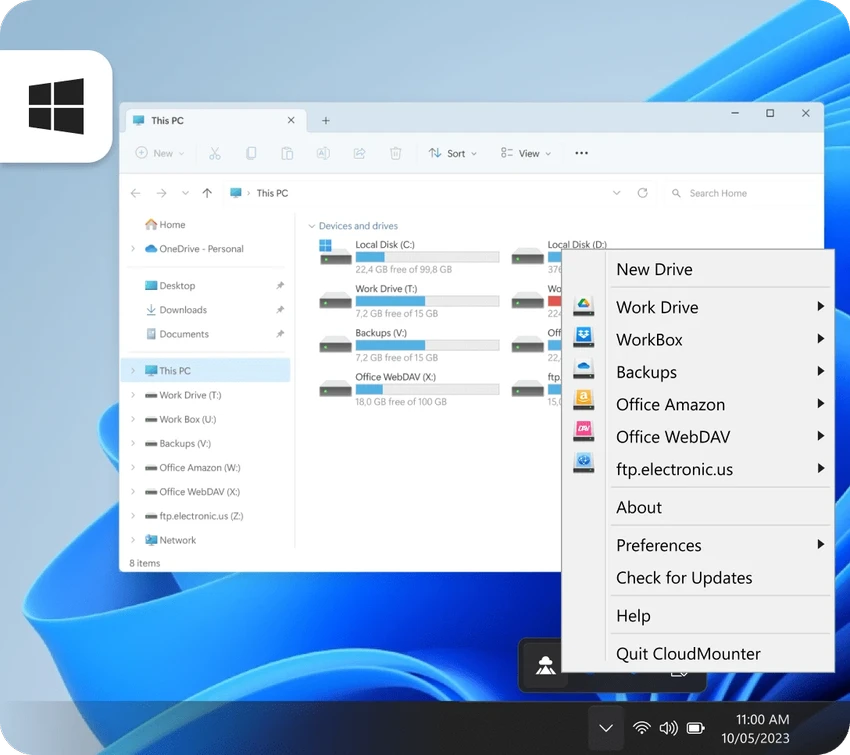
CloudMounter is a system utility that allows users to mount cloud storage services and remote servers as local drives on their computer. It enables seamless access to platforms like Google Drive, OneDrive, Dropbox, Amazon S3, and FTP/SFTP servers directly through the file explorer.

Overview

CloudMounter bridges the gap between local and cloud storage by integrating remote services into the operating system as if they were physical drives. This allows users to interact with cloud files in the same way they would manage local folders, eliminating the need for manual syncing or file duplication. The software supports multiple cloud providers and server types, making it a versatile tool for users who work across different storage ecosystems. It is designed to improve productivity by simplifying file access and reducing the complexity of managing multiple cloud accounts. Security is also a key aspect, as credentials are stored safely using system-level encryption mechanisms.

Features of CloudMounter

  • Mount cloud storage as local drives
  • Supports Google Drive, OneDrive, Dropbox, and Amazon S3
  • FTP, SFTP, and WebDAV server support
  • Direct file access without syncing to local storage
  • Manage multiple cloud accounts simultaneously
  • Secure credential storage (Keychain support on macOS)
  • Browse and edit remote files like local files
  • Support for full cloud storage account or selected buckets
  • Integration with system file explorer
  • Upload, download, and manage files directly
  • Works with multiple cloud services at once
  • Secure connection handling for remote servers

User Experience

CloudMounter offers a seamless and intuitive experience by integrating cloud services directly into the file system. Once configured, cloud storage appears as a mounted drive, allowing users to drag, drop, open, and edit files without needing to open separate web interfaces. This approach significantly improves workflow efficiency, especially for users who work across multiple cloud platforms. Instead of switching between different applications or browser tabs, everything is accessible from the native file explorer.

The setup process is straightforward, and once connected, the cloud drives behave like standard local storage. This makes file management more natural and reduces the learning curve for users already familiar with traditional file systems. Performance is generally smooth, although dependent on internet connection speed when accessing remote files.

Who Should Use CloudMounter?

  • Users working with multiple cloud storage services
  • Developers managing remote servers and FTP sites
  • Businesses using cloud-based file storage
  • IT professionals handling remote file systems
  • Users who prefer local-style access to cloud files
  • Teams collaborating across cloud platforms

Conclusion

CloudMounter is a powerful and efficient file management tool that transforms cloud storage into accessible local drives. Its ability to unify multiple cloud services and remote servers into a single file system makes it highly useful for productivity-focused users.

Pros & Cons

Pros

  • Integrates cloud storage as local drives
  • Supports multiple major cloud providers
  • Eliminates need for manual file syncing
  • Easy drag-and-drop file management
  • Supports FTP, SFTP, and WebDAV connections
  • Improves workflow efficiency across cloud services
  • Secure credential handling

Cons

  • Requires internet connection for cloud access
  • Performance depends on network speed
  • Advanced configuration may be needed for some servers

Frequently Asked Questions

What is CloudMounter used for?

CloudMounter is used to mount cloud storage and remote servers as local drives for easier file access and management.

Does CloudMounter sync files to my computer?

No. It allows direct access to cloud files without full local syncing.

Which services does CloudMounter support?

It supports Google Drive, OneDrive, Dropbox, Amazon S3, FTP, SFTP, and WebDAV.

Is CloudMounter secure?

Yes. It uses secure credential storage and encrypted connections for remote access.

Can I use multiple cloud accounts?

Yes. You can mount and manage multiple cloud accounts simultaneously.

Does it work like a normal file explorer?

Yes. Mounted cloud drives behave like local folders within your system file explorer.

Recommended apps [Freeware]:
  • EarthTime 6.33.6 EarthTime logo displays world clocks, weather, and local times for 120,000+ cities with customizable alarms and maps.
  • All in One Runtimes 2.5.0 All in One Runtimes logo Package essential Windows runtime environment packages to improve software compatibility and system stability.
  • Awesome Miner 11.5.5 Awesome Miner logo manage Bitcoin, Litecoin and Ethereum mining, monitor rigs, switch pools, and optimize profitability
  • Autoruns 14.30 Autoruns logo a Windows startup manager that reveals and controls all autostart programs, services, drivers, and registry entries
  • WifiInfoView 3.00 WifiInfoView logo scans nearby Wi-Fi networks and displays detailed technical information in real time
  • WinBin2Iso 6.77 WinBin2Iso logo a free, portable utility that quickly converts BIN CD and DVD image files to ISO format on Windows.
Recommended apps [Shareware]:
  • Coolutils Total Doc Converter 5.1.0.394/167 Coolutils Total Doc Converter logo Convert DOC, DOCX, RTF, and TXT files into PDF, HTML, images, and more with fast batch processing
  • MacDrive 12.0.1.23 MacDrive logo Access, read, and write Mac-formatted APFS and HFS+ drives on Windows with full support for encrypted volumes and RAID
  • PowerDirector 2026 v24.6 PowerDirector logo AI-powered video editor offering templates, effects, and tools for fast, professional video creation
  • Lyric Video Studio 1.5.49 Lyric Video Studio logo a Windows app for creating lyric videos with AI tools, subtitles, motion tracking, and 4K video editing
  • Rollback RX 12.91 Rollback RX logo instant system restore software for Windows lets users recover PCs via snapshots in seconds
  • Softros LAN Messenger 12.6.3.0 Softros LAN Messenger logo secure encrypted LAN messaging, group chat, and file sharing for office communication