RegRun Reanimator logo

RegRun Reanimator 18.50.2026.708

  • User Rating:
    ★★★★★
    ★★★★★
    0.0 ★ 0Votes
  • Requirements:
    Windows
  • Version: 18.50.2026.708
  • Latest updated: 2 weeks ago
  • License: Freeware  
  • Publisher: Greatis Software
  • Size: 46 MB
× app stores

RegRun Reanimator is a security utility designed to help detect and remove various types of malware, including Trojans, adware, spyware, rootkits, and other unwanted threats. The software focuses on identifying suspicious activity on a computer and providing tools to help users improve system security.

One of the notable aspects of RegRun Reanimator is its detailed reporting capability. Instead of only scanning for threats, the application can generate comprehensive reports about the current state of a PC. These reports include information about installed applications, drivers, codecs, browser settings, Explorer extensions, network settings, file associations, Windows services, startup programs, scheduled tasks, and loaded DLL files.

This system analysis approach makes RegRun Reanimator useful for users who want deeper insight into their computer environment. The detailed reports can help identify unusual changes or potentially unwanted components that may affect system performance or security.

Along with malware detection and removal features, RegRun Reanimator provides tools aimed at protecting computers from internet-related threats. It is designed for users who need additional analysis capabilities beyond standard security scanning.

Features of RegRun Reanimator

  • Detects and removes malware threats
  • Removes Trojans, adware, spyware, and rootkits
  • Provides detailed system status reports
  • Analyzes installed applications and drivers
  • Reviews browser settings and Explorer extensions
  • Checks network settings and file associations
  • Displays Windows service information
  • Monitors startup programs and scheduled tasks
  • Reports loaded DLL files
  • Helps protect computers from internet threats

Interface and Usability

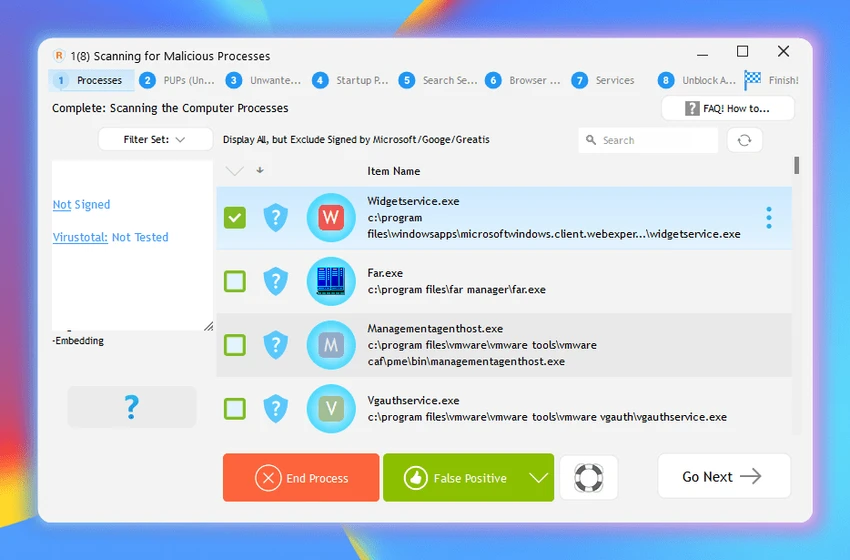
After using RegRun Reanimator, I found the application focused more on system analysis and security investigation than simple one-click scanning. The detailed reporting feature provides a broad overview of system components, which can be useful for users who want to understand what is running on their computer.

The amount of information available may feel extensive for beginners, but it provides valuable details for users who need deeper control over malware detection and system monitoring. The main functions are organized around identifying threats and reviewing system information. RegRun Reanimator is best suited for users who want additional visibility into their PC security rather than a basic background antivirus replacement.

Who Should Use RegRun Reanimator?

  • Users dealing with suspected malware infections
  • Users looking for Trojan and rootkit removal tools
  • Security-focused users who want detailed system reports
  • IT technicians analyzing Windows systems
  • Users who want additional malware investigation tools

Conclusion

RegRun Reanimator is a specialized malware removal and system analysis tool that provides more detailed information than many basic security utilities. Its ability to generate extensive reports about applications, services, startup items, and system components makes it valuable for investigating potential security issues.

Users who need a deeper look at their PC environment and tools for removing Trojans, spyware, adware, and rootkits may find RegRun Reanimator a useful addition to their security toolkit. For the best experience, it is recommended for users who are comfortable reviewing detailed system information.

Pros & Cons

✓

Pros

  • Detects multiple malware types
  • Includes detailed system reports
  • Provides information about many Windows components
  • Helps identify suspicious system changes
  • Includes tools for removing unwanted software
✕

Cons

  • Detailed reports may be overwhelming for inexperienced users
  • Focuses on malware analysis rather than general antivirus protection

Frequently Asked Questions

What is RegRun Reanimator used for?

RegRun Reanimator is used to detect and remove malware threats such as Trojans, adware, spyware, rootkits, and other unwanted software.

Can RegRun Reanimator remove rootkits?

Yes. RegRun Reanimator includes features designed to help detect and remove rootkits along with other types of malware.

Does RegRun Reanimator create system reports?

Yes. The software can create detailed reports containing information about applications, drivers, services, startup programs, browser settings, and other system components.

Is RegRun Reanimator an antivirus program?

RegRun Reanimator is a malware removal and system analysis tool. The provided information does not describe it as a complete antivirus replacement.

Who can benefit from using RegRun Reanimator?

It can be useful for users, technicians, and security-focused individuals who need to investigate malware infections or analyze system activity.

What types of threats can RegRun Reanimator detect?

RegRun Reanimator is designed to help detect threats including Trojans, adware, spyware, rootkits, and other forms of malware.

Recommended apps [Freeware]:
  • Garmin Express 7.29.0.0 Garmin Express logo manage Garmin GPS devices with map updates, backups, software updates, and device registration
  • AnyTXT Searcher 1.3.3241 AnyTXT Searcher logo fast desktop search tool that indexes and searches full-text content across documents, PDFs, emails, and more
  • PC Timer 19.7 PC Timer logo a lightweight Windows tool to schedule shutdown, restart, logout, or lock actions with a simple timer or calendar-based scheduler
  • CudaText 1.234.6.0 CudaText logo Edit code efficiently with a lightweight editor supporting many programming languages, syntax highlighting, plugins, and customization.
  • MultiPack Visual C++ Installer 4.2 MultiPack Visual C++ Installer logo Install required Microsoft Visual C++ runtimes quickly to fix application and game compatibility issues on Windows systems.
  • Intel Ethernet Adapter Complete Driver Pack 31.2.2 Intel Ethernet Adapter Complete Driver Pack logo Install and update Intel Ethernet drivers for supported network adapters with a complete collection for Windows, Linux, and FreeBSD.
Recommended apps [Shareware]:
  • Screenpresso 2.3.0 Screenpresso logo a versatile screen capture and video recording tool with editing and annotation features.
  • reaConverter Pro 8.0.231 reaConverter Pro logo batch image converter and editor supporting 700+ formats with automation and advanced processing tools
  • ON1 Resize AI 2026.4 ON1 Resize AI logo advanced AI upscaling technology to enlarge photos up to 10x while preserving detail, sharpness, and print quality
  • Google Satellite Maps Downloader 8.419 Google Satellite Maps Downloader logo downloads satellite map tiles from Google Maps for offline viewing, GIS projects, and map export
  • pdfFactory Pro 9.31 pdfFactory Pro logo creates, combines, previews, and prints PDFs easily with advanced tools like bookmarks, email export, and job control
  • TextPad 9.9.7 TextPad logo Edit large text files efficiently with a powerful Windows editor featuring macros, regular expressions, spell checking, file comparison, and more.