Blank And Secure logo

Blank And Secure 8.41

  • User Rating:
    ★★★★★
    ★★★★★
    0.0 0Votes
  • Requirements:
    Windows
  • Version: 8.41
  • Latest updated: 1 week ago
  • License: Freeware  
  • Publisher: Nenad Hrg
  • Size: 0.3 MB
× app stores

Blank And Secure is a compact and portable Windows utility designed for permanent data deletion. It focuses on securely erasing sensitive files by overwriting them with zeros before deletion, ensuring that the data cannot be recovered using standard recovery tools.

Overview of Blank And Secure

Blank And Secure is built around a simple but critical privacy concept: irreversible file deletion. Instead of just removing file references from the system, the tool overwrites file data using zero-filling (“zeroing data”) before deletion. This process ensures that previously stored information cannot be restored, even with specialized recovery software. Because of this, it is intended specifically for users who need to securely eliminate sensitive data. The application is lightweight and portable, meaning it can run without installation and is suitable for use on different systems. It also supports multiple languages, making it accessible to a wide range of users.

Features of Blank And Secure

  • Secure file deletion by overwriting data with zeros
  • Prevents recovery of deleted files using standard recovery tools
  • Lightweight and portable application (no installation required)
  • Simple and minimal interface for fast usage
  • Supports filling free disk space with zero data to remove traces
  • Available in multiple languages
  • Designed for permanent deletion of sensitive data

User Experience

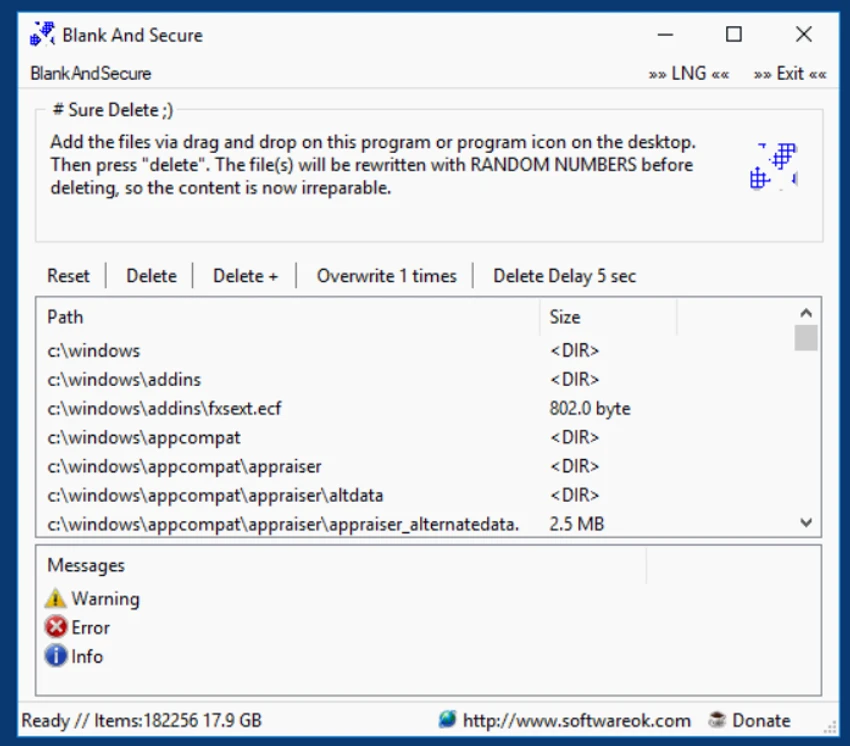
Blank And Secure offers a very straightforward user experience. The interface is minimal, focusing only on secure deletion tasks without unnecessary features or complexity. Users simply select files and execute deletion, with the tool handling the overwrite process automatically. Its portability adds convenience, allowing it to be used directly from external drives or across different systems. Because it permanently destroys data, the tool requires careful use. Once files are deleted, recovery is not possible, which is clearly aligned with its purpose.

Who Should Use Blank And Secure?

  • Users who want to permanently delete sensitive files
  • Individuals concerned about privacy and data recovery risks
  • IT professionals securely wiping temporary or confidential data
  • Users preparing drives or files for disposal or transfer
  • Anyone needing a lightweight, portable secure deletion tool

Conclusion

Blank And Secure is a simple yet effective tool for users who need guaranteed permanent file deletion. Its zero-overwrite method ensures that sensitive data cannot be recovered, making it useful for privacy-focused workflows.

Pros & Cons

Pros

  • Strong secure deletion via zero-overwrite method
  • Portable and very lightweight
  • Simple and fast to use
  • Effective for preventing file recovery
  • Multi-language support

Cons

  • Very basic interface with limited configuration options
  • Risk of accidental permanent deletion if used incorrectly

Frequently Asked Questions

What does Blank And Secure do?

It permanently deletes files by overwriting them with zeros before removal.

Can deleted files be recovered after using it?

No, files deleted with Blank And Secure cannot be recovered using standard recovery methods.

Does Blank And Secure require installation?

No, it is a portable application and can run without installation.

Does it support secure free space wiping?

Yes, it can fill free disk space with zero data to remove traces of deleted files.

Is Blank And Secure suitable for everyday deletion?

It is best used only for sensitive data, not regular file deletion.

Recommended apps [Freeware]:
  • EarthTime 6.33.6 EarthTime logo displays world clocks, weather, and local times for 120,000+ cities with customizable alarms and maps.
  • Valentina Studio 17.5 Valentina Studio logo manage SQL and NoSQL databases with schema design, queries, reports, and cross-platform support.
  • FluentTweaker 26.06.02 FluentTweaker logo a Windows utility for safe, reversible system tweaks focused on UI, privacy, and performance control.
  • ManicTime 2026.2.0.3 ManicTime logo Automatically track work hours, monitor productivity, and generate accurate reports with ManicTime
  • Microsoft Edge 149.0.4022.96 Microsoft Edge logo modern Chromium-based browser offering fast performance, strong security, privacy controls, and cross-platform support
  • VSDC Free Video Editor 11.2.3.729 VSDC Free Video Editor logo a non-linear video editing tool for creating videos with effects, transitions, and multi-format support on Windows
Recommended apps [Shareware]:
  • 4DDiG File Repair 4.4.2.9 4DDiG File Repair logo a Windows tool for repairing damaged photos and videos in batch mode with a simple, automated workflow
  • FileCenter 12.5.36 FileCenter logo organize documents, scan files, manage PDFs, and build an efficient digital filing system
  • FontExpert 2026 21.0 Release 1 FontExpert logo a Windows font manager for installing, organizing, previewing, and fixing fonts with advanced tools.
  • Okdo Pdf to All Converter Professional 6.0 Okdo Pdf to All Converter Professional logo Convert PDF files to Word, Excel, PowerPoint, images, HTML, text, and more with batch processing support
  • Pazu StreamGet 3.1.5 Pazu StreamGet logo Download movies and TV shows from major streaming platforms to MP4 or MKV
  • Macro Commander Pro 2.8.7 Macro Commander Pro logo Automate repetitive tasks using macros, scripting, scheduling, and powerful data entry tools