Power-user logo

Power-user 1.7.84.406

  • User Rating:
    ★★★★★
    ★★★★★
    0.0 0Votes
  • Requirements:
    Windows
  • Version: 1.7.84.406
  • Latest updated: 5 days ago
  • License: Freeware  
  • Publisher: Power-user SAS
  • Size: 47.5 MB
× app stores

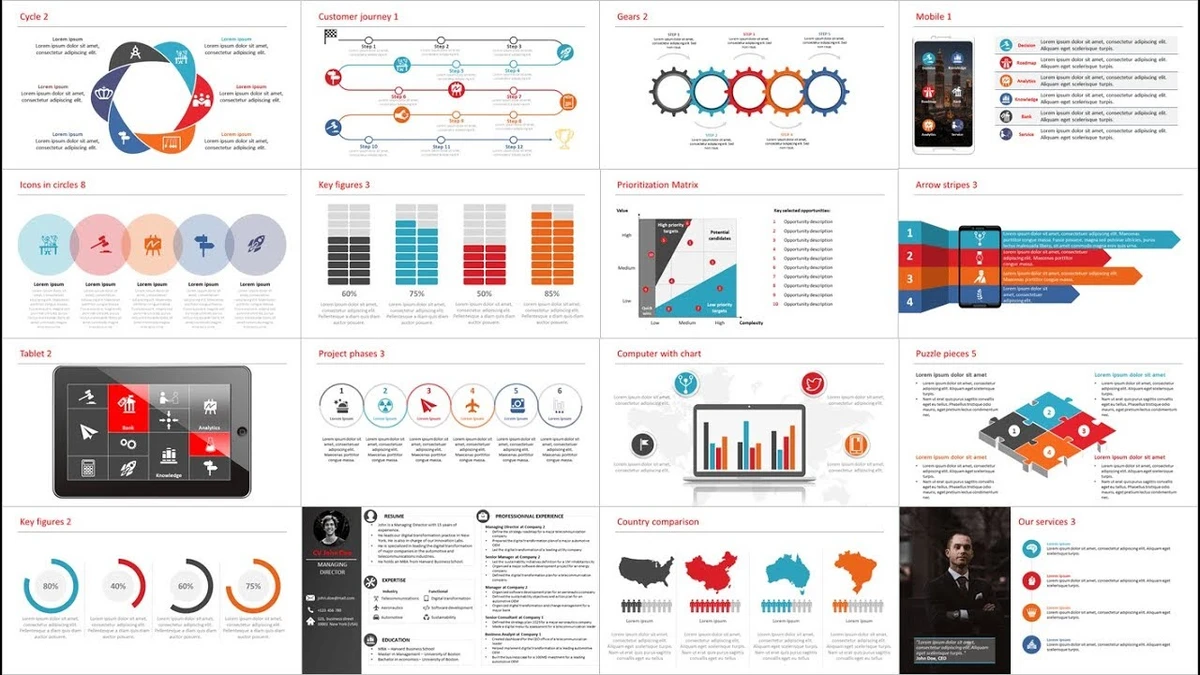
Power-user is a Microsoft Office add-in designed to enhance productivity in PowerPoint, Excel, and Word. It provides a rich library of templates, icons, charts, diagrams, and maps to help users create professional-quality documents faster and more efficiently.

Overview

Power-user integrates directly into Microsoft Office applications, acting as an enhancement layer that expands design and data visualization capabilities. Instead of building slides, charts, or diagrams from scratch, users can access a large library of ready-made assets and insert them instantly. The tool is particularly useful in business, consulting, finance, and corporate environments where presentation quality and speed are critical. It helps users transform raw data and ideas into visually compelling presentations with minimal effort. By combining templates, visual assets, and productivity tools, Power-user reduces repetitive formatting work and allows users to focus more on content and storytelling.

Features of Power-user

  • Extensive library of PowerPoint, Excel, and Word templates
  • 3,000+ vector icons and country flags
  • Over 100,000 stock images for presentations
  • 200+ editable data maps for geographic visualization
  • Waterfall charts for financial analysis
  • Mekko charts for multi-dimensional data representation
  • Sankey diagrams for flow visualization
  • Gantt charts for project planning
  • Fully editable diagrams (value chains, pyramids, traffic lights, etc.)
  • Automatic template adaptation to corporate color schemes
  • Sticky notes for slide comments and collaboration
  • Slide stamping tools (draft/confidential markers)
  • Mini-slide references within presentations
  • Slide summary generation tools
  • Presentation progress tracking tools
  • One-click insertion of professional design elements

User Experience

Using Power-user feels like adding a professional design assistant directly inside Microsoft Office. Templates and visual elements are easy to insert, significantly reducing the time spent on formatting slides or building charts manually. The search functionality for icons and images is particularly efficient, allowing users to quickly locate relevant visuals without interrupting workflow. Charts like Sankey, Mekko, and Waterfall are especially useful in data-heavy environments, simplifying complex information into clear visuals.

Because it integrates directly into Office apps, the learning curve is minimal for users already familiar with PowerPoint or Excel. Most features are accessible from within the ribbon interface, making it easy to adopt in daily work.

Who Should Use Power-user?

  • Business professionals and consultants
  • Financial analysts and data workers
  • Students preparing presentations
  • Marketing and sales teams
  • Anyone frequently using PowerPoint, Excel, or Word for reports

Conclusion

Power-user is a powerful enhancement tool for Microsoft Office that dramatically improves the speed and quality of presentations and documents. Its extensive library of templates, charts, and visual assets makes it especially valuable in professional environments.

Pros & Cons

Pros

  • Large library of templates and visual assets
  • Strong integration with Microsoft Office
  • Saves significant time on presentation design
  • High-quality charts and diagrams for business use
  • Extensive icon and image library
  • Easy to use for Office users
  • Improves presentation professionalism

Cons

  • Requires Microsoft Office environment
  • Advanced features may be unnecessary for casual users
  • Focused mainly on business and professional use cases

Frequently Asked Questions

What is Power-user used for?

Power-user is used to enhance PowerPoint, Excel, and Word with templates, charts, icons, maps, and productivity tools.

Does Power-user work with Microsoft Office?

Yes. It is an add-in designed specifically for Microsoft PowerPoint, Excel, and Word.

Can Power-user improve presentation design?

Yes. It provides templates, icons, diagrams, and charts to create professional presentations quickly.

What types of charts does Power-user include?

It includes Waterfall charts, Mekko charts, Sankey diagrams, Gantt charts, and more.

Does Power-user include images and icons?

Yes. It offers 3,000+ icons, country flags, and over 100,000 stock images.

Is Power-user suitable for beginners?

Yes. It integrates into Office and is easy to use, though some advanced features are more suited for professional users.

What system does Power-user require?

It requires Windows with Microsoft Office, Windows 8 or higher, and .NET Framework 4.8 or above.

Recommended apps [Freeware]:
  • StaxRip 2.52.4 StaxRip logo powerful Windows GUI for video/audio encoding using FFmpeg, x265, AviSynth+, VapourSynth, and more.
  • PC Timer 19.7 PC Timer logo a lightweight Windows tool to schedule shutdown, restart, logout, or lock actions with a simple timer or calendar-based scheduler
  • MakeMKV 1.18.4 MakeMKV logo disc ripper that converts DVD and Blu-ray discs into MKV files while preserving audio, video, subtitles, and metadata
  • SoundVolumeView 2.52 SoundVolumeView logo displays, manages, saves, and restores Windows audio settings with powerful profile and command-line support
  • GLview 7.4.4 GLview logo displays detailed OpenGL, Vulkan, DirectX, and GPU information, helping users analyze graphics hardware and driver capabilities
  • Kali Linux 2026.2 Kali Linux logo a powerful penetration testing OS with tools for cybersecurity, digital forensics, and ethical hacking
Recommended apps [Shareware]:
  • Syncovery 12.2.1 Syncovery logo fast backup and file synchronization tool with real-time sync, versioning, and advanced automation features
  • Remote Desktop Manager 2026.2.9.0 Remote Desktop Manager logo manage RDP, SSH, VNC, and virtual machines from one secure centralized platform
  • Ant Download Manager 2.17.4.96212 Ant Download Manager logo a Windows tool that speeds up downloads, captures streaming media, supports torrents, and integrates with browsers
  • MediaHuman YouTube to MP3 Converter 3.9.21 MediaHuman YouTube to MP3 Converter logo downloads audio from YouTube, SoundCloud, and other platforms in high-quality MP3 format
  • XL-Connector 3.7.14.0 XL-Connector logo Excel plugin for Salesforce data export, import, bulk updates, and metadata management.
  • WavePad 24.38 WavePad logo audio editor for Windows, macOS, and mobile devices, offering effects, restoration tools, and batch processing