


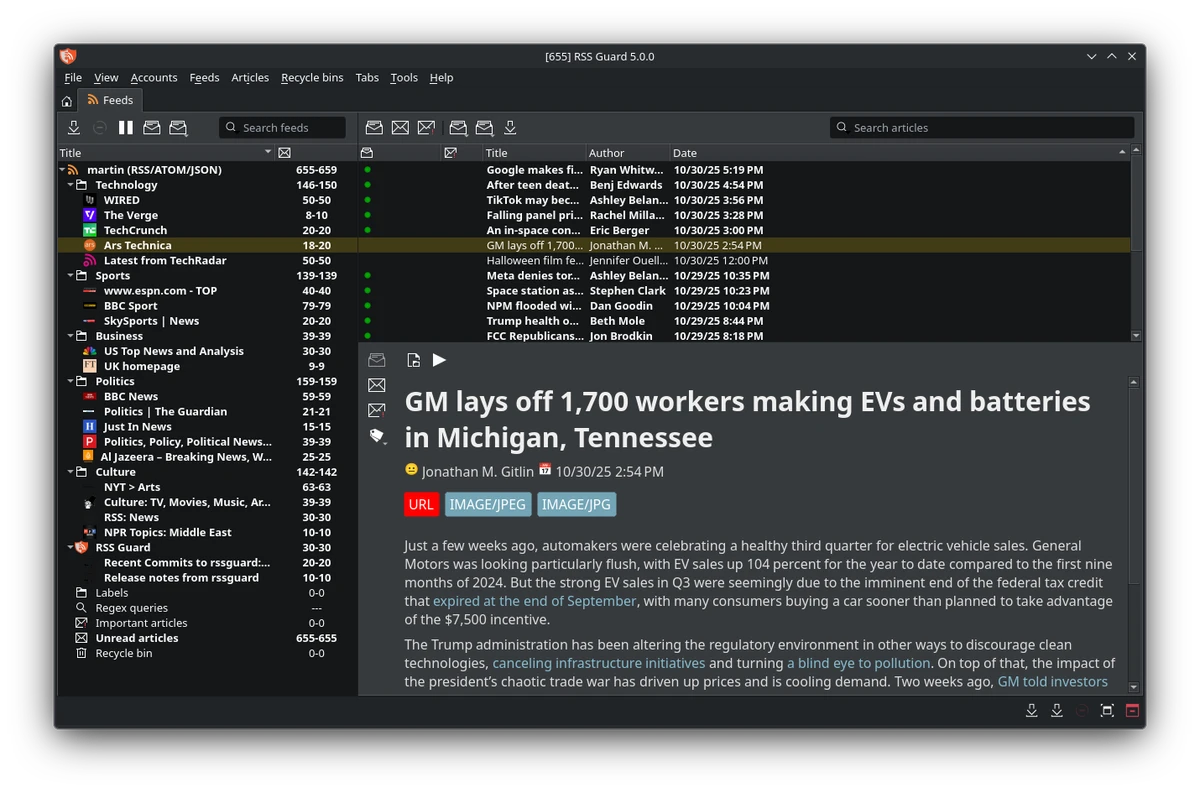

RSS Guard is a free, open-source RSS feed reader built with the Qt framework that supports RSS, RDF, and Atom feeds across multiple platforms, including Windows, macOS, Linux, and other Qt-supported operating systems. Designed for users who regularly follow news websites, blogs, podcasts, and online publications, RSS Guard offers much more than basic feed reading. It supports online feed synchronization through services such as Tiny Tiny RSS, NextCloud News, Inoreader, and Gmail accounts, while also allowing users to manage standard RSS subscriptions with ease.
Rather than focusing solely on simplicity, RSS Guard provides a feature-rich environment with customizable notifications, feed categorization, OPML import/export, podcast support, multiple database backends, and an integrated browser. While the interface may require some time to learn, it rewards advanced users with extensive customization and powerful feed management capabilities.
Features of RSS Guard
- Free and open-source
- Supports RSS, RDF, and Atom feeds
- Built with the Qt framework
- Cross-platform compatibility
- Online feed synchronization through plugins
- Supports Tiny Tiny RSS
- Supports NextCloud News
- Supports Inoreader
- Supports Gmail account integration
- Import and export feeds using OPML 2.0
- Feed categorization
- Automatic feed updates with customizable intervals
- Feed discovery on websites
- Podcast support for RSS and Atom feeds
- Configurable popup notifications
- Notification filtering using regular expressions
- Built-in download manager with up to six simultaneous downloads
- Metadata retrieval, including website icons
- Simple ad-blocking functionality
- Integrated web browser
- Google-based autocomplete in the internal browser
- Database cleanup tools
- Supports SQLite and MySQL databases
- Backup and restore settings or databases
- Portable mode support
- Drag-and-drop feed organization
- Keyboard navigation
- Printing support
- Feed authentication (Basic, Digest-MD5, NTLM-2)
- Automatic update checking
- Customizable user interface and themes
- Multiple interface layouts
Interface and Usability
RSS Guard adopts a traditional three-pane layout that separates your feed list, article headlines, and reading area. This familiar design makes it easy to browse large collections of subscriptions once everything is configured. During use, I found that the application emphasizes functionality over simplicity. There are numerous settings, synchronization options, and customization tools that may feel overwhelming for first-time users. However, experienced RSS users will likely appreciate the level of control available.
Managing multiple accounts is straightforward, and the addition of right-click options for creating new feeds improves usability compared to earlier versions. Feed categorization, drag-and-drop organization, and keyboard shortcuts also help streamline daily reading.
One drawback is that notifications can become intrusive, although they can be disabled. Additionally, some feeds may not always display headlines perfectly depending on the source, which can occasionally affect the browsing experience.Overall, RSS Guard feels more like a professional feed management tool than a lightweight RSS reader.
Who Should Use RSS Guard?
- News enthusiasts following numerous websites
- Bloggers and journalists
- Podcast listeners
- Developers who prefer open-source software
- Users of Tiny Tiny RSS or NextCloud News
- Anyone looking for a highly customizable desktop RSS reader
Conclusion
RSS Guard goes far beyond the capabilities of a basic feed reader. Its support for RSS, RDF, and Atom feeds, online synchronization, podcast subscriptions, OPML management, and flexible customization make it a capable solution for users with demanding feed management needs.


