


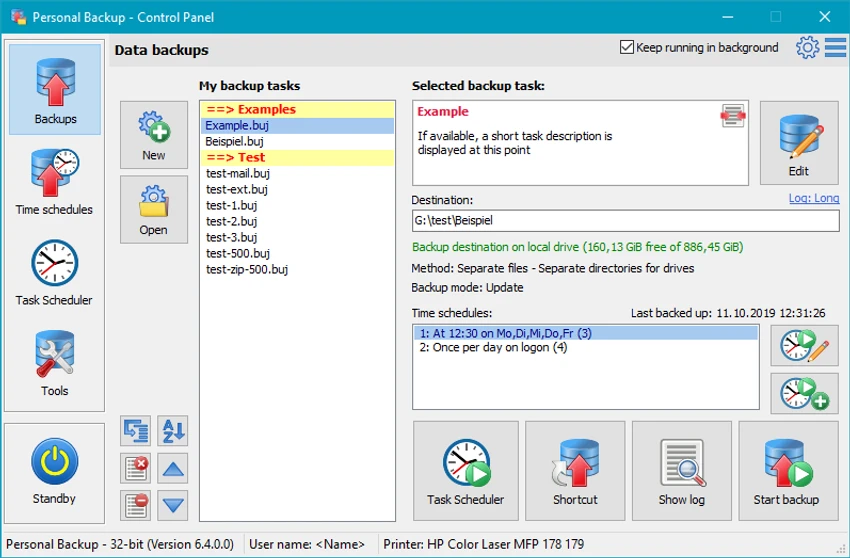

Personal Backup is a Windows utility designed to help users securely store and protect important files and folders through automated backup processes. It supports both manual and scheduled backups, allowing users to safeguard data to local drives, removable storage, network locations, or FTP servers. The software is built to handle multiple backup tasks simultaneously and offers flexible scheduling options, making it suitable for both personal and professional data protection needs.
Key Features of Personal Backup
- Backup files and entire folder structures
- Support for local, removable, network, and FTP destinations
- Run multiple backup tasks simultaneously
- Restore individual files or complete ZIP archives
- Backup data into ZIP or uncompressed formats
- Built-in backup scheduler for automated tasks
- Trigger backups at system startup, logout, or shutdown
- Manual or on-demand backup execution
- Wizard-based setup for creating backup tasks
- File selection dialog with folder tree navigation and search
- Preview files before selecting or excluding them from backup
- Unlimited number of configurable backup jobs
- Verification of backed-up files for integrity checks
- Integration with Windows Task Scheduler for advanced automation
- Compatible with Windows 7, 8, 10, and 11
User Experience
After reviewing Personal Backup, the software presents itself as a practical and structured solution for users who need reliable file protection without unnecessary complexity. The setup wizard simplifies the process of creating new backup jobs, making it accessible even for non-technical users. One of the strongest aspects is scheduling flexibility. Users can configure backups to run at specific times or system events such as startup, shutdown, or logout. This ensures that data protection can run automatically without manual intervention.
The ability to back up to multiple destinations—including FTP servers and network drives—adds versatility, especially for users who need offsite or remote backups. Running multiple backup tasks at the same time further enhances productivity for users managing large or diverse datasets. Restoration options are also well-designed. Users can restore individual files or entire ZIP archives, providing flexibility depending on the recovery needs. The inclusion of file preview and selection tools helps ensure that only necessary data is backed up or restored. File verification adds an extra layer of reliability, confirming that backup copies are intact and usable. This is especially important for long-term data storage and business environments where data integrity is critical.
Overall Rating
Personal Backup is a dependable and flexible backup solution for Windows users who want automated file protection. Its scheduling capabilities, multiple destination support, and straightforward workflow make it a practical tool for both personal and small business use.
Conclusion
Personal Backup provides a straightforward and effective way to automate file and folder backups on Windows. With strong scheduling options, flexible storage destinations, and reliable restore features, it delivers essential data protection capabilities in a lightweight package.


