FileLegit Windows Multimedia Media Players Nuclear Music Player
Nuclear Music Player logo

Nuclear Music Player 1.42.2

  • User Rating:
    ★★★★★
    ★★★★★
    0.0 ★ 0Votes
  • Requirements:
    Windows
  • Version: 1.42.2
  • Latest updated: 2 weeks ago
  • License: Open Source  
  • Publisher: Nuclear
  • Size: 13 MB
× app stores

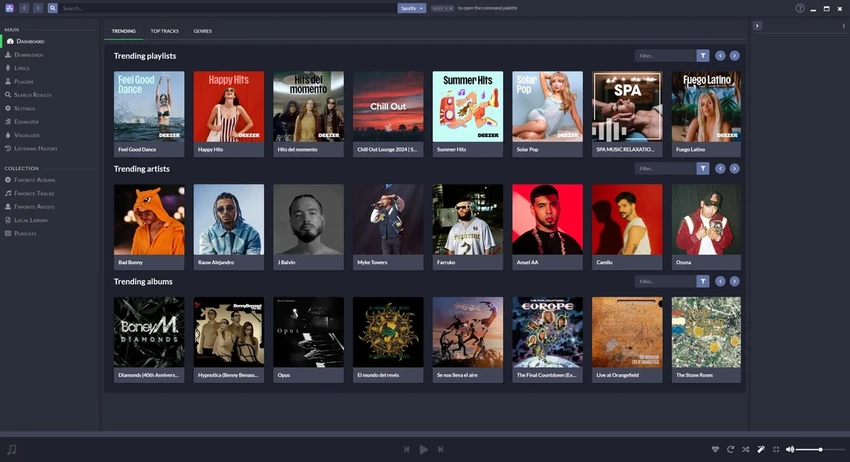
Nuclear Music Player is a free and open-source music streaming application designed for users who want a simple alternative to mainstream music platforms. Available for Windows, macOS, and Linux, it allows users to search for, stream, and download music from public online sources without subscription fees, advertisements, or tracking features. The player connects with platforms such as YouTube, SoundCloud, and Jamendo to provide access to a wide range of songs, albums, and artists. With features like curated playlists, music discovery tools, automatic similar-track suggestions, and a clean interface, Nuclear focuses on providing a lightweight listening experience without the extra features and distractions found in larger music applications.

Features of Nuclear Music Player

  • Free and open-source music streaming application.
  • Available on Windows, macOS, and Linux.
  • Provides music access through public sources such as YouTube, SoundCloud, and Jamendo.
  • No advertisements, login requirements, or subscription prompts.
  • Search for songs, albums, and artists through a central search bar.
  • Browse curated playlists such as Top and New.
  • Explore music by genre.
  • Automatically adds similar tracks to the queue for music discovery.
  • Supports downloading tracks in WEBM format for offline listening.
  • Simple and lightweight interface focused on music playback.
  • Supports privacy-conscious listening without ad tracking.

Interface and Usability

Nuclear Music Player focuses on simplicity and ease of use. The interface avoids unnecessary extras and keeps the main experience centered around searching, discovering, and playing music. The central search feature makes it easy to find songs, albums, or artists, while browsing options help users explore new content.

The automatic similar-track feature is one of the more interesting parts of the experience, as it can help users discover music related to what they are already listening to. However, the queue management for suggested tracks is limited because similar songs cannot be removed individually. The clean design makes Nuclear approachable for users who prefer a straightforward music player instead of a feature-heavy streaming platform.

Who Should Use Nuclear Music Player?

  • Users looking for a free alternative to subscription-based music services.
  • People who prefer open-source software without advertising or tracking.
  • Music fans who enjoy discovering new artists and songs.
  • Users who need a lightweight music player for Windows, macOS, or Linux.
  • Listeners who want offline playback options through supported downloads.

Conclusion

Nuclear Music Player offers a refreshing alternative for users who want a lightweight, open-source music application without advertisements, tracking, or subscription requirements. Its simple interface, cross-platform support, and music discovery features make it a practical choice for listeners who prefer a more direct way to enjoy online music.

While its reliance on third-party sources and limited download format may not suit everyone, Nuclear remains a useful option for privacy-focused users and those who enjoy exploring new music. If you are looking for a clean and flexible music player without the complexity of mainstream platforms, Nuclear Music Player is worth trying.

Pros & Cons

✓

Pros

  • Free and open-source with no ads or tracking.
  • Works across Windows, macOS, and Linux.
  • Provides music discovery features with automatic suggestions.
  • Includes support for offline downloads.
  • Offers a clean and easy-to-use interface.
  • Does not require an account or subscription.
✕

Cons

  • Downloads are available only in WEBM format, not MP3.
  • Similar tracks added to the queue cannot be managed individually.
  • Depends on third-party music sources, so availability may vary.
  • Downloading copyrighted content may have legal restrictions depending on location and platform policies.

Frequently Asked Questions

What is Nuclear Music Player used for?

Nuclear Music Player is used for streaming and discovering music from public online sources. It allows users to search for songs, albums, and artists while providing a simple music playback experience.

Is Nuclear Music Player free to use?

Yes. Nuclear Music Player is free and open-source software. It does not require subscription fees and is designed without advertisements or tracking features.

Which platforms does Nuclear Music Player support?

Nuclear Music Player is available for Windows, macOS, and Linux, allowing users across different operating systems to use the application.

Does Nuclear Music Player support music downloads?

Yes. Nuclear Music Player supports downloading tracks as WEBM files. These files can be played in compatible media players, although they are not available directly in MP3 format.

Where does Nuclear Music Player get music from?

Nuclear connects to public online sources including YouTube, SoundCloud, and Jamendo to provide music streaming and discovery features.

Can Nuclear Music Player replace services like Spotify?

Nuclear Music Player provides a different experience from commercial streaming services by focusing on open-source access, privacy, and simplicity. It may appeal to users who want fewer advertisements and less account-based functionality, but music availability depends on its connected sources.

Recommended apps [Freeware]:
  • XMedia Recode 3.6.3.1 XMedia Recode logo Free video and audio converter with GPU acceleration, batch conversion, editing tools, and subtitle support
  • Rocrail Build 7100 Rocrail logo free model railroad control software that automates train layouts, accessories, schedules, and operations across multiple platforms
  • WindowTop 5.32.3 WindowTop logo Manage desktop windows with WindowTop using Picture-in-Picture, transparency, dark mode, and always-on-top features
  • MiniTool Partition Wizard 13.9 MiniTool Partition Wizard logo manages disk partitions with resizing, cloning, recovery, OS migration, and storage tools
  • Waterfox 6.6.16.1 Waterfox logo Browse faster with a 64-bit Firefox-based browser optimized for performance, security, extensions, bookmarks, and downloads.
  • Wireshark 4.6.7 Wireshark logo Analyze network traffic, inspect packets, and troubleshoot connections with a powerful protocol analysis tool for professionals.
Recommended apps [Shareware]:
  • Araxis Merge 2026.0 Araxis Merge logo a powerful file comparison and merging tool for developers, legal teams, and professionals handling version control
  • EF Duplicate MP3 Finder 26.05 EF Duplicate MP3 Finder logo Find and remove duplicate MP3, FLAC, WMA, and OGG audio files using tag-based and similarity analysis
  • Home Manager 2026 v4.10.1002 Home Manager logo track home inventory, store item details, manage repairs, and generate insurance reports
  • Coolutils PDF Splitter Pro 6.1.0.86/58 Coolutils PDF Splitter Pro logo Split large PDF files by keywords, page breaks, or document patterns with Coolutils PDF Splitter Pro for Windows.
  • Pepakura Designer 6.2.6 Pepakura Designer logo converts 3D models into printable papercraft patterns with layout editing and export tools
  • WeBuilder 2025 v18.7.0.277 WeBuilder logo Lightweight web code editor with syntax highlighting, FTP publishing, code snippets, and support for modern web technologies.