Recuva logo

Recuva 1.55.133

  • User Rating:
    ★★★★★
    ★★★★★
    0.0 0Votes
  • Requirements:
    Windows
  • Version: 1.55.133
  • Latest updated: 1 week ago
  • License: Freeware  
  • Publisher: Gen Digital Inc
  • Size: 24.5 MB
× app stores

Recuva is a file recovery utility designed to help Windows users recover accidentally deleted files from computers, external drives, memory cards, USB devices, and other storage media. With support for deep scanning and recovery from damaged or formatted drives, it offers a practical solution for restoring lost data.

Overview

Data loss can happen unexpectedly due to accidental deletion, system crashes, formatting errors, or storage device issues. Recuva addresses these situations by scanning storage devices for recoverable files and helping users restore them when possible. The software supports a wide range of file types, including documents, photos, videos, music files, and emails. Beyond standard recovery tasks, Recuva includes a deep scan mode for locating difficult-to-find files and a secure deletion feature for permanently erasing sensitive data.

Its straightforward design makes recovery accessible to everyday users while still providing advanced options for more challenging recovery scenarios.

Features of Recuva

  • Recover accidentally deleted files
  • Restore documents, photos, videos, music, and emails
  • Recover files from recycle bin
  • Recover files from USB flash drives
  • Recover files from memory cards
  • Recover files from external hard drives
  • Support for MP3 players and other rewritable media
  • Recovery from damaged drives
  • Recovery from newly formatted drives
  • Deep scan mode for difficult recovery situations
  • Secure file deletion using advanced overwrite techniques
  • Support for a wide range of Windows operating systems

User Experience

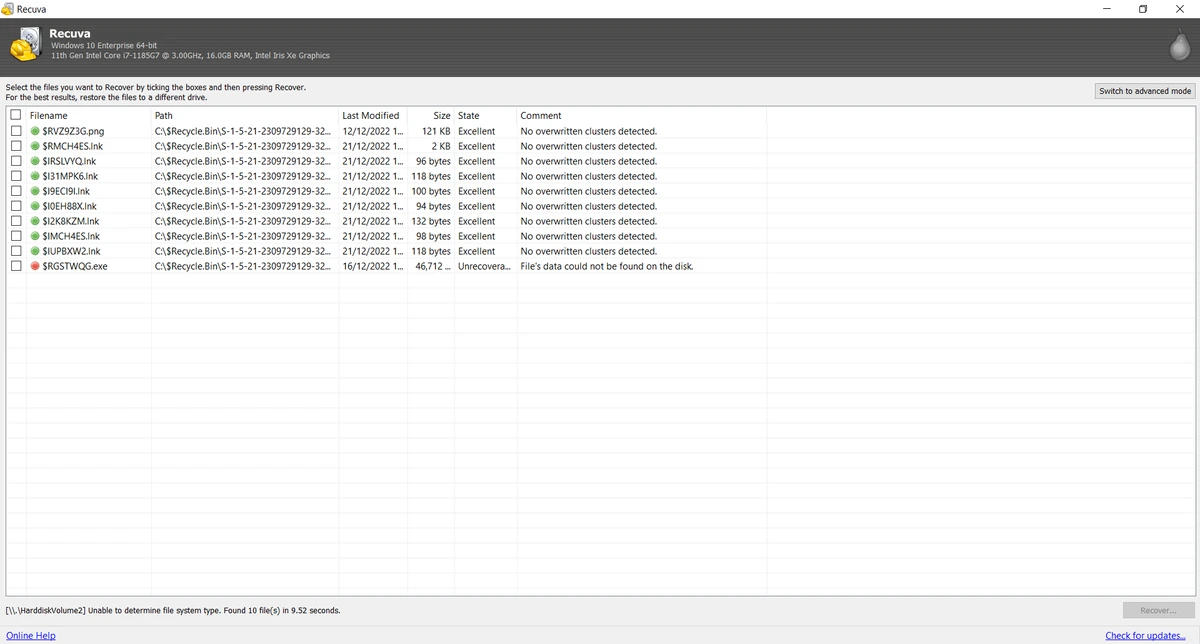
Recuva focuses on simplicity, making file recovery approachable even for users with little technical experience. The recovery process is straightforward, allowing users to scan selected drives and review recoverable files before attempting restoration. The standard scan mode works well for recently deleted files, while the Deep Scan feature provides an additional layer of recovery when files are harder to locate. This flexibility is particularly useful when dealing with older deletions or storage devices that have undergone formatting.

One of Recuva's notable strengths is its ability to recover files from damaged or newly formatted drives, which expands its usefulness beyond simple recycle bin recovery. The inclusion of a secure overwrite feature is also valuable. In addition to recovering data, users can permanently erase sensitive files when they no longer want them to be recoverable. Overall, the software delivers a clean and focused experience centered on file recovery and secure deletion.

Who Should Use Recuva?

  • Users who accidentally deleted important files
  • Home users recovering photos, documents, or videos
  • Professionals needing quick file recovery solutions
  • Users recovering files from USB drives and memory cards
  • Anyone dealing with formatted or damaged storage devices
  • Users who need secure file deletion capabilities

Conclusion

Recuva remains one of the most practical file recovery solutions for Windows users. Its combination of straightforward recovery tools, deep scanning capabilities, support for damaged drives, and secure file deletion features makes it useful in a variety of data loss situations.

Pros & Cons

Pros

  • Easy-to-use recovery process
  • Supports many file types and storage devices
  • Deep Scan improves recovery chances
  • Can recover files from damaged drives
  • Supports recovery from formatted disks
  • Includes secure file deletion tools
  • Compatible with a wide range of Windows versions
  • Suitable for both beginners and advanced users

Cons

  • Recovery success depends on how much data has been overwritten
  • Deep scans can take longer on large drives
  • Advanced recovery scenarios may still require specialized software

Frequently Asked Questions

What is Recuva used for?

Recuva is used to recover deleted files from computers, USB drives, memory cards, external hard drives, and other storage devices.

Can Recuva recover files from formatted drives?

Yes. Recuva can attempt to recover files from newly formatted drives in addition to standard deleted-file recovery.

Does Recuva support damaged disks?

Yes. The software includes recovery capabilities for damaged storage devices where recoverable data still exists.

What types of files can Recuva recover?

Recuva can recover photos, videos, music files, documents, emails, and many other file types.

What is Deep Scan in Recuva?

Deep Scan is an advanced scanning mode that thoroughly searches storage devices for traces of deleted files that may not appear in a standard scan.

Can Recuva permanently delete files?

Yes. Recuva includes a secure overwrite feature that permanently erases files using advanced deletion methods.

Which operating systems are supported?

Recuva supports Windows 11, Windows 10, Windows 8/8.1, Windows 7, Windows Vista, Windows XP, Windows Server 2003/2008, Windows 2000, and older versions such as Windows 98 (up to supported releases).

Recommended apps [Freeware]:
  • Tails 7.9 Tails logo a privacy-focused live operating system that enables anonymous browsing and secure communication
  • K-Lite Codec Pack Mega 19.8.2 K-Lite Codec Pack Mega logo Play all audio and video formats on Windows with K-Lite Codec Pack Mega, a full multimedia codec and filter package
  • MakeMKV 1.18.4 MakeMKV logo disc ripper that converts DVD and Blu-ray discs into MKV files while preserving audio, video, subtitles, and metadata
  • NanaZip 6.5.1750.0 NanaZip logo a modern file compression and extraction tool based on 7-Zip, offering strong encryption and wide format support
  • Ventoy 1.1.16 + LiveCD Ventoy logo create bootable USB drives and boot directly from ISO files without extraction or reformatting
  • Youtube Downloader HD 5.9.9.13 Youtube Downloader HD logo a simple Windows tool for downloading and converting YouTube videos in HD formats
Recommended apps [Shareware]:
  • Audio Transcoder 2.12.24 Audio Transcoder logo all-in-one audio converter and CD ripper supporting MP3, FLAC, AAC, WMA, and more
  • Internet Download Manager (IDM) 6.43 Build 2 Internet Download Manager (IDM) logo boosts download speeds up to 5x, schedules downloads, and supports all major browsers and protocols
  • Yamicsoft Windows Manager 2.3.9 Yamicsoft Windows Manager logo optimizes, cleans, secures, and customizes Windows 10 and 11 with over 40 tools.
  • Asset Manager 2026 v4.10.3001 Asset Manager logo track assets, manage inventory, use barcodes, and maintain service histories efficiently
  • Aeon Timeline 3.5.107 Aeon Timeline logo create detailed timelines for writing, projects, legal cases, research and education
  • FTPie 2026.6.3 FTPie logo Manage FTP, cloud storage, and files easily with FTPie, featuring quick upload, sharing, and document editing tools