


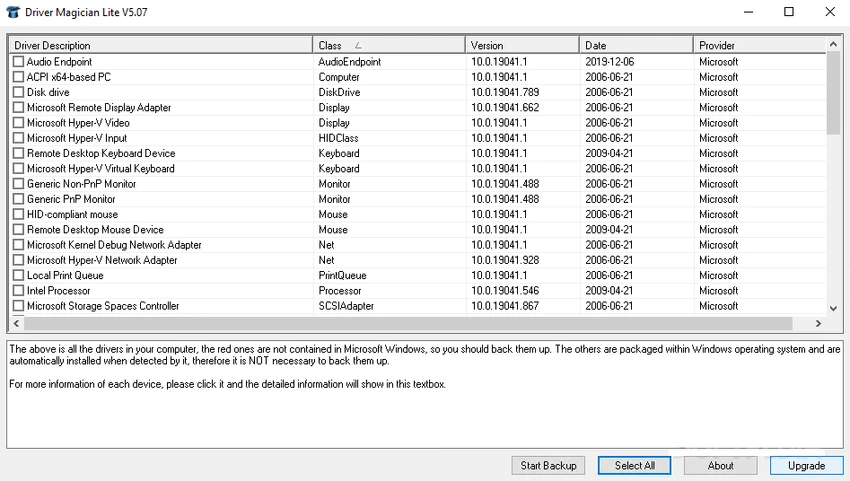

Driver Magician Lite is a Windows utility designed to help users manage device drivers through backup, restoration, and update functions. The software identifies installed hardware components, locates their associated drivers, and allows users to save them to a selected location for future recovery. This can be useful when reinstalling, upgrading, or formatting a Windows system, as saved drivers can be restored without manually searching for each device driver again.
The application supports multiple driver backup modes and provides tools for updating drivers, uninstalling drivers, detecting unknown hardware devices, and viewing detailed driver information. It also includes database update features for device identification and driver updates. Beyond driver management, the software can back up additional items such as My Documents and Registry data, while its driver cloning feature allows users to create an auto-setup executable package for restoring drivers without requiring the main application. Driver Magician Lite supports Windows 7, Windows 8, Windows 10, and Windows 11 systems.
Features of Driver Magician Lite
- Backs up device drivers in four different modes
- Restores drivers from backups with one-click operation
- Updates device drivers to improve compatibility and stability
- Uninstalls device drivers
- Updates device identifier and driver update databases
- Detects unknown hardware devices
- Provides detailed hardware driver information
- Supports backup of additional items such as My Documents and Registry
- Restores additional backed-up items
- Creates driver auto-setup packages in EXE format
- Allows driver restoration without installing the software
- Supports Windows 7, Windows 8, Windows 10, and Windows 11
Interface and Usability
Driver Magician Lite focuses on practical driver management tasks through a straightforward workflow. The software organizes its main functions around backup, restoration, updating, and hardware detection, making it easier for users to access essential driver tools. The one-click restoration feature simplifies the recovery process after system reinstallations or upgrades, while detailed driver information helps users identify installed hardware components. Its backup and cloning options provide additional flexibility for users who want to prepare driver packages before making major system changes.
Who Should Use Driver Magician Lite?
- Windows users reinstalling or upgrading operating systems
- Users who want to create driver backups before system changes
- IT technicians managing multiple computers
- Users recovering drivers after formatting a PC
- Anyone needing a simple driver restoration solution
- Users troubleshooting unknown hardware devices
Conclusion
Driver Magician Lite offers a practical approach to managing Windows device drivers by combining backup, restoration, updating, and hardware detection features in one utility. Its ability to save drivers before system changes and restore them after reinstallations makes it useful for users who want to avoid manually searching for hardware drivers. With support for driver cloning, unknown device detection, and additional backup options, it provides a convenient solution for Windows maintenance and driver recovery tasks.


