


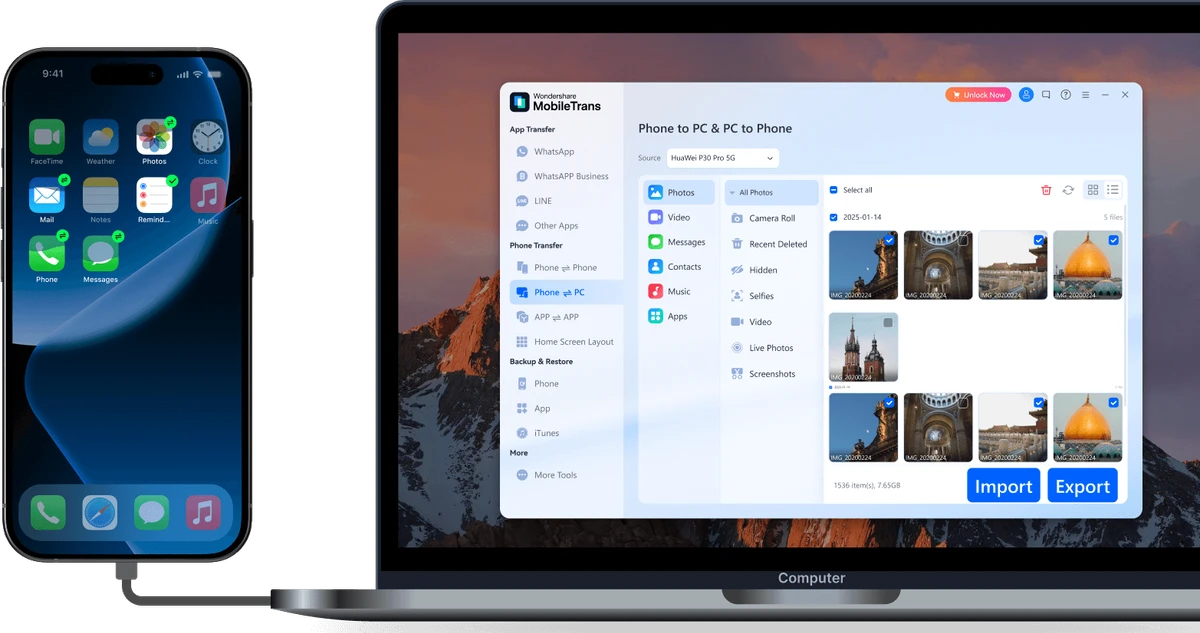

Switching to a new smartphone can be stressful, especially when trying to move contacts, photos, messages, and apps without losing important data. Wondershare MobileTrans is designed to simplify this process by providing an easy-to-use desktop solution for transferring data directly between mobile devices, as well as creating backups that can be restored later. Supporting thousands of devices across multiple mobile platforms, MobileTrans focuses on making phone migration quick, secure, and accessible for everyday users.
Overview
Wondershare MobileTrans is a phone data transfer and backup utility that helps users move content between smartphones and tablets running different operating systems. Instead of transferring only contacts, it supports a much broader range of data, including text messages, photos, videos, music, apps, and call logs. The software also includes backup and restore functionality, allowing users to create local backups on a Windows PC or Mac before restoring them to another compatible device. With its straightforward workflow and broad device compatibility, MobileTrans is suitable for users upgrading to a new phone or safeguarding important mobile data.
Features of Wondershare MobileTrans
- Direct phone-to-phone data transfer
- Transfer contacts, SMS, call logs, photos, videos, music, apps, and other supported data
- Backup mobile devices to Windows PC or Mac
- Restore backups to another compatible device
- Supports over 6,000 mobile devices
- Compatible with Android, iPhone, Windows Phone, BlackBerry, and Symbian devices
- Restore backups from:
- iTunes
- iCloud
- BlackBerry Backup
- OneDrive
- Samsung Kies
- Works with smartphones and tablets from:
- Apple
- Samsung
- HTC
- LG
- Sony
- HUAWEI
- Motorola
- ZTE
- and many others
- Direct transfer without cloud storage
- Local processing for improved privacy
- Existing data is not overwritten unless the user chooses to erase it
- Option to permanently erase data from the original device after migration
- Simple guided transfer process
- Fast transfer speeds
User Experience
Wondershare MobileTrans is designed with simplicity in mind. The interface walks users through the migration process step by step, making it approachable even for those with little technical experience. Getting started is straightforward. After installing the software, users simply connect both devices to the computer, choose the Phone to Phone Transfer option, and select the data they want to move. The clean interface minimizes confusion and helps reduce the chance of transferring the wrong information.
One of the software's biggest strengths is its broad compatibility. It supports transfers between different mobile platforms, allowing users to migrate from Android to iPhone, iPhone to Android, or between devices running other supported operating systems without relying solely on manufacturer-specific tools. The built-in backup and restore feature adds extra flexibility. Users can create local backups before replacing or resetting a device, then restore that data later to another supported phone. This makes MobileTrans useful not only for upgrading devices but also for protecting important personal information.
Privacy is another notable aspect. According to the provided information, MobileTrans processes data locally on the user's computer and does not store personal information in the software or upload it to cloud services.
Who Should Use Wondershare MobileTrans?
- Users upgrading to a new smartphone
- Android-to-iPhone switchers
- iPhone-to-Android switchers
- Users replacing damaged devices
- People who want local phone backups
- Families managing multiple mobile devices
- Business users migrating company phones
- Anyone looking for a simple, guided phone transfer solution
Conclusion
Wondershare MobileTrans offers a convenient solution for transferring data between mobile devices without requiring complicated setup or cloud-based migration. Its support for thousands of smartphones, combined with local backup and restore capabilities, makes it a practical tool for users moving to a new device or creating reliable backups.


