FileLegit Windows Utilities Disk Tools EF Duplicate Files Manager
EF Duplicate Files Manager logo

EF Duplicate Files Manager 26.05

  • User Rating:
    ★★★★★
    ★★★★★
    0.0 0Votes
  • Requirements:
    Windows
  • Version: 26.05
  • Latest updated: 1 week ago
  • License: Free Trial  
  • Publisher: EF Software
  • Size: 4 MB
× app stores

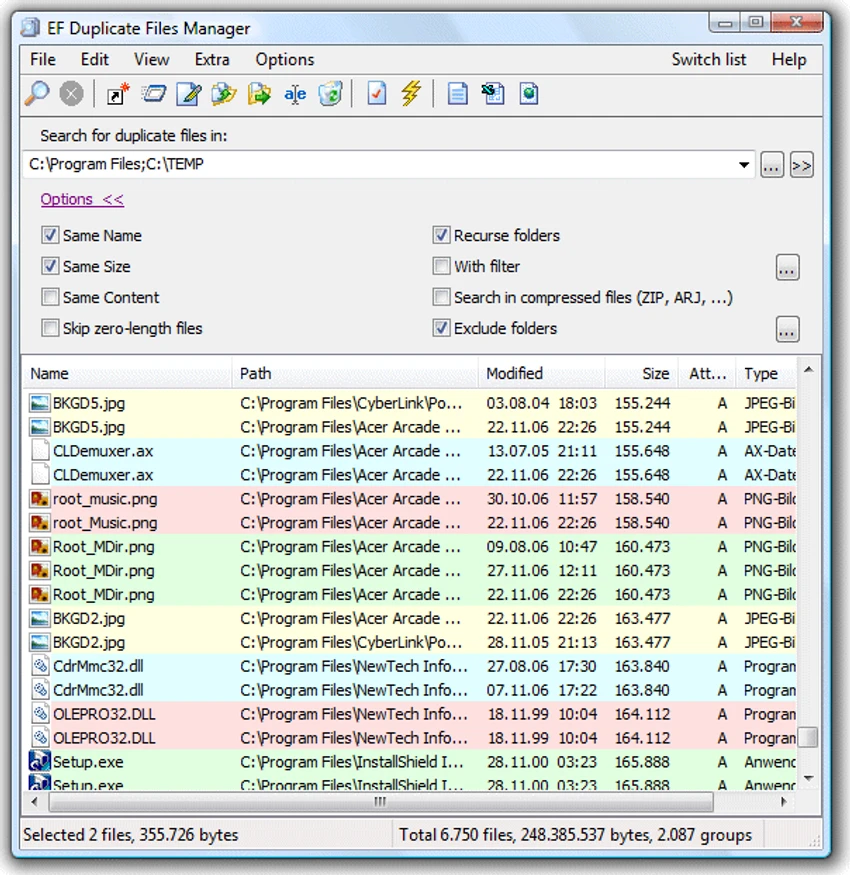
EF Duplicate Files Manager is a dedicated duplicate file detection and management tool designed to help users identify and remove redundant files that consume valuable storage space. By comparing files based on name, size, and even content, the software can locate exact duplicates across multiple drives, folders, archives, and disk image files. Whether you're cleaning up a personal computer, organizing a large media collection, or maintaining a file server, EF Duplicate Files Manager provides flexible scanning options and management tools to simplify duplicate file removal.

Features of EF Duplicate Files Manager

Duplicate File Detection

  • Find duplicate files by filename
  • Compare files by file size
  • Verify duplicates through content analysis
  • Identify completely identical files

Multi-Location Scanning

  • Scan multiple drives simultaneously
  • Search multiple folders and paths
  • Analyze local storage locations
  • Suitable for large file collections

Archive File Support

  • Scan contents of compressed archives
  • Supports ZIP and Zip64
  • Supports RAR
  • Supports 7Z and TAR variants
  • Supports CAB, ARJ, ACE, BZIP2, GZIP, LHA, RPM, SQX, XZ, ZOO, and more

Disk Image Support

  • Analyze ISO files
  • Analyze IMG files
  • Analyze UDF image files

Advanced Search Filters

  • Filter by file type
  • Filter by file size
  • Filter by file date
  • Custom search criteria

Exclusion Controls

  • Exclude selected folders
  • Exclude subfolders automatically
  • Skip system folders
  • Prevent scanning of backup locations

Duplicate File Management

  • Delete duplicate files
  • Copy duplicate files
  • Move duplicate files
  • Rename duplicate files
  • Save duplicate file lists for later processing

Reporting & Export

  • Export results to HTML
  • Export results to CSV
  • Export results to plain text
  • Color-coded result display

Additional Features

  • Multilingual support
  • Visual duplicate grouping
  • Compatible with very old and modern Windows systems

User Experience

EF Duplicate Files Manager is designed to make duplicate file detection both flexible and efficient. Unlike basic duplicate finders that rely solely on filenames, this software allows users to progressively increase search accuracy by comparing file sizes and, when necessary, actual file content. This layered approach is particularly useful because it gives users control over the balance between speed and precision. Quick scans can identify potential duplicates based on names, while deeper content analysis ensures only truly identical files are reported.

One of the software's standout features is its ability to scan inside archive files and disk images. This expands its usefulness beyond standard file systems, making it suitable for users who maintain software archives, backups, ISO collections, or compressed storage libraries.

The color-coded results list improves readability and helps users quickly identify groups of duplicate files. Once duplicates are found, the software provides several management options, including deletion, copying, moving, or renaming files. Advanced users will appreciate the filtering and exclusion options. Being able to skip Windows backup folders, system directories, or specific locations not only speeds up scanning but also reduces the risk of accidentally modifying important files.

Overall, EF Duplicate Files Manager balances thorough scanning capabilities with practical file management tools, making it suitable for both routine cleanups and large-scale storage optimization projects.

Conclusion

EF Duplicate Files Manager provides a powerful and reliable way to locate duplicate files across local drives, archives, and disk images. Its ability to compare filenames, sizes, and actual file content ensures accurate results while giving users control over how duplicates are managed.

Pros & Cons

Pros

  • Multiple duplicate detection methods
  • Content-based duplicate verification
  • Scans multiple drives and folders
  • Supports archive file analysis
  • Supports ISO and disk image scanning
  • Flexible filtering options
  • Folder exclusion support
  • Multiple file management actions
  • Exportable reports
  • Color-coded result presentation
  • Broad Windows compatibility
  • Multilingual interface

Cons

  • Deep content analysis may take longer on large datasets
  • Interface focuses on functionality rather than modern design
  • Advanced options may require some learning for new users

Frequently Asked Questions

What is EF Duplicate Files Manager?

EF Duplicate Files Manager is a utility that finds and manages duplicate files by comparing filenames, file sizes, and file contents.

Can it find exact duplicate files?

Yes. The software can perform content analysis to identify files that are completely identical.

Does it support archive files?

Yes. It can analyze the contents of numerous archive formats, including ZIP, RAR, 7Z, CAB, TAR, and many others.

Can it scan ISO images?

Yes. The software supports scanning ISO, IMG, and UDF disk image files.

What can I do with detected duplicates?

You can delete, copy, move, rename, or export lists of duplicate files for later review.

Can I exclude folders from scans?

Yes. The software allows users to create exclusion lists that prevent selected folders and subfolders from being scanned.

Which Windows versions are supported?

EF Duplicate Files Manager supports Windows 11, Windows 10, Windows 8/8.1, Windows 7, Windows Vista, Windows XP, Windows Server editions, Windows 2000, Windows NT 4, Windows ME, Windows 98, and Windows 95.

Recommended apps [Freeware]:
  • EarthTime 6.33.6 EarthTime logo displays world clocks, weather, and local times for 120,000+ cities with customizable alarms and maps.
  • Autoruns 14.30 Autoruns logo a Windows startup manager that reveals and controls all autostart programs, services, drivers, and registry entries
  • Hasleo Disk Clone 5.8.2.1 Hasleo Disk Clone logo clone disks, migrate Windows systems, and transfer partitions with fast and reliable tools.
  • PrivaZer 4.0.124.1 PrivaZer logo a privacy cleaning tool that removes PC traces, frees disk space, and helps protect personal data
  • Fastfetch 2.65.2 Fastfetch logo open-source system information tool that displays hardware and OS details with customizable output
  • FTP Rush 3.6.7 FTP Rush logo cross-platform FTP/SFTP and cloud storage client supporting server-to-server transfers, scripting, and multi-protocol file management
Recommended apps [Shareware]:
  • Secret Disk 2026 v323 Secret Disk logo create hidden, password-protected virtual drives to securely store private files on Windows
  • 4DDiG File Repair 4.4.2.9 4DDiG File Repair logo a Windows tool for repairing damaged photos and videos in batch mode with a simple, automated workflow
  • SQL Backup Master 8.5.1102.0 SQL Backup Master logo SQL Server backups with cloud storage, encryption, scheduling, and recovery features
  • Advanced Installer 23.8 Advanced Installer logo Windows MSI packaging tool for developers to build, customize, and deploy reliable installers
  • Capture One 16.8.2.3615 Capture One logo professional RAW photo editor with advanced color accuracy, tethered shooting, and studio workflow tools for photographers
  • Agisoft Metashape Professional 2.3.2 Build 22626 Agisoft Metashape Professional logo photogrammetry software that generates accurate 3D models, orthomosaics, and spatial data from digital images