


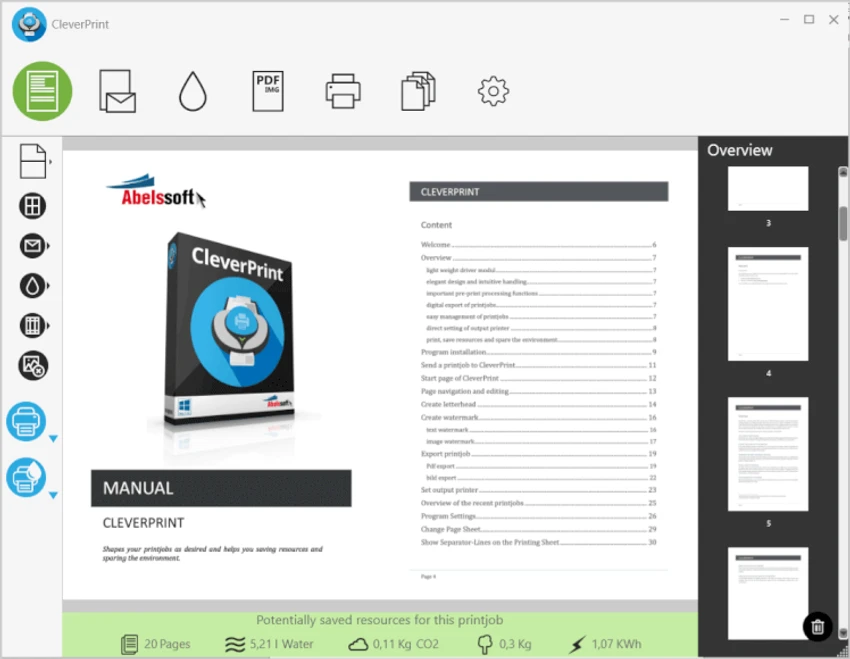

CleverPrint is a virtual printing solution designed to help Windows users reduce printing costs while improving document layout and print quality. By intercepting print jobs before they reach a physical printer, it allows users to preview, rearrange, and optimize pages, remove unnecessary content, and export documents to PDF or image formats. With built-in features such as multi-page printing, watermark support, toner saving, and print job management, CleverPrint offers an efficient way to minimize paper and ink usage without complicating the printing process.
Features of CleverPrint
- Print multiple pages on a single sheet (1, 2, 4, or 8 pages per sheet)
- Remove unwanted pages before printing
- Rearrange pages within print jobs
- Combine print jobs from multiple applications
- Add text or image watermarks
- Insert saved letterheads into documents
- Export print jobs as:
- JPG
- PNG
- Other image formats
- Toner-saving mode to reduce ink consumption
- Remove graphics from print jobs to lower printing costs
- Print preview before final output
- Manage and reuse saved letterheads
User Experience
CleverPrint integrates seamlessly into the Windows printing process by appearing as a virtual printer. Instead of sending documents directly to a printer, users are presented with a preview window where they can optimize the print job before final output. The interface focuses on practical printing tasks rather than overwhelming users with unnecessary options. Rearranging pages, deleting unwanted pages, and placing multiple pages on a single sheet can all be completed with only a few clicks.
One particularly useful capability is the ability to merge print jobs from different applications. For example, users can combine pages from Microsoft Word and Excel into a single print job, simplifying document preparation. The toner-saving mode provides an additional benefit by lightening printed content to reduce ink consumption, while optional graphic removal helps further lower printing costs for text-heavy documents.
Exporting print jobs to PDF or common image formats also makes CleverPrint useful beyond physical printing, allowing users to archive or digitally share documents without requiring additional software. Overall, CleverPrint delivers an efficient and user-friendly printing workflow focused on saving both time and printing expenses.
Who Should Use CleverPrint?
- Home users looking to reduce printing costs
- Office environments with frequent printing
- Students printing reports and study materials
- Businesses creating professional documents
- Users who regularly save documents as PDF
- Anyone wanting better control over print jobs
Conclusion
CleverPrint enhances the standard Windows printing experience by providing useful tools that help reduce waste and improve document presentation. Features such as multi-page printing, toner saving, watermark support, and PDF export make it a practical solution for anyone who prints regularly.


