Microsoft Edge logo

Microsoft Edge 149.0.4022.96

  • User Rating:
    ★★★★★
    ★★★★★
    0.0 0Votes
  • Requirements:
    Windows
  • Version: 149.0.4022.96
  • Latest updated: 4 days ago
  • License: Freeware  
  • Publisher: Microsoft
  • Size: 193 MB
× app stores

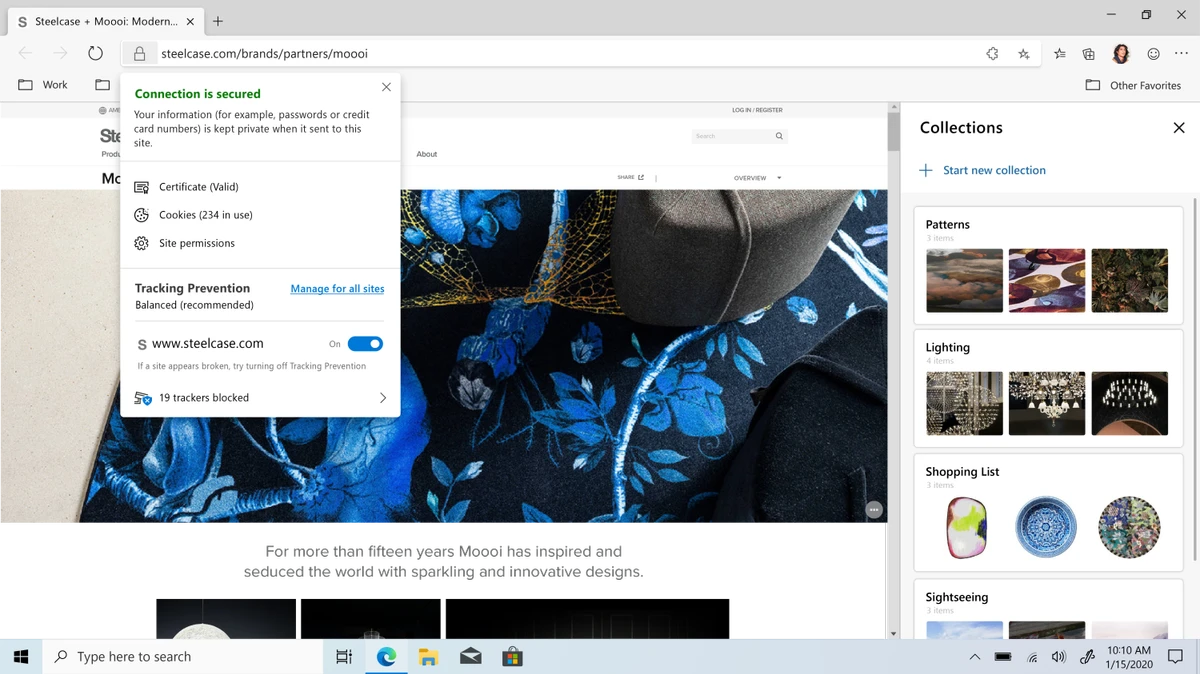
Microsoft Edge is a modern web browser developed by Microsoft, rebuilt on the Chromium engine to deliver improved speed, compatibility, and performance. It combines strong security features, privacy controls, and productivity tools, making it a versatile browser for everyday use.

Overview of Microsoft Edge

Microsoft Edge is designed as a fast and secure browsing solution for Windows and other platforms. By adopting the Chromium foundation, it supports a wide range of web standards and is compatible with extensions from both the Chrome Web Store and the Microsoft Edge Add-ons store. The browser focuses on balancing performance with productivity and privacy. It includes built-in tools for reading, note-taking, and media consumption, while also providing security features such as phishing protection and tracking prevention.

Microsoft Edge is available across Windows, macOS, iOS, and Android, making it a cross-device browsing solution.

Features of Microsoft Edge

  • Chromium-based engine for fast performance and wide compatibility
  • Supports extensions from Chrome Web Store and Microsoft Edge Add-ons
  • Built-in Tracking Prevention and InPrivate browsing mode for privacy control
  • Microsoft Defender SmartScreen for protection against phishing and malware
  • Customizable new tab page with Focused, Inspirational, or Informational layouts
  • Integrated tools for reading, note-taking, and productivity
  • Supports 4K Ultra HD streaming on Windows 10
  • Cross-platform availability on Windows, macOS, iOS, and Android
  • Seamless integration with Microsoft services and ecosystem

User Experience

Microsoft Edge delivers a smooth and responsive browsing experience, especially on Windows systems where it is tightly integrated into the operating system. Pages load quickly, and tab management feels stable even with multiple open tabs. The built-in privacy and security features run quietly in the background, offering protection without disrupting daily browsing. Features like tracking prevention and SmartScreen help reduce exposure to malicious websites. The browser also stands out for its productivity tools, such as reading mode and built-in note-taking, which are useful for students and professionals who frequently work with web content.

Conclusion

Microsoft Edge is a powerful and well-rounded browser that combines speed, security, and productivity features in a modern Chromium-based platform. It is especially appealing to Windows users but works well across multiple devices and operating systems.

Pros & Cons

Pros

  • Fast performance due to Chromium base
  • Strong built-in security and privacy features
  • Supports Chrome extensions
  • Cross-platform availability
  • Useful built-in productivity tools
  • Good integration with Windows ecosystem

Cons

  • Heavily tied to Microsoft services for full experience
  • Some users may prefer lighter or more minimal browsers
  • Occasional prompts promoting Microsoft ecosystem features

Frequently Asked Questions

What is Microsoft Edge used for?

Microsoft Edge is used for browsing the web with improved speed, security, and productivity tools.

Is Microsoft Edge based on Chromium?

Yes, it is built on the Chromium engine, ensuring compatibility with most modern websites and extensions.

Can Microsoft Edge use Chrome extensions?

Yes, it supports extensions from both the Chrome Web Store and Microsoft Edge Add-ons store.

Is Microsoft Edge available on mobile?

Yes, it is available on Android and iOS in addition to Windows and macOS.

Recommended apps [Freeware]:
  • IObit Driver Booster 13.5.0.239 IObit Driver Booster logo updates outdated drivers automatically to boost system stability and gaming performance.
  • EarthTime 6.33.6 EarthTime logo displays world clocks, weather, and local times for 120,000+ cities with customizable alarms and maps.
  • Stretchly 1.21.0 Stretchly logo reminds you to take breaks while working on your computer, promoting better health and productivity.
  • Executor 2.3.8 Executor logo a customizable Windows launcher with hotkeys, keyword commands, automation tools, notes, and workflow enhancements
  • Ventoy 1.1.16 + LiveCD Ventoy logo create bootable USB drives and boot directly from ISO files without extraction or reformatting
  • Quick CPU 6.6.0 Quick CPU logo Monitor core parking, turbo boost, frequency scaling, and system power in real time
Recommended apps [Shareware]:
  • Gilisoft Screen Recorder Pro 13.1 Gilisoft Screen Recorder Pro logo a Windows tool for capturing screen, webcam, and audio with editing features, GPU acceleration, and multiple formats
  • GoodSync 12.11.4.4 GoodSync logo a secure file backup and synchronization tool with real-time transfer, encryption, and version control support
  • XL-Connector 3.7.14.0 XL-Connector logo Excel plugin for Salesforce data export, import, bulk updates, and metadata management.
  • Pano2VR 8.0.4 Pano2VR logo powerful software for building interactive panoramic images and virtual tours for desktop and mobile platforms
  • Malwarebytes 5.24.0.4031 Malwarebytes logo cybersecurity tool that detects and removes malware, ransomware, spyware, and phishing threats with real-time protection on Windows
  • BootIt Bare Metal 2.12 BootIt Bare Metal logo combines partition management, multi-boot support, and disk imaging into one powerful tool for Windows users