Total Excel Converter logo

Total Excel Converter 7.1.0.126

  • User Rating:
    ★★★★★
    ★★★★★
    0.0 0Votes
  • Requirements:
    Windows
  • Version: 7.1.0.126
  • Latest updated: 1 week ago
  • License: Free Trial  
  • Publisher: Coolutils
  • Size: 37 MB
×

Total Excel Converter is a Windows-based file conversion utility designed to transform spreadsheet files into a wide variety of formats. It supports Excel, OpenOffice, and multiple legacy table formats, making it a versatile tool for users who need to convert structured data into documents, databases, or web-ready formats.

Total Excel Converter allows users to convert spreadsheet files such as XLS, XLSX, ODS, CSV, and many older formats into multiple output types including PDF, DOC, HTML, SQL, Access databases, and image formats. The software is designed for flexibility, offering batch processing, sheet-by-sheet conversion, and advanced PDF protection options such as permission control. It also supports command-line automation and integrates into Windows for quick file handling.

Features of Total Excel Converter

  • Converts Excel formats (XLS, XLSX, XLSM, XLSB) and OpenOffice files (ODS, OTS, etc.)
  • Supports legacy spreadsheet formats (DBF, DIF, WK, WQ, SLK, and more)
  • Converts spreadsheets to PDF, DOC, DOCX, HTML, TXT, SQL, CSV, and Access formats
  • Exports to image formats like JPEG, TIFF, and SVG
  • Converts each sheet into a separate file
  • PDF export with password protection and permission settings
  • Batch conversion support for multiple files
  • Command-line automation support
  • Built-in file renamer for output organization
  • Supports chart conversion from Excel files
  • Fit-to-page output option for documents
  • ActiveX and server version support for enterprise use

User Experience

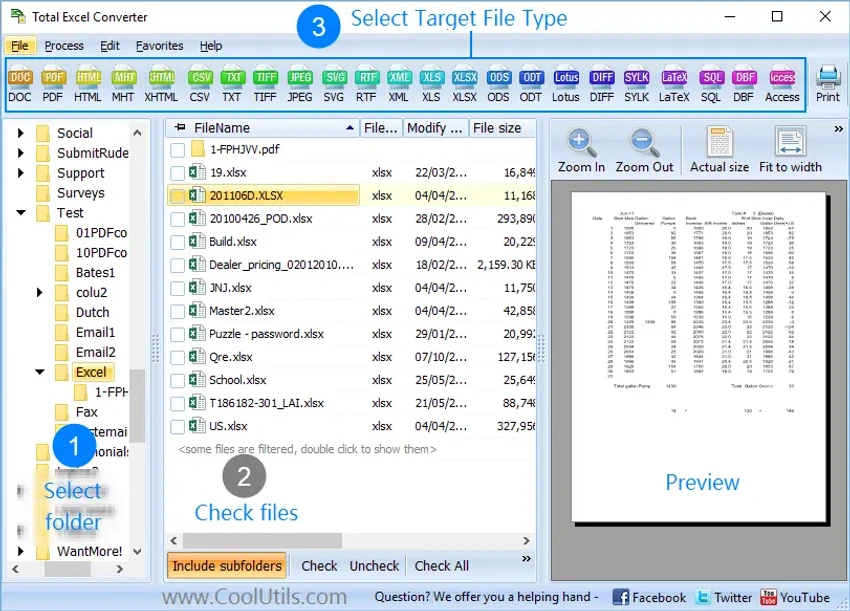
Using Total Excel Converter feels practical and workflow-focused. The interface is built around selecting source spreadsheets and choosing output formats, making it relatively easy to perform conversions without deep technical knowledge. Batch processing is one of its strongest advantages, especially for users handling large datasets or repeated conversion tasks. The ability to convert each worksheet separately adds flexibility for structured reporting or data distribution.

Who Should Use Total Excel Converter?

  • Office users converting spreadsheets into PDFs or documents
  • Data analysts exporting structured data into different formats
  • Businesses migrating spreadsheet data into databases
  • Users working with legacy spreadsheet formats
  • IT teams needing batch conversion tools

Conclusion

Total Excel Converter is a reliable and flexible tool for converting spreadsheet data into a wide range of formats. It is especially useful for professionals who frequently need to export Excel or OpenOffice files into documents, databases, or web formats.

Pros & Cons

Pros

    • Supports a very wide range of spreadsheet formats
    • Strong batch conversion capabilities
    • Converts to many output types (PDF, DOC, SQL, images, etc.)
    • Includes PDF protection and permissions
    • Command-line support for automation
    • Handles legacy and modern file formats

Cons

    • Interface is functional but not modern
    • No built-in spreadsheet editing or analysis tools
    • No official update log provided
    • Focused purely on conversion tasks

Frequently Asked Questions

What is Total Excel Converter used for?

Total Excel Converter is used to convert Excel and spreadsheet files into formats like PDF, DOC, HTML, CSV, SQL, and more.

Does it support OpenOffice files?

Yes, it supports ODS and other OpenOffice spreadsheet formats.

Can it convert spreadsheets to PDF?

Yes, and it also allows setting permissions and protections on PDF output.

Does it support batch conversion?

Yes, it can convert multiple files at once.

Can it export Excel data to databases?

Yes, it supports export to formats like SQL and Access databases.

Recommended apps [Freeware]:
  • IObit Driver Booster 13.4.0.234 IObit Driver Booster logo updates outdated drivers automatically to boost system stability and gaming performance.
  • Stretchly 1.21.0 Stretchly logo reminds you to take breaks while working on your computer, promoting better health and productivity.
  • TreeSize 9.8.1.2302 TreeSize logo Windows disk space analyzer to scan, visualize, and clean storage efficiently with reports.
  • FastCopy 5.11.3 FastCopy logo a lightweight Windows tool for ultra-fast file copying, syncing, and error-resilient data transfer
  • WSCC - Windows System Control Center 10.0.3.8 WSCC - Windows System Control Center logo Windows utility manager that installs, organizes, and runs Sysinternals and system tools from one central interface
  • AnyTXT Searcher 1.3.3173 AnyTXT Searcher logo fast desktop search tool that indexes and searches full-text content across documents, PDFs, emails, and more
Recommended apps [Shareware]:
  • Sidify Spotify Music Converter 2026 Sidify Spotify Music Converter logo convert Spotify songs, playlists, and podcasts to MP3, AAC, FLAC, and WAV formats.
  • Coolutils Print Maestro 4.2.0.0 Coolutils Print Maestro logo print folder contents, export directory trees, and generate detailed file reports quickly
  • Wondershare Filmora 15.3.20.18660 Wondershare Filmora logo a powerful, user-friendly video editor with effects, transitions, and 4K support.
  • DBConvert Studio 4.3.1 DBConvert Studio logo simplifies database migration and synchronization across multiple database platforms.
  • Send Anywhere 24.6.0 Send Anywhere logo free cross-platform file-sharing tool that transfers files of any size without registration.
  • Any video Converter 9.2.3 Any video Converter logo video conversion tool that supports multiple formats, editing features, and device-ready output profiles