


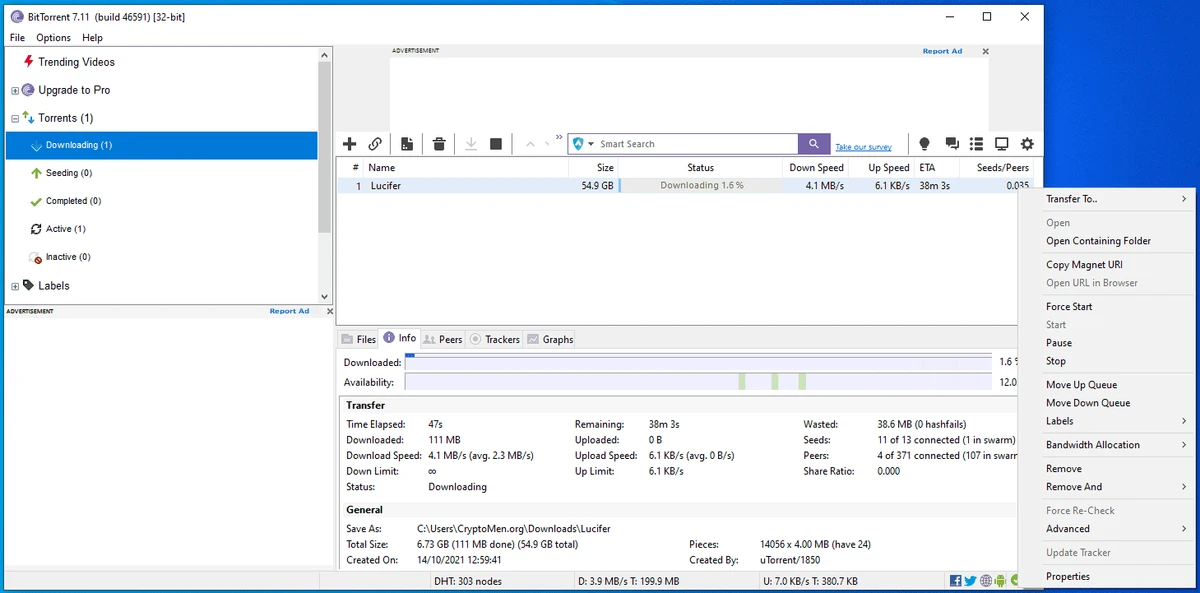

BitTorrent is a peer-to-peer (P2P) file sharing client built on the BitTorrent protocol, designed to distribute large files efficiently across the internet. Instead of relying on a single server, it allows users to download and upload pieces of files simultaneously, improving speed and scalability for large distributions. It is widely used for downloading large files such as software distributions, media content, and open datasets in a more efficient and distributed way than traditional HTTP downloads.
Overview
BitTorrent works by splitting files into small chunks and sharing them among multiple users in a “swarm.” As users download data, they also upload it to others, reducing the load on any single source. This decentralized approach makes it highly scalable, especially for large files or popular downloads accessed by many users at once. The client also includes bandwidth management tools and connection optimization features to maintain performance during active downloads.
Features of BitTorrent
- Peer-to-peer (P2P) file sharing protocol support
- Lightweight client designed for efficient downloads
- Multiple simultaneous downloads
- Local peer discovery for faster connections
- Configurable bandwidth scheduler
- Global and per-torrent speed limits
- Resume support for interrupted downloads
- RSS feed downloader for automated downloads
- Trackerless support using Distributed Hash Table (DHT)
- Detailed file health and swarm statistics
- Dynamic bandwidth management to avoid disrupting other apps
- Secure and spyware-free client implementation
- Fast connection setup using Canonical Peer Priority
- Optional pro features including streaming and file conversion tools
Features in the PRO version:
- View or preview torrents as they download, without waiting for the file to complete.
- BitTorrent Pro automatically scans and checks your torrent content for viruses and malware. It's designed to keep your library, and your PC, safe.
- BitTorrent Pro lets you open and manage media files from any device, even when you're not far from your home screen.
- Our technology splits large files into smaller parts. The files are then downloaded, piece by piece, from one or more different sources. Since the files are split into small chunks, you use less bandwidth. That means your downloads will move much faster.
- With BitTorrent, there are no limits on the number of files you can download or the amount of data you can move.
- BitTorrent automatically adjusts bandwidth usage based on your network and internet connection to ensure fast file delivery.
User Experience
BitTorrent provides a straightforward interface focused on managing active downloads and monitoring their progress. Users can easily add torrent files or magnet links, adjust speed limits, and monitor peer connections in real time. Performance is generally strong when swarms are healthy, with download speeds often improving as more peers join. The client also offers useful controls for managing network usage, making it suitable for users who need downloads to run in the background without affecting other tasks. However, performance heavily depends on swarm availability, meaning download speeds can vary significantly between files.
Who Should Use BitTorrent?
BitTorrent is best suited for:
- Users downloading large files efficiently across multiple peers
- Developers distributing open-source software or datasets
- Users with limited bandwidth who benefit from distributed downloads
- People who need resumable and stable large file transfers
- Advanced users managing multiple simultaneous downloads
Conclusion
BitTorrent is a powerful and efficient file sharing solution built for large-scale data distribution. Its peer-to-peer architecture makes it highly effective for handling large files and reducing server load.


