Godot Game Engine logo

Godot Game Engine 4.7.1

  • User Rating:
    ★★★★★
    ★★★★★
    0.0 ★ 0Votes
  • Requirements:
    Windows
  • Version: 4.7.1
  • Latest updated: 1 week ago
  • License: Open Source  
  • Publisher: Godot Engine
  • Size: 81 MB
× app stores

Godot Game Engine is a free and open-source game development platform that enables developers to create both 2D and 3D games within a unified development environment. Designed to simplify the game creation process without limiting flexibility, it provides a comprehensive set of built-in tools that allow developers to focus on designing gameplay, building levels, and creating interactive experiences instead of assembling multiple third-party solutions.

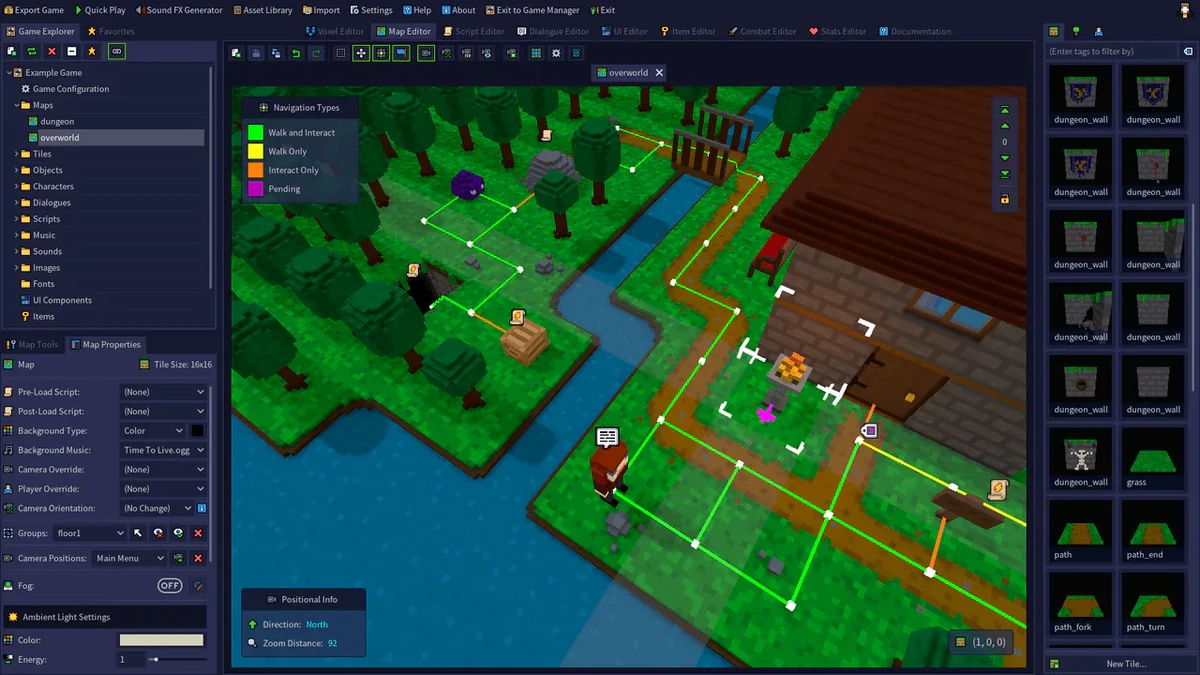
At the heart of Godot is its node-based architecture, which allows games to be built from reusable components that can be combined into flexible scenes. Developers can use hundreds of built-in nodes or create custom ones to implement unique behaviors and workflows. The engine also includes a visual editor with a clean, context-sensitive interface that helps streamline development for programmers, artists, designers, and animators alike.

Godot supports the complete game production pipeline with tools for scene creation, animation, level design, and content management. Live editing allows many changes to remain available while testing projects, making iteration faster during development. Once a project is complete, it can be exported to a wide range of platforms, including Windows, macOS, Linux, Android, iOS, HTML5, and other supported environments. Its open-source license and active community have made Godot a popular choice for indie developers, students, and professional game creators.

Features of Godot Game Engine

  • Free and open-source game engine
  • Unified environment for 2D and 3D game development
  • Node-based development system
  • Flexible scene composition with instancing and inheritance
  • Hundreds of built-in nodes
  • Create custom nodes, tools, and editors
  • Visual, context-sensitive editor
  • Integrated content creation pipeline
  • Live editing during development
  • Cross-platform project export
  • Support for Windows, macOS, Linux, Android, iOS, and HTML5
  • Support for VR and AR platforms
  • Suitable for artists, designers, animators, and programmers

Interface and Usability

Godot features a clean and well-organized interface that keeps development tools accessible without overwhelming new users. The visual editor groups commonly used tools into logical workspaces, making it easy to switch between scene editing, animation, scripting, and project management.

The engine's node and scene system simplifies project organization by encouraging reusable components and modular design. Developers can build complex scenes by combining smaller elements instead of creating everything from scratch. Live editing further improves productivity by allowing many changes to remain available during testing, reducing repetitive setup during development. Although beginners will need time to understand concepts such as nodes and scenes, the interface remains approachable compared with many professional game engines.

Who Should Use Godot Game Engine?

  • Indie game developers
  • Professional game studios
  • Students learning game development
  • Developers creating 2D games
  • Developers building 3D projects
  • Artists and level designers
  • Educators teaching game design
  • Anyone looking for a free, open-source game engine

Conclusion

Godot Game Engine delivers a complete game development environment without licensing costs, making it one of the strongest open-source alternatives available today. Its combination of a flexible node-based architecture, visual editor, integrated production tools, and broad platform support allows developers to create everything from simple 2D projects to complex 3D games within a single application. The active community and open-source development model also ensure continuous improvements and long-term accessibility.

Pros & Cons

✓

Pros

  • Completely free and open source
  • Supports both 2D and 3D game development
  • Unified development environment
  • Flexible node and scene system
  • Cross-platform export capabilities
  • Built-in tools for artists, designers, and programmers
  • Live editing improves development workflow
  • Active open-source community
✕

Cons

  • Learning the node-based workflow may take time for beginners
  • Advanced projects require familiarity with game development concepts

Frequently Asked Questions

What is Godot Game Engine used for?

Godot Game Engine is used to develop 2D and 3D games. It provides tools for scene creation, animation, scripting, level design, visual editing, and exporting games to multiple platforms.

Is Godot Game Engine free?

Yes. Godot is completely free and open source. It is released under an open-source license that allows individuals and organizations to use, modify, and distribute the software.

Which platforms can games created with Godot be exported to?

Godot supports exporting projects to Windows, macOS, Linux, Android, iOS, HTML5, and other supported platforms, including selected virtual and augmented reality devices.

Is Godot suitable for beginners?

Yes. Godot is designed to be approachable for newcomers while still providing advanced tools for experienced developers. Learning concepts such as nodes and scenes takes some practice, but the interface is relatively beginner-friendly.

Can Godot create both 2D and 3D games?

Yes. Godot includes dedicated tools for both 2D and 3D development, allowing developers to work within a single unified editor.

Can I customize Godot for my own workflow?

Yes. Godot allows developers to create custom nodes, tools, and editors, making it possible to extend the engine and tailor workflows to specific project requirements.

Recommended apps [Freeware]:
  • XMedia Recode 3.6.3.1 XMedia Recode logo Free video and audio converter with GPU acceleration, batch conversion, editing tools, and subtitle support
  • ReIcon 2.3 ReIcon logo save and restore desktop icon layouts, keeping your Windows desktop organized after resolution changes
  • Quick Clipboard Editor 3.4.1.0 Quick Clipboard Editor logo edit, format, and manage clipboard text with powerful tools for productivity and automation
  • PDFCreator 6.3.0 PDFCreator logo Create PDFs from any Windows application with PDFCreator, supporting encryption, merging, and file format conversion
  • RunAsTool 1.6 RunAsTool logo Run Windows programs with administrator rights without passwords using RunAsTool, a portable privilege management utility
  • Free Music & Video Downloader 3.19 Free Music & Video Downloader logo Download music and videos from supported online sources, save MP3 files, and organize downloaded media with a simple search tool.
Recommended apps [Shareware]:
  • Digimizer 6.5.4 Digimizer logo image analysis tool for precise measurements, object detection, and scientific image processing
  • DBF Recovery 4.74 DBF Recovery logo repairs corrupted DBF database files from dBASE, FoxPro, and Visual FoxPro formats with automatic recovery tools
  • ezAccounting 3.16.18 ezAccounting logo Manage accounting, payroll, invoicing, and tax forms locally with ezAccounting, an affordable desktop solution for small businesses
  • ESET Internet Security 19.2.7.0 ESET Internet Security logo Protect your PC with ESET Internet Security, offering antivirus, firewall, anti-phishing, and online security tools
  • Cutting Optimization Pro 5.18.27.3 Cutting Optimization Pro logo Optimize 1D and 2D cutting layouts for wood, metal, glass, and more with Cutting Optimization Pro software
  • Gammadyne Mailer 74.0 Gammadyne Mailer logo Automate email campaigns, manage mailing lists, track engagement, and process messages with advanced marketing tools.