


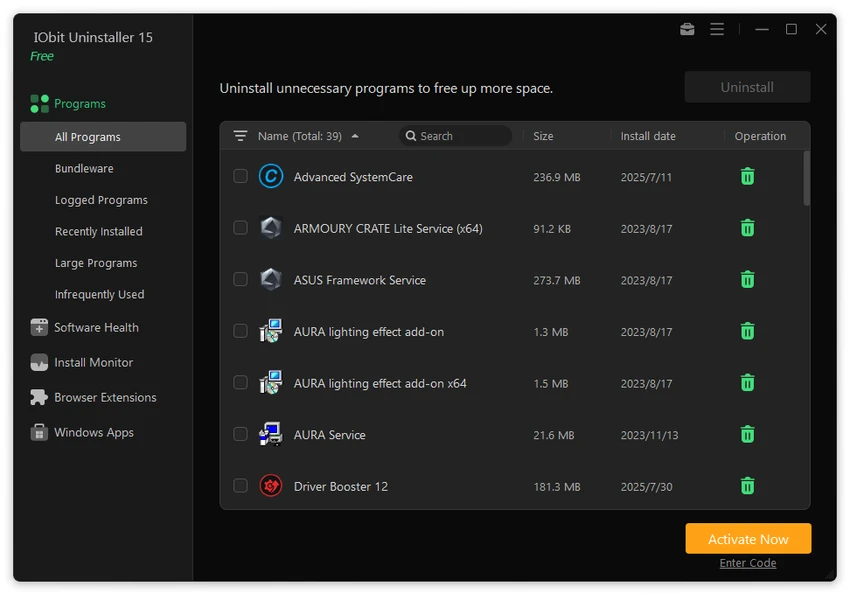

Uninstalling software through Windows often leaves behind registry entries, temporary files, and other remnants that gradually clutter your system. IObit Uninstaller is designed to solve this problem by removing applications along with their leftover files, helping keep Windows cleaner and more organized. Beyond standard program removal, the software also handles stubborn applications, browser extensions, pre-installed Windows apps, and leftover installation files, making it a comprehensive uninstallation utility for Windows users.
Overview
IObit Uninstaller is a Windows uninstaller that removes applications, browser toolbars, plug-ins, and leftover files that standard Windows uninstallers often leave behind. It also creates a system restore point before each uninstall, providing an extra layer of safety. The software supports removing traditional desktop applications, Windows apps, stubborn programs, browser extensions, and pre-installed Windows software. Additional maintenance tools help clean invalid shortcuts, installation packages, and remnants from previously removed applications. The application is available in both Free and Pro editions, with the free version covering the core uninstall features.
Key Features of IObit Uninstaller
Complete Program Removal
- Uninstall Windows desktop applications
- Remove stubborn programs
- Delete leftover files and registry entries
- Continue unfinished uninstall processes after system reboot
- Supports removal of certain antivirus software leftovers
Leftover Cleanup
- Scan for remaining files after uninstall
- Remove leftover registry entries
- Clean uninstall history remnants
- Delete unnecessary installation and update packages
- Remove invalid shortcuts
Browser Cleanup
- Remove browser toolbars
- Remove browser plug-ins and extensions
- Supports major browsers including:
- Google Chrome
- Mozilla Firefox
- Microsoft Edge
- Internet Explorer
- Opera
- Removes certain Chrome extensions not installed through the Chrome Web Store
- Blocks website notification prompts
Windows App Removal
- Remove pre-installed Windows applications
- Uninstall Universal Windows Platform (UWP) apps
Install Monitor
- Detects changes during software installation
- Records installation activities
- Helps restore monitored changes after uninstalling supported applications
- Monitors services, scheduled tasks, and DLL registrations
Software Health
- Helps identify cleanup opportunities
- Assists with maintaining system organization
Additional Tools
- Create a system restore point before every uninstall
- Easy Uninstall mode using a desktop target pointer
- Access to common Windows tools
- One-click application updates
- Modern, easy-to-use interface
User Experience
IObit Uninstaller offers a polished interface that makes software removal much easier than relying solely on the Windows uninstall feature. Applications are displayed in organized lists, allowing users to quickly locate and remove unwanted software. The strongest aspect of the application is its leftover scanning. After uninstalling a program, IObit Uninstaller searches for remaining files, folders, registry entries, and other traces that would otherwise remain on the system. This helps keep storage cleaner and reduces unnecessary clutter.
Removing stubborn software is another area where the program performs well. Applications that refuse to uninstall normally or leave incomplete uninstall processes can often be handled using the software's advanced removal options. Browser management is also convenient. Instead of manually searching through browser settings, users can review installed extensions and remove unwanted toolbars and plug-ins from supported browsers.
The built-in Install Monitor provides additional value by recording installation changes, making future removals more thorough. Combined with Software Health and the Easy Uninstall feature, the application offers several maintenance tools beyond standard software removal. Creating a restore point before each uninstall also adds an important safety measure, allowing users to recover their system if an unexpected issue occurs.
Who Should Use IObit Uninstaller?
- Windows users removing unwanted software
- Users dealing with stubborn applications
- People cleaning browser extensions and toolbars
- Users wanting to reduce leftover system clutter
- Anyone maintaining long-term Windows performance
Conclusion
IObit Uninstaller goes well beyond the standard Windows uninstall utility by removing leftover files, cleaning registry entries, and handling applications that cannot be removed normally. Features such as browser extension management, Install Monitor, Software Health, and restore point creation make it a practical maintenance tool for everyday Windows use.


