


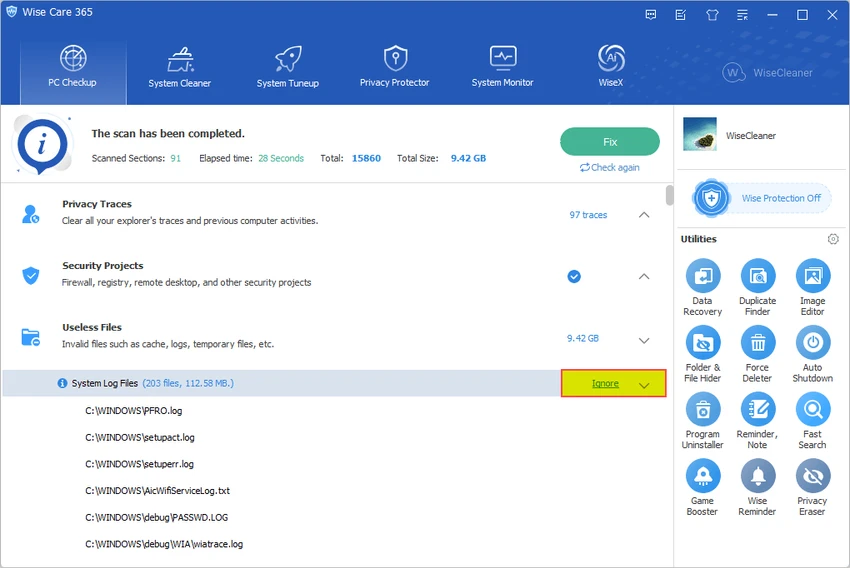

Wise Care 365 is a Windows system optimization suite designed to help users maintain and improve computer performance. The software combines several utilities for cleaning unnecessary files, managing system settings, optimizing startup processes, monitoring hardware information, and protecting user privacy.
The application provides a collection of tools focused on common PC maintenance tasks. It can scan a computer with a single click, identify areas that may need attention, remove unwanted files, and help free up disk space. Wise Care 365 also includes registry cleaning and optimization features designed to organize Windows registry entries and remove invalid items.
In addition to cleanup tools, Wise Care 365 provides system protection features that monitor certain changes to Windows settings. It can help prevent unauthorized modifications to registry settings, browser defaults, startup items, and other system-related areas.
The software also includes performance optimization tools such as disk and registry defragmentation, startup management, and process monitoring. These features allow users to review background activity, disable unnecessary startup programs, and manage system resources. For users who want an all-in-one Windows maintenance utility, Wise Care 365 offers a collection of tools for cleaning, optimizing, monitoring, and managing different aspects of system performance.
Features of Wise Care 365
- One-click PC health check
- System cleanup and performance optimization tools
- Windows registry cleaning and optimization
- Disk cleanup for removing unnecessary files
- Hardware information and system monitoring
- Real-time system protection features
- Startup program management
- Disk and registry defragmentation tools
- Privacy protection and activity cleanup
- Free up additional disk space
- Silent mode for uninterrupted operation
- Process monitoring and management tools
- Automatic updates
Interface and Usability
Wise Care 365 provides a centralized interface that brings multiple Windows maintenance tools together in one application. The one-click check feature allows users to quickly scan their system and identify areas that may require optimization.
The software organizes its tools into separate sections, making it easier to access cleanup, optimization, privacy, and monitoring functions. Users can review detected items before applying changes, which provides more control over system maintenance tasks.
The startup management and process monitoring features are useful for users who want to understand which applications are running in the background and how they affect system performance. While the range of available tools provides flexibility, some advanced maintenance options may require users to understand Windows system settings before making changes.
Who Should Use Wise Care 365?
- Users looking to clean unnecessary files from their PCs
- People managing older Windows computers
- Users who want startup optimization tools
- Anyone needing registry and disk maintenance utilities
- Users interested in privacy cleanup features
- People who want basic hardware and process monitoring
Conclusion
Wise Care 365 is a comprehensive Windows maintenance utility that combines system cleanup, optimization, privacy tools, and monitoring features in a single package. Its range of tools makes it convenient for users who prefer managing PC maintenance from one application.


