Black Menu for Google logo

Black Menu for Google 31.6.2

  • User Rating:
    ★★★★★
    ★★★★★
    0.0 ★ 0Votes
  • Requirements:
    Windows
  • Version: 31.6.2
  • Latest updated: 2 weeks ago
  • License: Freeware  
  • Publisher: Carlos Jeurissen
  • Size: 3 MB
× app stores

Black Menu is a free browser extension designed to provide quick access to a wide range of Google services directly from Chrome, Firefox, and Opera. Instead of opening separate tabs or navigating through different Google pages manually, users can access commonly used services through a convenient dropdown menu.

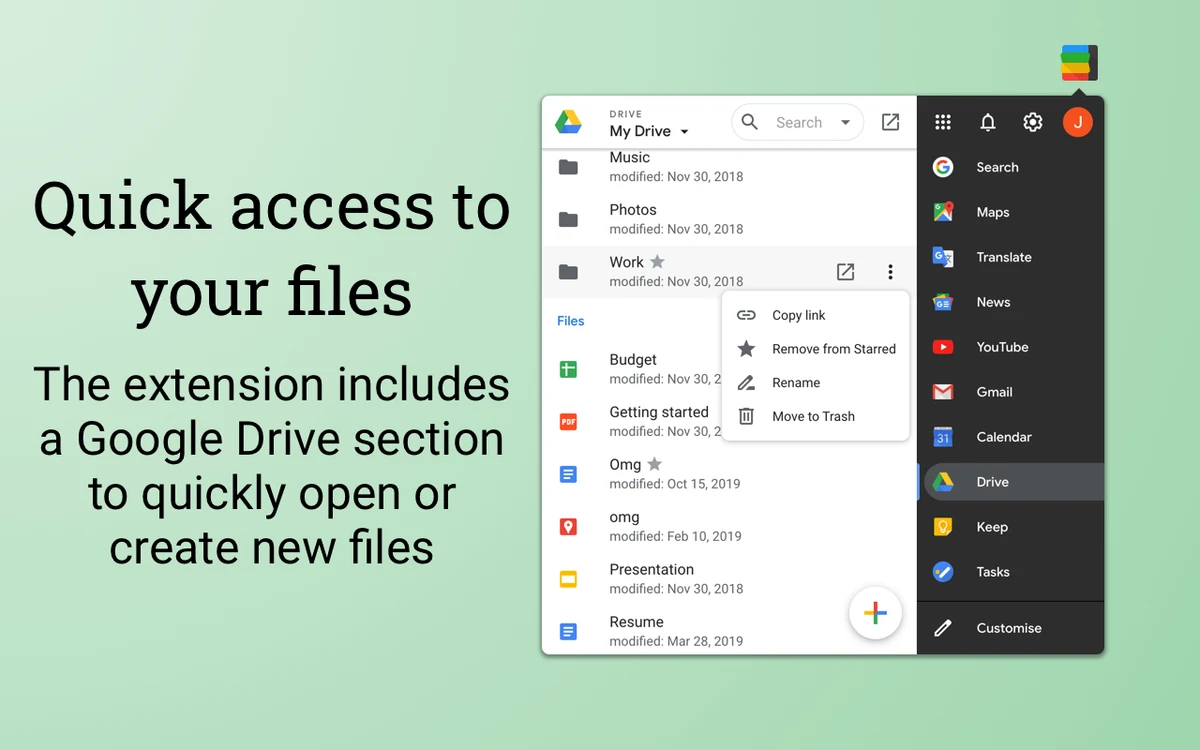
The extension works as a centralized shortcut panel for Google tools, including Search, Translate, Maps, YouTube, News, Gmail, Drive, Calendar, and Keep. Users can browse available services from the menu and open selected tools either through a preview window or in a new browser tab.

Black Menu for Google is designed as a replacement for older Google shortcuts and menu systems, offering a more convenient way to organize frequently used services. The menu can be customized by adding preferred Google services and removing those that are not needed. With support for multiple browsers and a lightweight design, Black Menu provides a simple way to improve access to Google's ecosystem without requiring users to leave their current browsing workflow.

Features of Black Menu

  • Quick access to Google services from the browser toolbar
  • Supports Google Chrome, Firefox, and Opera
  • Dropdown menu for browsing Google tools
  • Preview Google services in a small window
  • Open services in new browser tabs
  • Customizable service menu
  • Access Google Search tools
  • Quick access to Gmail
  • Browse Google Drive files
  • Use Google Maps features
  • Access YouTube searches and recommendations
  • Use Google Translate tools
  • View Google News content
  • Access Google Calendar and Google Keep
  • Lightweight browser extension

Interface and Usability

Black Menu for Google provides a straightforward interface centered around a dropdown menu that appears from the browser toolbar. The layout makes it easy to browse available Google services without opening multiple websites manually.

The extension allows users to customize the menu by selecting which Google services appear, helping keep frequently used tools within easy reach. Clicking a service can display a preview window or open the full service in a new tab. The lightweight design keeps the extension simple and focused on improving access to Google tools rather than adding unnecessary browser features.

Who Should Use Black Menu?

  • Google service users
  • Students and professionals using Google Workspace tools
  • Users who frequently switch between Google services
  • Anyone looking for faster browser shortcuts
  • Users who want a more organized Google access menu

Conclusion

Black Menu for Google is a practical browser extension for users who rely heavily on Google's ecosystem. By placing commonly used services behind a single customizable menu, it makes switching between Google Search, Gmail, Drive, Maps, YouTube, and other tools more convenient.

Pros & Cons

✓

Pros

  • Provides quick access to many Google services
  • Works with multiple popular browsers
  • Customizable service menu
  • Lightweight and easy to use
  • Reduces the need to manually search for Google tools
✕

Cons

  • Focused only on Google services
  • Some features depend on availability of the connected Google services
  • Not a replacement for full Google applications

Frequently Asked Questions

What is Black Menu for Google used for?

Black Menu for Google is a browser extension that provides quick access to various Google services through a convenient dropdown menu.

Which browsers support Black Menu for Google?

The extension supports Google Chrome, Firefox, and Opera browsers.

Can I customize the services shown in Black Menu?

Yes. Users can add preferred Google services to the menu and remove services they do not need.

Does Black Menu open Google services inside the browser?

Yes. Users can preview some services through the menu or open them directly in a new browser tab.

Which Google services can I access with Black Menu?

The extension provides access to services such as Google Search, Gmail, Translate, Maps, YouTube, News, Drive, Calendar, and Keep.

Is Black Menu for Google free?

Yes. Black Menu for Google is available as a free browser extension.

Recommended apps [Freeware]:
  • Cyberduck 9.5.2.45323 Cyberduck logo Manage FTP, SFTP, and cloud storage services like Google Drive, Dropbox, and Amazon S3 with Cyberduck for Windows
  • QueueExplorer 5.0.88 QueueExplorer logo helps developers and admins manage, test, troubleshoot, and monitor message queues across platforms
  • Wagnardsoft Tools 1.0.8.2 Wagnardsoft Tools logo Clean temporary files, repair Windows system files, and maintain your PC with Wagnardsoft Tools (WTools)
  • ShareX 21.0.0 ShareX logo a free Windows tool for screenshots, screen recording, annotation, and instant file sharing with cloud support
  • HP Easy Start 17.5.11 HP Easy Start logo Install and configure HP printer drivers easily with automatic device detection, network support, and streamlined setup tools.
  • Duplicati 2.3.0.4 Duplicati logo Create encrypted backups with flexible cloud storage support, scheduling, compression, and secure data protection features.
Recommended apps [Shareware]:
  • EF Commander 26.06 EF Commander logo a feature-rich Windows file manager with FTP, media tools, archiving, and advanced file control
  • KeyShot 2026.2 KeyShot logo real-time 3D rendering and animation software for photorealistic visuals, materials, and product design
  • MixPad 14.19 MixPad logo Record, mix, and edit unlimited audio tracks with MixPad, an intuitive multitrack audio production software
  • S3 Browser 13.3.5 S3 Browser logo Manage Amazon S3 storage and CloudFront distributions with S3 Browser for fast uploads, secure transfers, and bucket control
  • Wondershare UniConverter 17.4.4.617 Wondershare UniConverter logo converts, edits, compresses, downloads, and manages videos across multiple formats with ease
  • Rapid PHP 2025 v18.7.0.277 Rapid PHP logo Lightweight PHP editor with intelligent coding tools, debugging, FTP support, and modern web development features for Windows.