Duplicate Finder logo

Duplicate Finder 2026 v418

  • User Rating:
    ★★★★★
    ★★★★★
    0.0 0Votes
  • Requirements:
    Windows
  • Version: 2026 v418
  • Latest updated: 6 days ago
  • License: Freemium  
  • Publisher: Clean Space LTD
  • Size: 0.3 MB
× app stores

Duplicate Finder is a disk utility designed to locate and remove duplicate files such as images, videos, and other data stored on a Windows system. It uses content-based analysis rather than file names, ensuring accurate detection of duplicates and helping users reclaim valuable storage space.

Overview

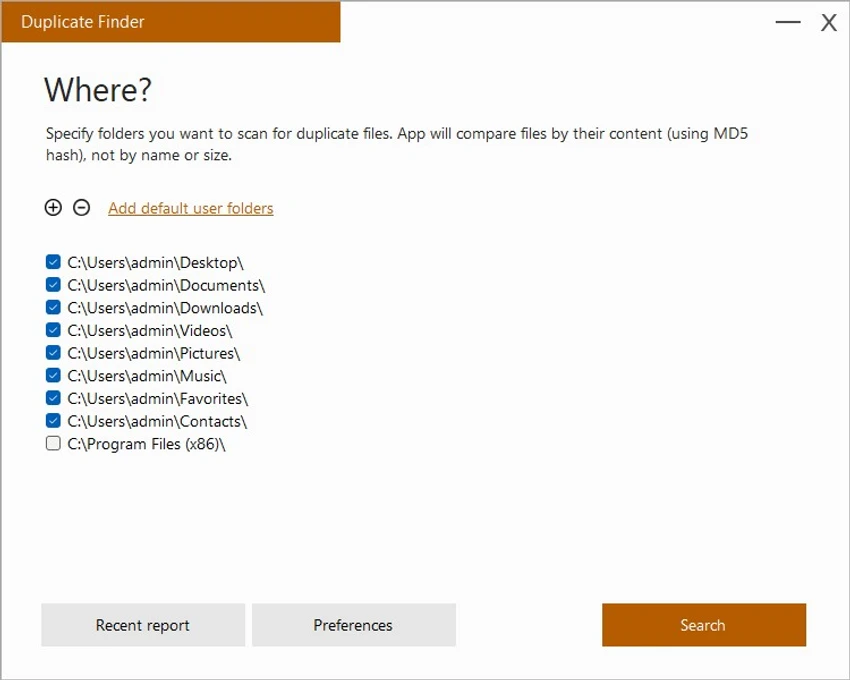
Duplicate Finder scans selected folders or entire user directories to identify duplicate files based on their actual content. By using MD5 hashing, the software compares files at a binary level, ensuring that even files with different names are correctly identified as duplicates if their contents match. The tool is designed for efficiency, allowing quick scans that can process large volumes of data in seconds. It is especially useful for users who manage large media libraries or frequently download and store files across multiple locations Once duplicates are detected, users can review results through a structured interface before deciding which files to delete or keep.

Features of Duplicate Finder

  • Detects duplicate images and videos
  • Content-based comparison using MD5 hashing
  • Scans user-selected folders or system directories
  • Fast scanning performance
  • Groups duplicates into categories (large, medium, small files)
  • Built-in file preview options
  • Open file location in Windows Explorer
  • Delete files safely to Recycle Bin
  • Session memory to retain scan results
  • Simple and organized user interface
  • Designed for handling large file collections
  • Helps reclaim disk space efficiently

User Experience

Using Duplicate Finder is straightforward and efficient. Users can select specific folders or rely on default system directories to begin scanning. The tool quickly analyzes files and groups duplicates in a way that makes review manageable, even when dealing with large datasets. One of the most useful aspects is its file preview capability. Before deleting anything, users can inspect files to ensure important data is not removed accidentally. Integration with Windows Explorer also makes it easy to navigate directly to file locations for manual verification.

The ability to send files to the Recycle Bin rather than permanently deleting them adds a safety layer, reducing the risk of accidental data loss. Additionally, retaining scan results between sessions improves workflow efficiency by eliminating the need for repeated scans. While the software is effective, users should still exercise caution when cleaning system directories, as some duplicate files may be part of important system processes.

Who Should Use Duplicate Finder?

  • Users with large photo and video libraries
  • People running low on disk space
  • Content creators managing media files
  • Office users handling repeated documents
  • Anyone looking to clean and organize storage
  • Windows users maintaining system performance

Conclusion

Duplicate Finder is a fast and reliable disk cleanup utility that helps users reclaim storage space by identifying and removing duplicate files. Its content-based scanning and simple interface make it effective for both casual users and advanced file managers.

Pros & Cons

Pros

  • Fast and efficient duplicate detection
  • Content-based comparison (MD5 hashing)
  • Helps free significant disk space
  • Easy-to-use interface
  • Safe deletion via Recycle Bin
  • Supports large file collections
  • Saves scan results for later use

Cons

  • Requires caution when scanning system folders
  • Limited to duplicate detection only
  • No advanced file management or editing features

Frequently Asked Questions

What does Duplicate Finder do?

It scans folders and detects duplicate files based on their content using MD5 hashing.

Can it detect duplicate images and videos?

Yes. It is specifically designed to find duplicate photos and videos.

Is it safe to delete duplicates?

Yes, but users should review results carefully, especially in system folders, before deleting files.

Does it compare file names or content?

It compares file content using MD5 hashing, not file names.

Can I recover deleted files?

Yes. Deleted files can be moved to the Recycle Bin for easy recovery.

Does it support large folders?

Yes. It is designed to handle large file collections efficiently.

Recommended apps [Freeware]:
  • ManicTime 2026.2.0.3 ManicTime logo Automatically track work hours, monitor productivity, and generate accurate reports with ManicTime
  • SoundSwitch 7.1.0 / 7.1.1 Beta 1 SoundSwitch logo a lightweight Windows tool that lets you switch audio devices instantly using customizable hotkeys
  • Process Monitor 4.04 Process Monitor logo a Windows tool that tracks real-time file, registry, and process activity for system troubleshooting and malware analysis
  • Bulk Crap Uninstaller 6.2 Bulk Crap Uninstaller logo a free Windows tool that quickly removes multiple applications and cleans leftover files
  • Tor Browser 15.0.17 Tor Browser logo anonymous web browsing with privacy protection, IP masking, and access to the Tor network
  • InstallerClean 1.9.2 InstallerClean logo removes unnecessary Windows installer leftovers safely to free disk space with a simple cleanup process
Recommended apps [Shareware]:
  • Amazing Laptop Cooling Wizard 1.1.5.8 Amazing Laptop Cooling Wizard logo Reduce laptop overheating by optimizing CPU and fan cooling performance on Windows.
  • Wondershare Filmora 15.3.20.18660 Wondershare Filmora logo a powerful, user-friendly video editor with effects, transitions, and 4K support.
  • Remo Recover Windows 6.0.0.260 Remo Recover Windows logo Recover deleted, formatted, and lost files with Remo Recover Windows, a comprehensive data recovery solution
  • Disk Savvy 18.2.36 Disk Savvy logo analyze disk space usage, network shares, NAS storage, and generate detailed reports on Windows
  • DP Animation Maker 3.5.51 DP Animation Maker logo a simple Windows tool for creating animated images, GIFs, and videos with effects, objects, and music.
  • Lansweeper 12.8.1.3 Lansweeper logo network discovery and IT asset management tool for software inventory, compliance reporting, and device tracking