


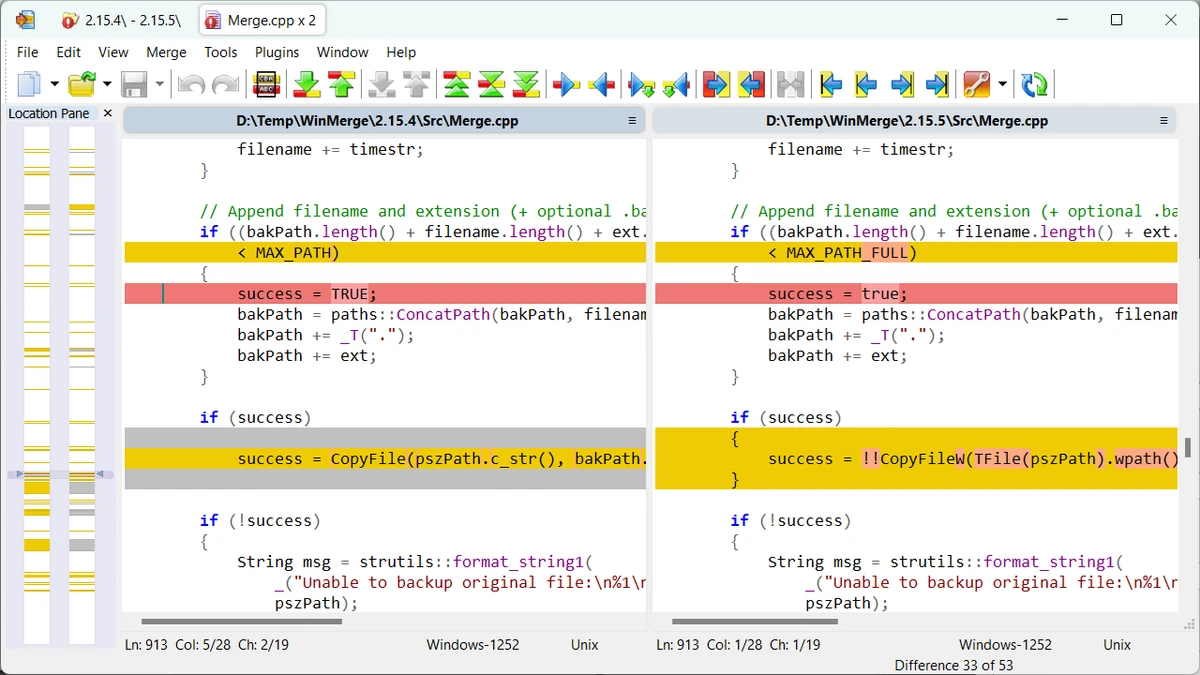

WinMerge is an open-source comparison and merge tool designed for Windows that helps identify differences between files and folders quickly and clearly. After using it to compare text files and project folders, I found its visual approach especially useful for reviewing changes and merging different versions without manually checking every line. It can work as a standalone application or as an external comparison and merge tool, making it suitable for software development, document comparison, and folder synchronization tasks. Its combination of visual difference highlighting, flexible comparison options, and support for multiple text formats makes it a practical utility for everyday workflows.
Features of WinMerge
- Open-source file and folder comparison tool for Windows
- Supports Windows XP and later versions of Windows
- Compare both files and directories
- Three-way file comparison
- Three-way folder comparison
- Visual comparison and merging of text files
- Supports Windows, Unix, and Mac text file formats
- Unicode support
- Tabbed interface
- Flexible text editor with:
- Syntax highlighting
- Line numbering
- Word wrapping
- Highlights differences within individual lines
- Difference pane showing current differences between compared files
- Location pane providing an overview of compared files
- Detects moved lines
- Regular expression-based file filters for including or excluding files
- Fast comparisons using file size and modification date
- Compare individual folders or include all subfolders
- Tree view for folder comparison results
- Supports multiple image formats
- Highlights image differences with blocks
- Image overlay capability
Interface and Usability
WinMerge offers a clean, tab-based interface that keeps multiple comparison sessions organized. During file comparisons, differences are displayed visually, making it much easier to identify modified sections than reviewing files manually. The built-in editor includes syntax highlighting, line numbers, and word wrapping, which improves readability when working with source code or text documents.
Folder comparisons are equally straightforward, with an optional tree view that helps navigate large directory structures. Although the interface focuses on functionality rather than modern design, it remains practical and efficient for users who regularly compare or merge files.
Who Should Use WinMerge?
- Software developers comparing source code versions
- IT professionals synchronizing folders
- Users reviewing document revisions
- Anyone needing to compare text files visually
- Teams that require an external comparison or merge tool for Windows
Conclusion
WinMerge is a reliable choice for anyone who frequently compares or merges files and folders on Windows. Its visual comparison tools, three-way comparison support, Unicode compatibility, and flexible filtering options make everyday comparison tasks significantly easier. Whether you're reviewing source code, synchronizing directories, or checking document revisions, it provides the essential features without unnecessary complexity. If you're looking for a free, open-source comparison and merge utility, WinMerge is well worth trying.


