XnConvert logo

XnConvert 1.112.0.0

  • User Rating:
    ★★★★★
    ★★★★★
    0.0 0Votes
  • Requirements:
    Windows
  • Version: 1.112.0.0
  • Latest updated: 5 days ago
  • License: Freeware  
  • Publisher: XnSoft
  • Size: 27 MB
× app stores

XnConvert is a free, cross-platform batch image processing tool designed to convert, edit, and enhance multiple images at once. It supports an extensive range of file formats and offers a wide selection of editing operations, making it a practical solution for photographers, designers, and anyone who regularly works with large image collections.

Overview

XnConvert is built around the batch processing engine of XnView MP, focusing on speed, flexibility, and format compatibility. It allows users to apply multiple transformations and effects to hundreds of images in a single workflow.

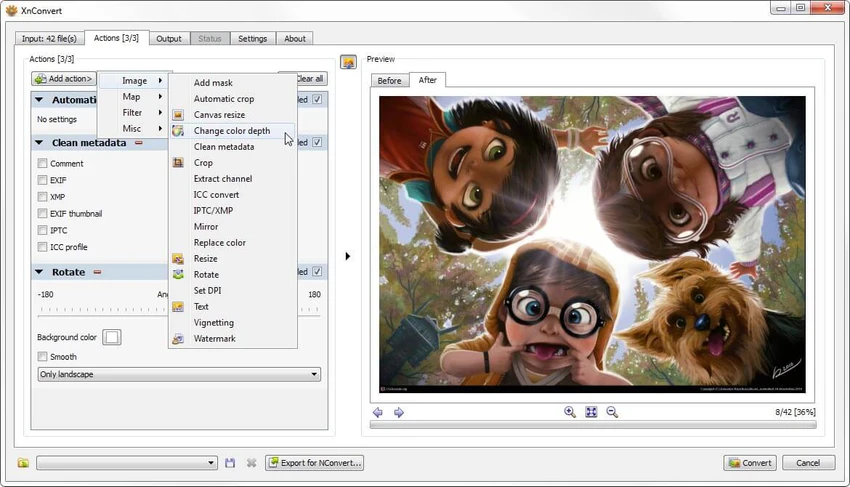
The software supports more than 500 input formats and can export to around 70 different file types. This wide compatibility makes it especially useful for users dealing with mixed image libraries or professional workflows requiring format conversion. Its interface is designed for accessibility, featuring drag-and-drop functionality and a structured workflow that helps users apply edits, preview results, and export processed images efficiently.

Features of XnConvert

  • Batch processing of multiple images at once
  • Support for 500+ image formats
  • Export to approximately 70 file formats
  • Over 80 editing operations available
  • Metadata editing tools
  • Transform tools (rotate, crop, resize)
  • Image adjustments (brightness, contrast, saturation)
  • Filters (blur, sharpen, emboss)
  • Visual effects (watermarking, masking, vignetting)
  • Cross-platform support (Windows, macOS, Linux)
  • Available in 20+ languages
  • Drag-and-drop workflow interface
  • Integration with command-line tool (NConvert)

User Experience

Using XnConvert feels straightforward even when working with complex batch tasks. The workflow is divided into clear steps: adding images, selecting actions, and defining output settings. This structure reduces confusion and makes it easier to apply multiple edits without requiring advanced technical knowledge. Performance is strong when processing large batches, and the ability to stack multiple transformations is particularly useful for repetitive tasks such as resizing image libraries or applying consistent branding elements like watermarks.

The drag-and-drop support simplifies importing files, while the preview system helps ensure changes are applied correctly before exporting. For more advanced users, the integration with command-line processing through NConvert adds flexibility for automation.

Who Should Use XnConvert?

  • Photographers processing large image sets
  • Designers applying consistent edits across multiple files
  • Web developers optimizing image assets
  • Users converting images between formats in bulk
  • Anyone needing fast, automated image transformations

Conclusion

XnConvert is a reliable and efficient solution for batch image conversion and processing. Its combination of wide format compatibility, extensive editing tools, and cross-platform support makes it a valuable utility for both casual and professional users.

Pros & Cons

Pros

  • Completely free to use
  • Extremely wide format support (500+ formats)
  • Powerful batch processing capabilities
  • 80+ editing and transformation actions
  • Cross-platform availability (Windows, macOS, Linux)
  • Easy drag-and-drop workflow
  • Supports automation via command-line integration

Cons

  • Interface may feel basic compared to modern photo editors
  • Focuses on batch processing rather than advanced single-image editing
  • Learning curve for combining multiple actions efficiently

Frequently Asked Questions

What is XnConvert used for?

XnConvert is used for batch image processing, allowing users to convert, edit, and apply effects to multiple images at once across many file formats.

Is XnConvert free to use?

Yes, XnConvert is a free software tool available for personal and professional use on Windows, macOS, and Linux.

How many file formats does XnConvert support?

XnConvert supports over 500 image input formats and can export to around 70 different output formats, making it highly versatile for conversion tasks.

Can I edit images with XnConvert or only convert them?

You can do both. XnConvert includes more than 80 actions such as resizing, cropping, color adjustments, filters, effects, and metadata editing.

Does XnConvert support batch processing?

Yes, batch processing is one of its core features, allowing you to apply the same edits or conversions to hundreds of images simultaneously.

Is XnConvert suitable for professional use?

Yes, it is widely used for professional workflows such as photography, design, and web asset optimization, especially when handling large image sets.

What platforms does XnConvert support?

XnConvert is available on Windows, macOS, and Linux, including both 32-bit and 64-bit systems.

Can XnConvert add watermarks to images?

Yes, it includes effects such as watermarking, masking, and vignetting as part of its editing tools.

Recommended apps [Freeware]:
  • Simple IP Config 2.9.7 Simple IP Config logo a lightweight, portable tool for quickly changing Windows IP, DNS, and network settings
  • CheckMail 5.23.6 CheckMail logo a POP3 email checker that lets users preview, manage, and delete emails before downloading them
  • ExplorerPatcher 26100.8457.70.3 ExplorerPatcher logo restores Windows 10-style taskbar, menus, and Explorer behavior on Windows 11.
  • Directory Opus 13.24 Directory Opus logo a powerful Windows file manager with dual-pane navigation, FTP support, file tagging, and Explorer replacement
  • TreeSheets 3223 TreeSheets logo combines spreadsheets, outlines, notes, and mind mapping into a lightweight data organization tool
  • Executor 2.3.8 Executor logo a customizable Windows launcher with hotkeys, keyword commands, automation tools, notes, and workflow enhancements
Recommended apps [Shareware]:
  • Adobe Premiere Pro 2026 Adobe Premiere Pro logo professional 4K video editor with advanced audio, color, and motion graphics tools.
  • UPDF 2.5.5 UPDF logo AI-powered PDF editor for Windows that simplifies editing, annotating, converting, and managing PDFs
  • GoodSync 12.11.4.4 GoodSync logo a secure file backup and synchronization tool with real-time transfer, encryption, and version control support
  • FontExpert 2026 21.0 Release 1 FontExpert logo a Windows font manager for installing, organizing, previewing, and fixing fonts with advanced tools.
  • Lansweeper 12.8.1.3 Lansweeper logo network discovery and IT asset management tool for software inventory, compliance reporting, and device tracking
  • reaConverter Pro 8.0.229 reaConverter Pro logo batch image converter and editor supporting 700+ formats with automation and advanced processing tools