FileLegit Windows Utilities Backup & Recovery MobiKin Assistant for Android
MobiKin Assistant for Android logo

MobiKin Assistant for Android 5.1.47

  • User Rating:
    ★★★★★
    ★★★★★
    0.0 0Votes
  • Requirements:
    Windows
  • Version: 5.1.47
  • Latest updated: 5 days ago
  • License: Free Trial  
  • Publisher: MobiKin
  • Size: 24 MB
× app stores

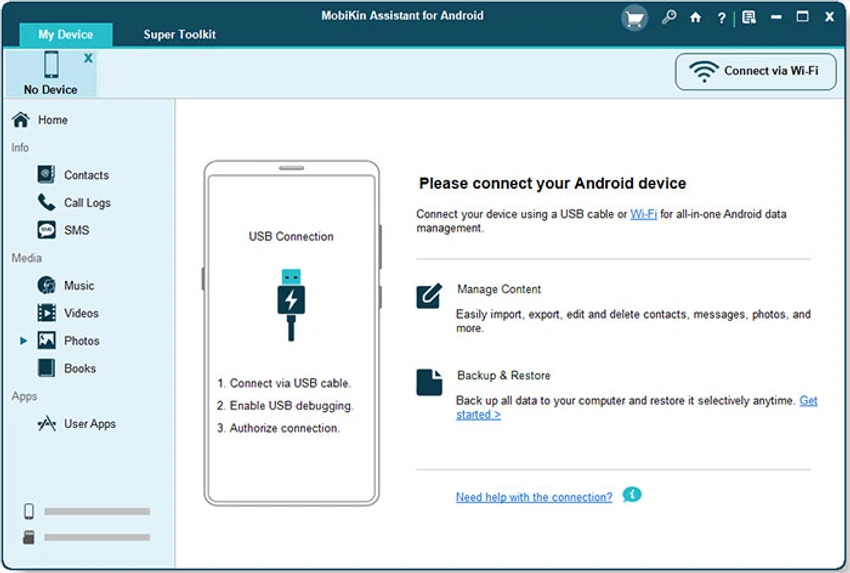
MobiKin Assistant for Android is a desktop-based Android management solution designed to help users back up, restore, and organize data stored on their Android devices. Whether you want to safeguard important files, manage contacts and messages, or organize apps and media, the software provides a centralized way to handle Android content directly from your computer. Compatible with Windows XP through Windows 11, MobiKin Assistant for Android supports a wide range of Android smartphone brands and offers convenient tools for everyday device management.

Features of MobiKin Assistant for Android

  • Back up Android data to a computer with one click
  • Restore backed-up data when needed
  • Connect and manage multiple Android devices from a PC
  • Manage contacts directly from a computer
  • Organize and back up SMS messages
  • Install or uninstall Android applications
  • Manage files stored on internal storage and external SD cards
  • Add or delete music playlists
  • Manage music files from a desktop computer
  • Capture device screenshots with a single click
  • Supports many Android brands, including Samsung, HTC, Motorola, Sony, LG, and Huawei

User Experience

During my experience with MobiKin Assistant for Android, the software proved to be a practical solution for users who regularly manage Android devices from a Windows PC. The backup functionality is one of its strongest features, making it easy to create copies of important data before performing device changes or updates The contact and SMS management tools are particularly useful for users who prefer working with large amounts of information on a computer screen rather than directly on a mobile device. Being able to organize, back up, and maintain communication records from a desktop environment helps simplify routine tasks.

App management is another area where the software adds convenience. Installing and removing applications from a connected device can be handled from the computer, reducing the need to navigate through multiple menus on the phone itself. The software also offers flexible file management by supporting both internal storage and external SD cards. Combined with music management and screenshot capture capabilities, MobiKin Assistant for Android provides a broad set of tools for everyday Android administration.

Who Should Use MobiKin Assistant for Android

  • Android users who regularly back up important data
  • Users managing contacts and SMS archives
  • Individuals who prefer organizing mobile content from a PC
  • Users handling multiple Android devices
  • Anyone looking for a centralized Android management solution

Conclusion

MobiKin Assistant for Android combines essential backup functionality with practical device management tools in a single Windows application. From protecting important data to organizing contacts, messages, apps, and media, it offers a convenient way to manage Android devices from a desktop environment.

Pros & Cons

Pros

  • Simple one-click Android backup functionality
  • Supports management of multiple Android devices
  • Comprehensive contact and SMS management tools
  • Allows app installation and removal from a PC
  • Supports internal storage and SD card management
  • Includes music management features
  • Compatible with many popular Android brands
  • Built-in screenshot capture tool

Cons

  • Requires a Windows computer for management tasks

Frequently Asked Questions

What is MobiKin Assistant for Android used for?

MobiKin Assistant for Android is used to back up, restore, and manage data stored on Android devices, including contacts, messages, apps, music, and files.

Can I back up my Android data to a computer?

Yes. The software allows users to back up Android data to a Windows computer with a simple one-click process.

Does MobiKin Assistant for Android support multiple devices?

Yes. The software can connect and manage multiple Android devices from a PC.

Can I manage contacts and SMS messages?

Yes. The program includes tools for organizing, backing up, and managing both contacts and text messages.

Does the software allow app management?

Yes. Users can install or uninstall Android applications through the desktop interface.

Which Android brands are supported?

The software supports many popular Android manufacturers, including Samsung, HTC, Motorola, Sony, LG, and Huawei.

What operating systems are supported?

According to the provided system requirements, MobiKin Assistant for Android supports Windows 11, Windows 10, Windows 8, Windows 7, Windows Vista, and Windows XP.

Recommended apps [Freeware]:
  • Garmin Express 7.29.0.0 Garmin Express logo manage Garmin GPS devices with map updates, backups, software updates, and device registration
  • ManicTime 2026.2.0.3 ManicTime logo Automatically track work hours, monitor productivity, and generate accurate reports with ManicTime
  • NirLauncher Package 1.30.24 NirLauncher Package logo a portable Windows utility suite with 180+ NirSoft tools for system, network, and recovery tasks
  • Microsoft PowerToys 0.100.2 Microsoft PowerToys logo adds powerful productivity tools and customization features to Windows 10 and 11
  • Windows 10 Debloater 3.0.3 Windows 10 Debloater logo customize Windows 10 by disabling unwanted features and generating PowerShell scripts
  • InstallerClean 1.9.2 InstallerClean logo removes unnecessary Windows installer leftovers safely to free disk space with a simple cleanup process
Recommended apps [Shareware]:
  • VovSoft AI Requester 5.2 VovSoft AI Requester logo a program that can connect to OpenAI API and OpenAI-compatible APIs with ease
  • SkyDemon 4.3.1 SkyDemon logo Plan flights with real-time aeronautical data, dynamic charts, NOTAMs, METAR, TAF, and intelligent route planning using SkyDemon
  • Rollback RX 12.91 Rollback RX logo instant system restore software for Windows lets users recover PCs via snapshots in seconds
  • NTFS Permissions Auditor 26.6.27 NTFS Permissions Auditor logo analyze Windows folder permissions, audit NTFS access rights, and export detailed security reports
  • Your Uninstaller! 7.5.3.1287 Your Uninstaller! logo powerful Windows uninstaller tool with deep scan, leftover removal, and system cleanup utilities for Windows PC
  • Softros LAN Messenger 12.6.3.0 Softros LAN Messenger logo secure encrypted LAN messaging, group chat, and file sharing for office communication