Actual Window Minimizer logo

Actual Window Minimizer 8.15.4

  • User Rating:
    ★★★★★
    ★★★★★
    0.0 ★ 0Votes
  • Requirements:
    Windows
  • Version: 8.15.4
  • Latest updated: 3 weeks ago
  • License: Free Trial  
  • Publisher: Actual Tools
  • Size: 9 MB
× app stores

Actual Window Minimizer is a lightweight Windows utility designed with a single clear purpose: enabling users to minimize any application window directly to the system tray. Since Windows does not natively support this feature for all programs, this tool fills that gap by extending window controls with additional minimize options.

Once installed, it integrates directly into every window by adding a dedicated Minimize-to-Tray button in the title bar. This allows users to hide applications from the taskbar while keeping them accessible in the system tray for quick restoration. Over time, the software has expanded slightly in usability options, but its core focus remains fast and reliable tray-based window minimization.

Features of Actual Window Minimizer

  • Add a Minimize-to-Tray button to every window title bar
  • Minimize any application directly to the system tray
  • Override the standard minimize button behavior
  • Automatically minimize windows on startup or deactivation
  • Restore windows from the system tray with a click
  • Lightweight installation and background operation
  • Supports a wide range of Windows applications
  • Simple configuration for global or per-application behavior
  • Improves taskbar cleanliness by hiding inactive windows
  • 60-day free trial available for evaluation

Interface and Usability

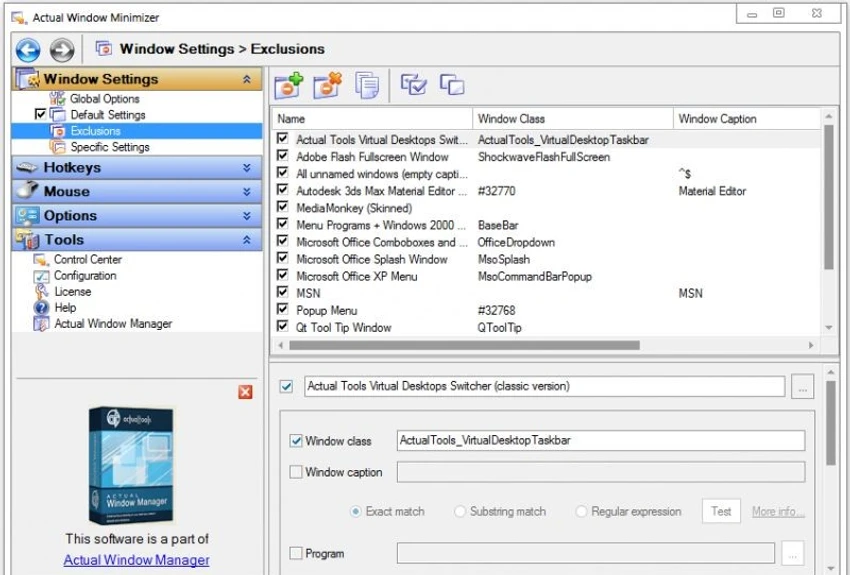
Actual Window Minimizer is designed to be extremely simple and unobtrusive. After installation, users immediately see the new minimize-to-tray button added to window title bars. No separate interface is required for basic usage, making it very easy to understand. Advanced settings allow users to customize how and when windows are minimized, including automatic rules based on application behavior. Despite offering these options, the tool remains lightweight and does not interfere with normal Windows operation. Its simplicity makes it suitable for users who want a direct solution without complex configuration steps.

Who Should Use Actual Window Minimizer?

  • Users who keep multiple apps running simultaneously
  • Office workers managing communication tools and browsers
  • Developers running background utilities or servers
  • Users who want a cleaner taskbar
  • Anyone needing quick access to background applications
  • Multitaskers who prefer system tray organization

Conclusion & Recommendation

Actual Window Minimizer is a straightforward and reliable tool for users who want better control over background applications. By adding simple but powerful minimize-to-tray functionality, it helps keep the desktop and taskbar clean while ensuring quick access to running programs.

Pros & Cons

✓

Pros

  • Simple and focused functionality
  • Adds minimize-to-tray support to any window
  • Easy to use with title bar button integration
  • Helps reduce taskbar clutter
  • Supports automatic minimization rules
  • Lightweight and stable performance
  • Works with most Windows applications
✕

Cons

  • Limited feature set compared to full window managers
  • No modern dashboard or advanced interface
  • Focuses only on tray minimization
  • May not be necessary for simple workflows

Frequently Asked Questions

What is Actual Window Minimizer used for?

Actual Window Minimizer is used to add minimize-to-tray functionality to Windows applications, allowing users to hide windows in the system tray.

Can I minimize any window to the system tray?

Yes. The software allows almost any standard Windows application window to be minimized to the system tray.

Does it add a button to the title bar?

Yes. It adds a dedicated Minimize-to-Tray button directly into the window title bar for quick access.

Can windows be minimized automatically?

Yes. You can configure windows to automatically minimize to the tray when they start or lose focus.

Is it easy to use?

Yes. It requires minimal setup and works directly through window controls without needing a separate interface.

Does it affect system performance?

No. It is a lightweight utility designed to run efficiently in the background.

Recommended apps [Freeware]:
  • Smart Defrag 11.4.0.508 Smart Defrag logo a fast Windows disk defragmenter that optimizes hard drives, improves speed, and system stability.
  • AB Download Manager 1.9.2 AB Download Manager logo Download files with features such as queue management, scheduling, speed control, and browser integration.
  • WonderPen 3.2.0.8457 WonderPen logo writing app with Markdown support, tree structure organization, and export tools for Windows users
  • SecretDNS 3.9.2 SecretDNS logo Improve online privacy with encrypted DNS requests and SNI protection while reducing access issues through secure network features.
  • DXVA Checker 4.8.0 DXVA Checker logo Check DXVA support, decoder compatibility, GPU usage, and hardware video acceleration capabilities for Windows media playback.
  • HashMyFiles 2.51 HashMyFiles logo Calculate MD5 and SHA1 file hashes quickly with a lightweight utility for verifying file integrity and managing checksum data.
Recommended apps [Shareware]:
  • HTTP Debugger Pro 10.5 HTTP Debugger Pro logo captures and analyzes HTTP and HTTPS traffic from browsers and apps, helping developers debug web requests in real time
  • UniFab 4.1.7.0 UniFab logo Enhance videos with AI using UniFab. Upscale footage, reduce noise, boost frame rates, convert HDR, and improve audio quality
  • iNMR 7.1.9 iNMR logo Analyze and process NMR spectroscopy data with iNMR, featuring 1D–3D processing, scripting, simulations, and broad format support
  • RadioBOSS 7.2.2.0 RadioBOSS logo a radio automation tool for scheduling playlists, ads, streaming, and managing professional audio broadcasts
  • SmarterMail Build 9686 SmarterMail logo Host and manage business email with collaboration tools, spam protection, ActiveSync support, and web-based administration.
  • Notesbrowser 2.6 Notesbrowser logo Organize notes, tasks, calendars, bookmarks, and appointments in one customizable workspace with fast search and flexible organization.