FileLegit Windows Utilities System Tools Argente System Repair
Argente System Repair logo

Argente System Repair 1.0.8.2

  • User Rating:
    ★★★★★
    ★★★★★
    0.0 0Votes
  • Requirements:
    Windows
  • Version: 1.0.8.2
  • Latest updated: 3 weeks ago
  • License: Freeware  
  • Publisher: Raúl Argente
  • Size: 63 MB
× app stores

Argente System Repair is a Windows diagnostic and repair utility designed to scan key system components, identify errors, and apply quick fixes to improve overall system performance. During my review of its features, the tool appears focused on simplifying system maintenance through guided scanning modes and automated repair suggestions.

The software is built around the idea of helping users assess the health of their PC and resolve common Windows issues such as system file errors, environment variable issues, and system component inconsistencies. It provides a straightforward interface that prioritizes usability over complexity. Argente System Repair is especially useful for users who want a guided approach to diagnosing and repairing Windows without manually troubleshooting system components.

Key Features of Argente System Repair

  • Scans and diagnoses Windows system errors.
  • Offers three scan modes:
    • Simple mode: checks environment variables, file system errors, and WMI repository.
    • Recommended mode: scans all major system areas including Windows components and installed packages.
    • Custom mode: allows users to select specific scan areas.
  • Detects and lists system issues after scanning.
  • Provides repair options for identified errors.
  • Allows creation of exclusion lists to ignore selected system areas or applications.
  • Monitors and displays system health and scan statistics.
  • Supports drive-related maintenance tasks (including drive C optimization in recommended mode).

Interface and Usability

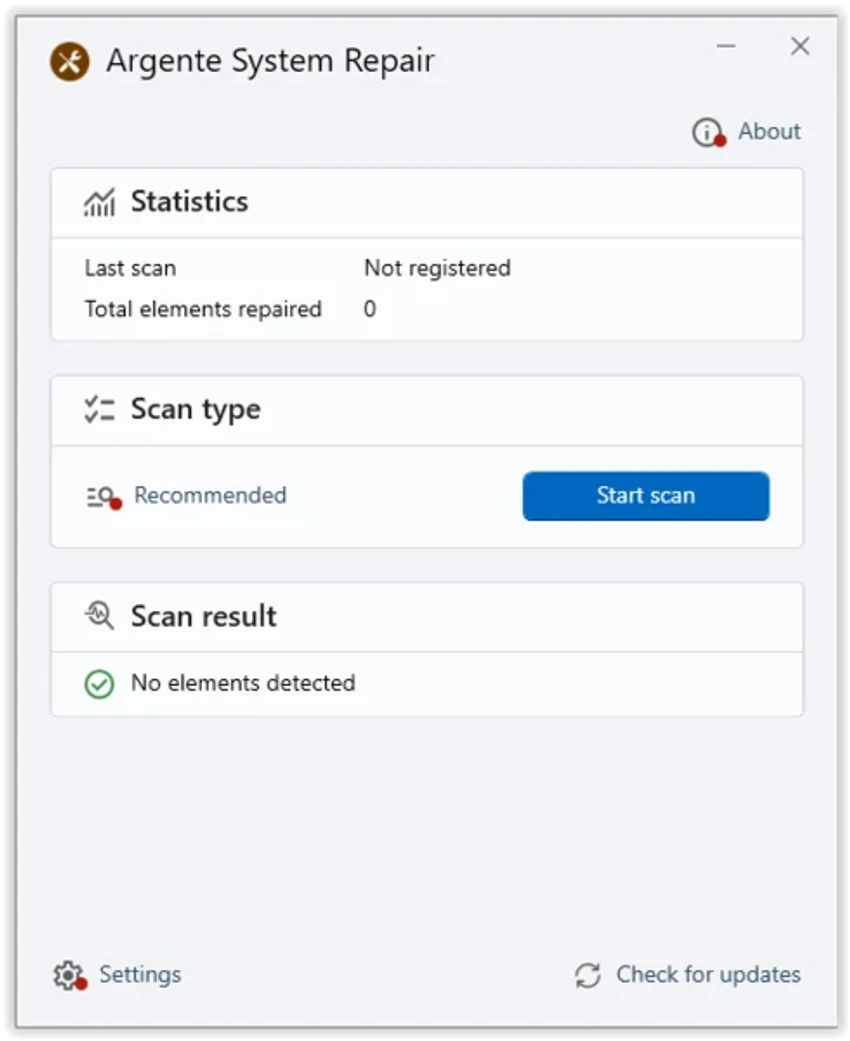
Argente System Repair uses a minimalistic and user-friendly interface that focuses on clarity and ease of use. From my perspective, the layout is designed so users can quickly start a scan without needing technical knowledge.

The main dashboard displays scan history, detected issues, and repair results, making it easy to understand the current condition of the system. The three scan modes also help guide users based on their level of experience—Simple mode for quick checks, Recommended for full analysis, and Custom for advanced control. While the interface is functional and easy to navigate, some detailed results may not always be fully accessible, which can limit deeper analysis for advanced users.

Who Should Use Argente System Repair?

  • Home users experiencing slow or unstable Windows performance.
  • Users who want quick system diagnostics without technical complexity.
  • Beginners looking for guided repair tools.
  • IT support technicians performing basic system checks.
  • Users who want to clean and repair common Windows issues.

System Requirements

  • Windows 8
  • Windows 10
  • Windows 11

Conclusion

Argente System Repair is a straightforward Windows maintenance tool designed to quickly scan and repair common system issues. Its guided scan modes make it accessible for beginners, while still offering some customization for more experienced users.

Pros & Cons

Pros

  • Easy-to-use interface
  • Three flexible scan modes (Simple, Recommended, Custom)
  • Helps identify common Windows system errors
  • Includes repair functionality
  • Allows exclusion lists for advanced control
  • Good for quick system health checks

Cons

  • Limited detail visibility in some scan results
  • Not designed for advanced system forensics or deep troubleshooting
  • Repair capabilities may be basic compared to advanced system tools

Frequently Asked Questions

What does Argente System Repair do?

It scans Windows for system errors, analyzes key components, and helps repair issues to improve performance and stability.

Does Argente System Repair have different scan modes?

Yes. It includes Simple, Recommended, and Custom scan modes, allowing users to choose the level of system analysis.

Can Argente System Repair fix Windows errors automatically?

Yes. After scanning, it can identify and repair certain detected system issues.

Is Argente System Repair suitable for beginners?

Yes. Its simple interface and guided scan modes make it easy for non-technical users to perform system diagnostics.

Does it allow excluding certain areas from scans?

Yes. Users can create exclusion lists to prevent specific system areas or applications from being analyzed.

Which Windows versions are supported?

Argente System Repair supports Windows 8, Windows 10, and Windows 11.

Recommended apps [Freeware]:
  • ManicTime 2026.2.0.3 ManicTime logo Automatically track work hours, monitor productivity, and generate accurate reports with ManicTime
  • QueueExplorer 5.0.88 QueueExplorer logo helps developers and admins manage, test, troubleshoot, and monitor message queues across platforms
  • Markdown Monster 4.4.4 Markdown Monster logo a powerful Windows Markdown editor with live preview, HTML/PDF export, Git integration, and blogging tools
  • Prime95 31.06 Build 1 Prime95 logo CPU stress testing tool used for overclocking stability checks and Mersenne prime number calculations
  • GnuCash 5.16 GnuCash logo open-source accounting software for tracking personal and small business finances with double-entry bookkeeping
  • Notepad++ 8.9.7 Notepad++ logo Edit code and plain text with a fast, lightweight editor featuring syntax highlighting, multiple tabs, plugins, and support for many programming languages.
Recommended apps [Shareware]:
  • LumaBooth 8.2.1.0 LumaBooth logo professional photo booth software for photos, GIFs, videos, 360 booths, and event customization
  • BootIt Bare Metal 2.12 BootIt Bare Metal logo combines partition management, multi-boot support, and disk imaging into one powerful tool for Windows users
  • Sparkbooth 7.2.79 Sparkbooth logo Create a professional photo booth with Sparkbooth, featuring customizable layouts, green screen effects, instant sharing, and printing
  • SpectraLayers 13.0 SpectraLayers logo Edit, repair, and design audio visually with SpectraLayers using AI-powered spectral processing and advanced sound separation tools
  • Actual Transparent Window 8.15.4 Actual Transparent Window logo adjust per-window transparency, improve multitasking, and organize desktop space efficiently on Windows
  • Hex Editor Neo 8.12.00.9421 Hex Editor Neo logo Edit and analyze binary files of any size with advanced hex editing, data inspection, patch creation, and developer-focused tools.